What Is DHCP
DHCP (Dynamic Host Configuration Protocol) lets a host automatically obtain its network settings at boot time — an IPv4 address, a subnet mask, a default gateway, and DNS servers. It is defined in RFC 2131, and the settings it can distribute (the options) are defined in RFC 2132.
Without DHCP, an administrator has to configure an address on every host by hand, and the more hosts there are, the easier it becomes to make a mistake or assign the same address twice. Because DHCP manages addresses by “leasing” them, addresses that are no longer in use are reclaimed automatically, which makes efficient reuse of a limited address space possible.
DHCP is the successor to RARP and BOOTP (RARP is also covered in the ARP article). RARP could only map a MAC address to an IP address, BOOTP (RFC 951) extended that to distribute a default gateway and a boot file name as well, and DHCP added the dynamic notion of lending an address for a limited time rather than assigning it permanently. That history is why a DHCP message uses the same format as BOOTP.
169.254.0.0/16 (APIPA: Automatic Private IP Addressing). Such an address cannot cross a router, so the host can only communicate within its own segment. See IPv4 Addresses for details.Message Format
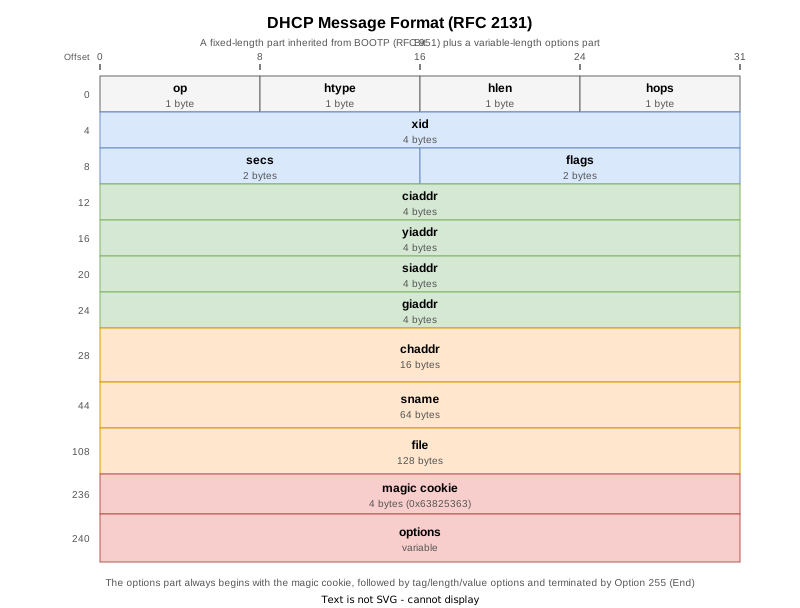
DHCP messages are carried over UDP, with the server on port 67 and the client on port 68. The first 236 bytes are the fixed-length part inherited from BOOTP, followed by a variable-length options part. Every piece of DHCP-specific information (the message type, the lease time, and so on) lives in the options part, so the fixed-length part alone does not tell you whether a message is a DISCOVER or an ACK.
| Field | Size | Description |
|---|---|---|
| op | 1 byte | The direction of the message. Client to server is 1 (BOOTREQUEST), server to client is 2 (BOOTREPLY). |
| htype | 1 byte | The hardware address type. Ethernet is 1 — the same value as the hardware type in ARP. |
| hlen | 1 byte | The length of the hardware address in bytes. A MAC address is 6. |
| hops | 1 byte | A client sets this to 0. Each relay agent the message passes through increments it by one. |
| xid | 4 bytes | Transaction ID. A random value generated by the client, kept the same throughout one address acquisition (DISCOVER through ACK) so that replies can be matched to the exchange they belong to. |
| secs | 2 bytes | The number of seconds elapsed since the client began acquiring an address. |
| flags | 2 bytes | The most significant bit is the broadcast flag. A client that cannot receive unicast traffic while it has no address sets it to 1 to ask the server to broadcast its reply. The remaining bits are 0. |
| ciaddr | 4 bytes | The client’s current IP address. It is filled in only when the client already holds an address and can communicate, such as during a lease renewal. Otherwise it is 0.0.0.0. |
| yiaddr | 4 bytes | The IP address the server assigns to the client (“your” IP address). Set in OFFER and ACK. |
| siaddr | 4 bytes | The IP address of the next server to use in the boot process. It is 0.0.0.0 in ordinary use that does not involve network booting. |
| giaddr | 4 bytes | The relay agent’s IP address. A client sets 0.0.0.0, and the relay agent writes its own address into it. |
| chaddr | 16 bytes | The client’s hardware address. On Ethernet the MAC address occupies the first 6 bytes and the rest is padded with 0. The server identifies the client by this value. |
| sname | 64 bytes | The server host name (optional). Usually padded with 0. |
| file | 128 bytes | The boot file name (optional). Usually padded with 0. |
| options | variable | Always begins with the 4-byte magic cookie (0x63825363), followed by the options themselves. |
99.130.83.99 = 0x63825363) marks the options part as being in RFC 2132 format. BOOTP originally had a 64-byte vend field reserved for vendor-specific data, and DHCP redefined that area as the variable-length options part. The magic cookie is there so that a receiver can tell the new format apart from the older BOOTP one.Major DHCP Options
Each option in the options part is encoded as tag (1 byte), length (1 byte), and value (variable), and the part is terminated by Option 255 (End). The most common ones are listed below.
| Option | Name | Description |
|---|---|---|
| 1 | Subnet Mask | The subnet mask for the assigned address. |
| 3 | Router | The default gateway address. Multiple values are allowed, and the first has the highest priority. |
| 6 | Domain Name Server | DNS server addresses. Multiple values are allowed. |
| 12 | Host Name | The client’s host name. |
| 15 | Domain Name | The domain name the client belongs to. |
| 50 | Requested IP Address | The address the client asks for. Used in REQUEST. |
| 51 | IP Address Lease Time | The lease time in seconds. |
| 53 | DHCP Message Type | The type of the message. This option is mandatory for DHCP. |
| 54 | Server Identifier | The IP address identifying the server. In an environment with multiple servers it shows which OFFER the client accepted. |
| 55 | Parameter Request List | The list of option numbers the client would like the server to supply. |
| 58 | Renewal (T1) Time Value | How long until renewal (RENEWING) begins. Defaults to 50% of the lease time. |
| 59 | Rebinding (T2) Time Value | How long until rebinding (REBINDING) begins. Defaults to 87.5% of the lease time. |
| 61 | Client Identifier | A value identifying the client, sometimes used in place of chaddr. |
| 82 | Relay Agent Information | Information inserted by a relay agent (RFC 3046). |
| 255 | End | Terminates the options part. |
The value of Option 53 (DHCP Message Type) is what actually identifies the kind of message.
| Value | Message | Direction | Description |
|---|---|---|---|
| 1 | DISCOVER | Client to server | Looks for a DHCP server. |
| 2 | OFFER | Server to client | Proposes an address for assignment. |
| 3 | REQUEST | Client to server | Formally requests the proposed address. Also used for lease renewal. |
| 4 | DECLINE | Client to server | Reports that the proposed address is already in use. |
| 5 | ACK | Server to client | Approves the request and commits the address and settings. |
| 6 | NAK | Server to client | Rejects the request. |
| 7 | RELEASE | Client to server | Returns an address that is in use. |
| 8 | INFORM | Client to server | The client already has an address and only wants the other settings. |
How DHCP Works (DORA)
When a client acquires a new address, four messages are exchanged: DISCOVER, OFFER, REQUEST, and ACK. Their initials give the exchange its name, DORA.
sequenceDiagram
    participant C as Client
(no address yet)
    participant S as DHCP server
192.168.10.1

    Note over C: It has no address,
so the source is 0.0.0.0

    C->>S: 1. DISCOVER (broadcast)
0.0.0.0:68 to 255.255.255.255:67
Option 53 = 1, yiaddr = 0.0.0.0

    Note over S: Picks an unused address
from the pool

    S->>C: 2. OFFER
Option 53 = 2
yiaddr = 192.168.10.101
Option 54 (Server Identifier)

    Note over C: If several OFFERs arrive,
it picks one

    C->>S: 3. REQUEST (broadcast)
Option 53 = 3
Option 50 = 192.168.10.101
Option 54 = the chosen server

    S->>C: 4. ACK
Option 53 = 5
yiaddr, subnet mask,
default GW, DNS, lease time

    Note over C: Confirms there is no conflict
and starts using the address
- DISCOVER: because the client has no address yet, it looks for a DHCP server with a source IP address of
0.0.0.0and a destination of255.255.255.255(the limited broadcast address). The destination MAC address is the broadcast address (FF:FF:FF:FF:FF:FF) as well. - OFFER: a server that receives the DISCOVER picks one unused address from its pool and proposes it in yiaddr. Nothing is committed at this point; the server merely reserves the address temporarily. Most implementations check with ARP or an ICMP Echo that the address is not actually in use before proposing it.
- REQUEST: the client picks one of the OFFERs it received and requests it, putting the desired address in Option 50 (Requested IP Address) and the chosen server in Option 54 (Server Identifier). This REQUEST is broadcast too, so the servers that were not chosen learn that their OFFER was declined and can release the address they had reserved.
- ACK: the server approves the request and returns the address, subnet mask, default gateway, DNS servers, and lease time together. The client receives this and starts using the address.
Every message carries the same xid, and the client uses that value to decide whether a reply is meant for it.
| Message | Source IP | Destination IP | Destination MAC |
|---|---|---|---|
| DISCOVER | 0.0.0.0 | 255.255.255.255 | Broadcast |
| OFFER | The server’s IP | 255.255.255.255 or the client’s IP | Broadcast or the client’s MAC |
| REQUEST | 0.0.0.0 | 255.255.255.255 | Broadcast |
| ACK | The server’s IP | 255.255.255.255 or the client’s IP | Broadcast or the client’s MAC |
Whether OFFER and ACK come back as broadcast or unicast depends on whether the client set the broadcast flag in the flags field. Some implementations cannot receive a unicast IP packet while they have no address configured, and those set the flag to ask for a broadcast reply.
0.0.0.0 as the sender protocol address (see the Gratuitous ARP section of the ARP article).Lease Time and Renewal
The lease time announced in the ACK (Option 51) is not indefinite; a client has to renew the lease before it expires. Renewal uses two timers.
| Timer | Default | State | Behavior |
|---|---|---|---|
| T1 | 50% of the lease time | RENEWING | Sends a REQUEST as a unicast to the original server asking to extend the lease. |
| T2 | 87.5% of the lease time | REBINDING | If no reply came at T1, sends a REQUEST as a broadcast, asking any server at all to answer. |
| Lease expiry | 100% of the lease time | — | If there is still no reply, the client stops using the address and starts over from DISCOVER. |
A renewal REQUEST is sent while the client already holds an address, so its current address goes in ciaddr and Option 50 (Requested IP Address) is not used. No DISCOVER is involved: the exchange completes with just a REQUEST and an ACK.
Note that the T1 and T2 defaults are the values RFC 2131 suggests. Implementations may add randomization, so they are not always exactly 50% and 87.5%.
ip dhcp pool on Cisco IOS XE is one day.Other DHCP Messages
Besides DORA and lease renewal, the following messages are used.
- DECLINE: sent by the client when the address assigned in the ACK turns out to be in use by another host. The server records the address as problematic and excludes it from assignment for a while.
- NAK: returned when the server rejects a request — for instance when a client that has moved to a different segment asks for its previous address, so the requested address is not valid on that segment. A client that receives a NAK discards the address and starts over from DISCOVER.
- RELEASE: sent by a client to return an address explicitly. The server deletes the lease and makes the address assignable again. It is sent as a unicast. The returned address is not necessarily reused straight away, though: implementations commonly hand out the next address in the pool instead.
- INFORM: used when the client already has a statically configured address and only wants settings other than the address, such as DNS servers. The server replies with an ACK that leaves yiaddr unset.
DHCP Relay Agent
Because a DISCOVER is broadcast, it cannot cross a router. That would mean placing a DHCP server on every segment, so in practice a router receives the broadcast, converts it into a unicast, and forwards it to a DHCP server on another segment. This function is called a DHCP relay agent, and on Cisco IOS it is enabled by configuring ip helper-address on an interface.
When it does this, the relay agent writes its own IP address into giaddr. The server looks at giaddr to determine which segment the request came from and picks an address from the pool that corresponds to that segment. giaddr is the field that reveals whether a relay was involved.
The detailed behavior of a relay agent and Option 82 are covered in DHCP Relay Agent.
Security Considerations
DHCP has no mechanism for authenticating a server. A client accepts the first OFFER that arrives, so if a rogue DHCP server is placed on the same segment and answers faster than the legitimate one, it can hand out a bogus default gateway or DNS server and steer traffic to an attacker’s machine.
There is also an attack in which a flood of DISCOVERs with forged chaddr values exhausts the address pool so that legitimate clients cannot obtain an address (DHCP starvation).
The usual countermeasure is the DHCP Snooping feature on switches. DHCP Snooping treats only the ports where legitimate DHCP servers are connected as trusted ports and discards any OFFER or ACK arriving on another port. At the same time it records which IP address was assigned to which MAC address on which port in a binding table, and combining that information with Dynamic ARP Inspection (DAI) from the ARP article makes it useful for detecting ARP spoofing as well.
Verification on Real Devices
R1 (DHCP server), R2 (client), and Linux1 (client) were connected to a single segment, and DORA, lease renewal, RELEASE, and the assignment to a second client were verified on real devices. The routers run Cisco IOS XE 17.03.08a (csr1000v) and Linux1 runs Ubuntu 24.04.

The pool configuration on R1 is shown below. The lease time is deliberately short (two minutes) so that the renewal behavior can be observed by waiting for T1 (50% of the lease, 60 seconds) to expire.
ip dhcp excluded-address 192.168.10.1 192.168.10.100
!
ip dhcp pool LAN
 network 192.168.10.0 255.255.255.0
 default-router 192.168.10.1
 dns-server 192.168.10.53
 domain-name kazulog.example
 lease 0 0 2
R2 acts as a DHCP client through ip address dhcp on GigabitEthernet1, and DORA is triggered at will by shutting and unshutting the interface.
Test Sequence and the Server-Side Counters
The per-message counters in show ip dhcp server statistics make it possible to follow what happened at each step.
| STEP | Operation | DISCOVER rcvd | OFFER sent | REQUEST rcvd | ACK sent | RELEASE rcvd |
|---|---|---|---|---|---|---|
| 0 | Initial state | 0 | 0 | 0 | 0 | 0 |
| 1 | no shutdown on R2’s Gi1 | 1 | 1 | 1 | 1 | 0 |
| 2 | Wait for T1 (60 seconds) to expire | 1 | 1 | 2 | 2 | 0 |
| 3 | release dhcp Gi1 on R2 | 1 | 1 | 2 | 2 | 3 |
| 4 | renew dhcp Gi1 on R2 | 2 | 2 | 3 | 3 | 3 |
| 5 | Bring up ens2 on Linux1 | 4 | 4 | 7 | 7 | 4 |
In STEP 2, DISCOVER and OFFER do not increase while REQUEST and ACK do — the evidence for the earlier statement that a renewal completes with just a REQUEST and an ACK. STEP 4, by contrast, is a re-acquisition after the lease was given up with release, so it is a full DORA starting from DISCOVER.
systemd-networkd and dhcpcd — briefly ran at the same time on Linux1 and each obtained its own address (192.168.10.103 and 192.168.10.104). dhcpcd was stopped afterwards, so the final state keeps only 192.168.10.103, obtained by systemd-networkd.Capture of DORA
The capture was taken on R1’s GigabitEthernet1 (facing SW). Packets No.1 through No.5 of the attached capture are the DORA in which R2 obtained its address.
    1   0.000000      0.0.0.0 → 255.255.255.255 DHCP 357 DHCP Discover - Transaction ID 0xfdd
    2   0.119593 52:54:00:8c:63:71 → Broadcast    ARP 60 Who has 192.168.10.101? Tell 192.168.10.1
    3   2.089207 192.168.10.1 → 255.255.255.255 DHCP 372 DHCP Offer    - Transaction ID 0xfdd
    4   2.131093      0.0.0.0 → 255.255.255.255 DHCP 375 DHCP Request  - Transaction ID 0xfdd
5 2.134861 192.168.10.1 → 255.255.255.255 DHCP 372 DHCP ACK - Transaction ID 0xfddAll four messages share Transaction ID 0xfdd, which is how xid ties one address acquisition together. In No.2 R1 sends an ARP asking who owns 192.168.10.101: as described above, the server is checking that the address it is about to offer is not actually in use.
Not only the DISCOVER but the OFFER and the ACK are broadcast as well (to 255.255.255.255), because R2 sets the broadcast flag.
Dynamic Host Configuration Protocol (Discover)
    Message type: Boot Request (1)
    Hardware type: Ethernet (0x01)
    Hardware address length: 6
    Hops: 0
    Transaction ID: 0x00000fdd
    Seconds elapsed: 0
    Bootp flags: 0x8000, Broadcast flag (Broadcast)
    Client IP address: 0.0.0.0
    Your (client) IP address: 0.0.0.0
    Next server IP address: 0.0.0.0
    Relay agent IP address: 0.0.0.0
    Client MAC address: 52:54:00:cf:69:eb (52:54:00:cf:69:eb)
    Magic cookie: DHCP
    Option: (53) DHCP Message Type (Discover)
        DHCP: Discover (1)
    Option: (61) Client identifier
        Client Identifier: cisco-5254.00cf.69eb-Gi1
    Option: (55) Parameter Request List
        Parameter Request List Item: (1) Subnet Mask
        Parameter Request List Item: (6) Domain Name Server
        Parameter Request List Item: (15) Domain Name
Parameter Request List Item: (3) Routerciaddr, yiaddr, and giaddr are all 0.0.0.0, and chaddr holds R2’s MAC address. giaddr is 0.0.0.0 because no relay agent was involved. Option 55 (Parameter Request List) shows the client asking for the subnet mask, DNS servers, domain name, and default gateway.
The ACK comes back with the requested settings packed in as options.
Dynamic Host Configuration Protocol (ACK)
    Message type: Boot Reply (2)
    Transaction ID: 0x00000fdd
    Your (client) IP address: 192.168.10.101
    Magic cookie: DHCP
    Option: (53) DHCP Message Type (ACK)
        DHCP: ACK (5)
    Option: (54) DHCP Server Identifier (192.168.10.1)
        DHCP Server Identifier: 192.168.10.1
    Option: (51) IP Address Lease Time
        IP Address Lease Time: 2 minutes (120)
    Option: (58) Renewal Time Value
        Renewal Time Value: 1 minute (60)
    Option: (59) Rebinding Time Value
        Rebinding Time Value: 1 minute, 45 seconds (105)
    Option: (1) Subnet Mask (255.255.255.0)
        Subnet Mask: 255.255.255.0
    Option: (3) Router
        Router: 192.168.10.1
yiaddr carries the assigned address 192.168.10.101, and Option 51 announces a 120-second lease, Option 58 a T1 of 60 seconds, and Option 59 a T2 of 105 seconds. T1 and T2 are not computed by the client: the server distributes them explicitly as options. Those values are exactly 50% and 87.5% of the lease time.
The same information can be confirmed from the client side.
R2#show dhcp lease
Temp IP addr: 192.168.10.101  for peer on Interface: GigabitEthernet1
Temp  sub net mask: 255.255.255.0
   DHCP Lease server: 192.168.10.1, state: 5 Bound
   DHCP transaction id: FDD
   Lease: 120 secs,  Renewal: 60 secs,  Rebind: 105 secs
Temp default-gateway addr: 192.168.10.1
   Next timer fires after: 00:00:40
   Retry count: 0   Client-ID: cisco-5254.00cf.69eb-Gi1
   Hostname: R2
On the server side, one lease appears in show ip dhcp binding.
R1#show ip dhcp binding
Bindings from all pools not associated with VRF:
IP address      Client-ID/ 		Lease expiration 	Type       State      Interface
		Hardware address/
		User name
192.168.10.101  0063.6973.636f.2d35.    Sep 06 2026 04:39 AM    Automatic  Active     GigabitEthernet1
                3235.342e.3030.6366.
                2e36.3965.622d.4769.
                31
In the Client-ID 0063.6973.636f.2d35..., everything after the leading 00 is the ASCII encoding of cisco-5254.00cf.69eb-Gi1.
Capture of the Lease Renewal (T1)
Sixty seconds after the lease was obtained, T1 expired and the lease was renewed. These are packets No.10 and No.11 of the attached capture. In the extracted file, No.10 appears as No.1 and No.11 as No.2.
   10 112.192916 192.168.10.101 → 255.255.255.255 DHCP 363 DHCP Request  - Transaction ID 0xfdd
11 112.198228 192.168.10.1 → 192.168.10.101 DHCP 372 DHCP ACK - Transaction ID 0xfddThere is no DISCOVER and no OFFER: the exchange completes with just a REQUEST and an ACK. The source IP address is also no longer 0.0.0.0 but the already-assigned 192.168.10.101, another difference from a new acquisition.
Dynamic Host Configuration Protocol (Request)
    Message type: Boot Request (1)
    Client IP address: 192.168.10.101
    Your (client) IP address: 0.0.0.0
    Option: (53) DHCP Message Type (Request)
        DHCP: Request (3)
    Option: (61) Client identifier
        Client Identifier: cisco-5254.00cf.69eb-Gi1
    Option: (51) IP Address Lease Time
    Option: (55) Parameter Request List
The current address is in ciaddr (Client IP address), and Option 50 (Requested IP Address) is absent. Comparing this with the REQUEST from the initial acquisition makes the difference clear.
Dynamic Host Configuration Protocol (Request)
    Message type: Boot Request (1)
    Client IP address: 0.0.0.0
    Your (client) IP address: 0.0.0.0
    Option: (53) DHCP Message Type (Request)
        DHCP: Request (3)
    Option: (54) DHCP Server Identifier (192.168.10.1)
        DHCP Server Identifier: 192.168.10.1
    Option: (50) Requested IP Address (192.168.10.101)
        Requested IP Address: 192.168.10.101
On a new acquisition ciaddr is 0.0.0.0, and instead Option 50 carries the desired address while Option 54 says whose OFFER was accepted.
Capture of RELEASE
Running release dhcp GigabitEthernet1 on R2 sends a RELEASE and deletes the binding. These are packets No.12 through No.14 of the attached capture.
   12 158.227141 192.168.10.101 → 192.168.10.1 DHCP 319 DHCP Release  - Transaction ID 0xfdd
   13 158.289871 192.168.10.101 → 192.168.10.1 DHCP 319 DHCP Release  - Transaction ID 0xfdd
14 159.257198 192.168.10.101 → 192.168.10.1 DHCP 319 DHCP Release - Transaction ID 0xfddAs described earlier, the RELEASE is sent as a unicast to the server. This implementation also sent the same RELEASE three times: no reply (ACK) comes back for a RELEASE, so implementations send it more than once to make sure it arrives.
Running renew dhcp GigabitEthernet1 on R2 afterwards acquires an address from a state where the lease has been given up, so it produces a full DORA rather than a renewal. These are packets No.15 through No.19 of the attached capture, and xid has changed to a new value (0x11df).
   15 201.064437      0.0.0.0 → 255.255.255.255 DHCP 357 DHCP Discover - Transaction ID 0x11df
   16 201.071284 52:54:00:8c:63:71 → Broadcast    ARP 60 Who has 192.168.10.102? Tell 192.168.10.1
   17 203.070332 192.168.10.1 → 255.255.255.255 DHCP 372 DHCP Offer    - Transaction ID 0x11df
   18 203.074758      0.0.0.0 → 255.255.255.255 DHCP 375 DHCP Request  - Transaction ID 0x11df
19 203.078088 192.168.10.1 → 255.255.255.255 DHCP 372 DHCP ACK - Transaction ID 0x11dfThe address assigned is 192.168.10.102 rather than 192.168.10.101. As described above, a released address is not reused straight away; the next address in the pool is handed out instead.
Assignment to a Second Client
Bringing up ens2 on Linux1 makes systemd-networkd act as a DHCP client and obtain an address. These are packets No.22 through No.28 of the attached capture.
cisco@linux1:~$ sudo cat /run/systemd/netif/leases/2
ADDRESS=192.168.10.103
NETMASK=255.255.255.0
ROUTER=192.168.10.1
SERVER_ADDRESS=192.168.10.1
T1=1min
T2=1min 45s
LIFETIME=2min
DNS=192.168.10.53
DOMAINNAME=kazulog.example
The subnet mask (Option 1), default gateway (Option 3), DNS server (Option 6), domain name (Option 15), lease time (Option 51), server identifier (Option 54), T1 (Option 58), and T2 (Option 59) all arrived exactly as configured in R1’s pool.
At this point the server holds two bindings.
R1#show ip dhcp binding
Bindings from all pools not associated with VRF:
IP address      Client-ID/ 		Lease expiration 	Type       State      Interface
		Hardware address/
		User name
192.168.10.102  0063.6973.636f.2d35.    Sep 06 2026 04:44 AM    Automatic  Active     GigabitEthernet1
                3235.342e.3030.6366.
                2e36.3965.622d.4769.
                31
192.168.10.103  ff32.39f9.b500.0200.    Sep 06 2026 04:44 AM    Automatic  Active     GigabitEthernet1
                00ab.11bf.2c47.2a54.
                c859.64
Because the Client-IDs differ, the two machines get different addresses. R2 (IOS XE) sends the string cisco-<MAC address>-<interface name> while Linux1 (systemd-networkd) sends an RFC 4361 style identifier as its Client-ID (Option 61), and the server tells the clients apart by that value.
Verifying the Address with ARP After the ACK
Right after Linux1 received the ACK, it used ARP to check that the assigned address really was free. These are packets No.32 through No.35 of the attached capture.
   32 254.094669 52:54:00:ae:85:ed → Broadcast    ARP 42 Who has 192.168.10.104? (ARP Probe)
   33 255.983190 52:54:00:ae:85:ed → Broadcast    ARP 42 Who has 192.168.10.104? (ARP Probe)
   34 257.577179 52:54:00:ae:85:ed → Broadcast    ARP 42 Who has 192.168.10.104? (ARP Probe)
35 259.583695 52:54:00:ae:85:ed → Broadcast ARP 42 ARP Announcement for 192.168.10.104Exactly as RFC 2131 §2.2 recommends, three ARP Probes are sent and, once no reply comes back, an ARP Announcement tells the segment that the address is now in use. Both are covered in the Gratuitous ARP section of the ARP article. Had there been a reply, the client would have sent a DECLINE to the server and asked for a different address.
192.168.10.53. That is because the pool’s dns-server was set to an address that does not exist in this lab; in DHCP terms it shows the client actually trying to use the DNS server address delivered in Option 6.Verification Config and show Output
At each step the following three kinds of output were collected from R1 and R2, kept in separate files per router. The verification config is the ..._run.txt file (the final state is the one from STEP 5).
| File | Contents |
|---|---|
..._show.txt | show version / show interfaces description / show ip interface brief / show ip route / show arp / show ip dhcp pool / show ip dhcp binding / show ip dhcp server statistics / show ip dhcp conflict / show dhcp lease |
..._log.txt | show logging narrowed to that step alone. A marker is written with send log at the start of each step, and that string is passed to show logging | begin when collecting |
..._run.txt | show running-config at that step (that is, the verification config for the step) |
For Linux1, the equivalent of the show output was collected in STEP 0 and STEP 5 only.
STEP 0: initial state (R2’s Gi1 shut down, Linux1’s ens2 down)
| Node | show output | syslog | running-config |
|---|---|---|---|
| R1 | show | log | run |
| R2 | show | log | run |
| Linux1 | show | — | — |
STEP 1: R2’s Gi1 brought up and an address obtained through DORA
| Node | show output | syslog | running-config |
|---|---|---|---|
| R1 | show | log | run |
| R2 | show | log | run |
STEP 2: the lease renewed by the expiry of T1
| Node | show output | syslog | running-config |
|---|---|---|---|
| R1 | show | log | run |
| R2 | show | log | run |
STEP 3: the lease returned with release dhcp on R2
| Node | show output | syslog | running-config |
|---|---|---|---|
| R1 | show | log | run |
| R2 | show | log | run |
STEP 4: the address re-acquired with renew dhcp on R2
| Node | show output | syslog | running-config |
|---|---|---|---|
| R1 | show | log | run |
| R2 | show | log | run |
STEP 5: Linux1 also obtained an address, giving two clients (final state)
| Node | show output | syslog | running-config |
|---|---|---|---|
| R1 | show | log | run |
| R2 | show | log | run |
| Linux1 | show | — | — |
References
| RFC | Title | Summary |
|---|---|---|
| RFC 2131 | Dynamic Host Configuration Protocol | The original DHCP specification. Defines the message format, DORA, and the lease renewal state machine. |
| RFC 2132 | DHCP Options and BOOTP Vendor Extensions | Defines options 1 through 255 and the magic cookie. |
| RFC 951 | Bootstrap Protocol (BOOTP) | Defines the fixed-length message format that DHCP inherited. |
| RFC 3046 | DHCP Relay Agent Information Option | Defines Option 82, inserted by relay agents. |