IS-IS LSPs and the Link-State Database
Every IS-IS router packs its adjacencies and prefixes into an LSP (Link State PDU) and distributes it across the whole domain. The collection of every router’s LSPs is the link-state database (LSDB), and route computation works from that alone.
This article follows an LSP through its life (generation, periodic refresh, fragmentation, deciding which copy is newer, expiry and purge) in the words of ISO/IEC 10589:2002, then confirms each step on IOS XR and in captures. The fields of the LSP header are covered in IS-IS PDU types and header formats.
The three parts of an LSP ID
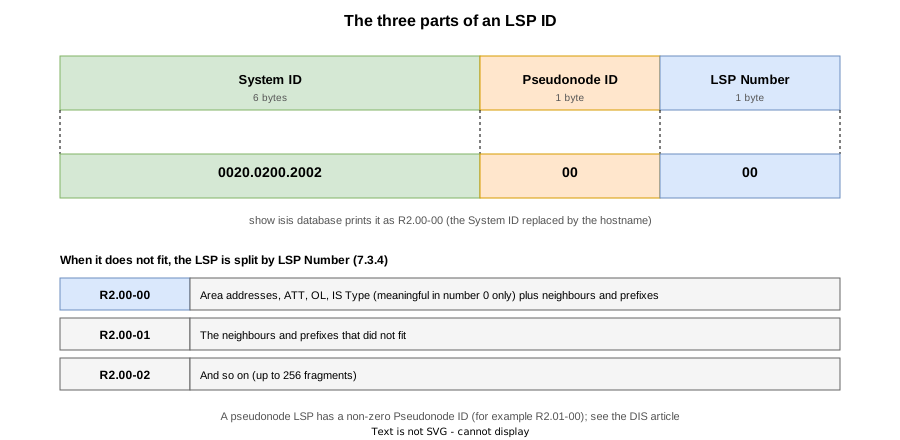
The LSP ID is 8 bytes; show isis database replaces the System ID with the hostname, so an entry reads R2.00-00.
| Part | Meaning |
|---|---|
| System ID (6 bytes) | The originating router: the 0020.0200.2002 part of its NET |
| Pseudonode ID (1 byte) | 00 for the router’s own LSP; 01 or higher for an LSP the DIS creates for a pseudonode (The DIS and the Pseudonode) |
| LSP Number (1 byte) | The fragment number when the information does not fit in one LSP. Starts at 00 |
When it does not fit, change the LSP Number and split it
The size of one LSP is bounded by ReceiveLSPBufferSize = 1492 bytes (Table 2) on the receiving side and by the management parameters originatingL1LSPBufferSize / originatingL2LSPBufferSize (7.3.4.2) on the generating side. On IOS XR that is lsp-mtu (default 1492).
When it does not fit, the information is split across several LSPs with the same System ID and different LSP Numbers (7.3.4.1). Each is flooded and ages on its own; only the decision process reads them together as one originator’s.
LSP Number 0 is special, though. 7.3.4.3 lists four items that are meaningful only in LSP Number zero, and says the Area Addresses option shall be present only there:
- the LSP Database Overload bit (OL)
- the IS Type field
- the Area Addresses option
- the Attached flag (ATT)
Adjacencies and prefixes may sit in any number.
A router advertises its lsp-mtu in TLV 14 (LSP Buffer Size, 9.8). It appears as LSP MTU: in IOS XR’s show isis database detail, and a mismatch with a neighbour is logged as %ROUTING-ISIS-4-LSP_MTU_MISMATCH. NOTE 24 under 7.3.4.2 warns that unless the value is set consistently some adjacencies will fail to initialise, so it is a value that ought to match.
The life of an LSP

Generation and regeneration
At start-up a router builds its own LSP with sequence number 1 (7.3.16.1), and every change of contents (an adjacency going up or down, and so on) regenerates it with the number advanced by one (7.3.6). A freshly generated LSP carries a Remaining Lifetime of MaxAge = 1200 seconds (7.3.16.3, Table 2).
Even with no change, the LSP is regenerated every maximumLSPGenerationInterval (default 900 s), and the number advances then too (7.3.5). On IOS XR these are lsp-refresh-interval (900 s) and max-lsp-lifetime (1200 s). 7.3.21 requires MaxAge to be larger than maximumLSPGenerationInterval, so that a new copy always arrives before the lifetime hits zero. The actual interval is shortened by the jitter of 10.1 (25 %).
How a receiver decides which copy is newer
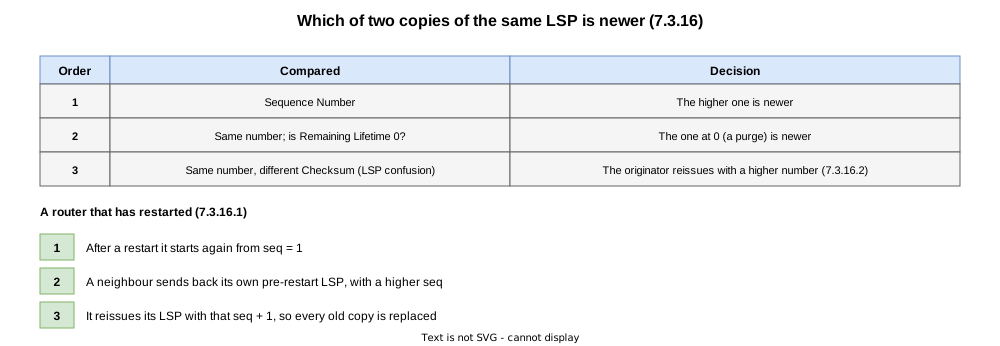
These are the rules for a received LSP whose ID is already in the database (7.3.16).
- The higher sequence number is newer (7.3.16.1)
- Same number, but one copy has a Remaining Lifetime of zero: the zero-lifetime copy (the purge) is newer (7.3.16.3)
- Same number but different checksums (LSP confusion): the receiver treats it as expired, and the originator advances the number and reissues (7.3.16.2)
A restarted router begins again at 1, while the domain still holds its pre-restart LSP with a higher number. 7.3.16.1 says that on receiving its own LSP with a higher number, the router regenerates at the next number above the received one, which replaces every old copy.
Expiry and purge
Every router holding an LSP keeps decrementing its lifetime (7.3.16.3); once the originator is gone it reaches zero. 7.3.16.4 then applies.
- a) set the SRM flags on every circuit (that is, flood the zero-lifetime LSP)
- b) retain only the LSP header
- c) drop the header once
ZeroAgeLifetime(60 s, Table 2) has elapsed
This is a purge, sent not by the originator but by the router that saw the lifetime reach zero. RFC 6232 defines TLV 13 (Purge Originator Identification), which carries the purging router’s System ID.
Confirming delivery
On a point-to-point circuit the receiver acknowledges each LSP with a PSNP (7.3.17). Until that arrives, the sender retransmits every minimumLSPTransmissionInterval (5 s) (7.3.15.5).
A CSNP is a table of contents for the whole database; the receiver sends whatever the neighbour lacks or holds an older copy of (7.3.15.2). IOS XR sends a CSNP when an adjacency comes up on a point-to-point circuit as well, which is how synchronisation right after a restart proceeds.
Configuration on IOS XR
RP/0/RP0/CPU0:R1(config-isis)# max-lsp-lifetime ?
  <1-65535>  Maximum LSP lifetime in seconds, default is 1200
RP/0/RP0/CPU0:R1(config-isis)# lsp-refresh-interval ?
  <1-65535>  LSP refresh time in seconds, default is 900
RP/0/RP0/CPU0:R1(config-isis)# lsp-mtu ?
  <128-8979>  Max LSP size in bytes, default is 1492
RP/0/RP0/CPU0:R1(config-isis)# lsp-gen-interval ?
  initial-wait    Initial delay before generating an LSP in milliseconds, default is 50
  secondary-wait  Secondary delay before generating an LSP in milliseconds, default is 200
maximum-wait Maximum delay before generating an LSP in milliseconds, default is 5000| Command | Standard counterpart | Default |
|---|---|---|
max-lsp-lifetime | MaxAge (remaining lifetime at generation) | 1200 s |
lsp-refresh-interval | maximumLSPGenerationInterval (periodic regeneration) | 900 s |
lsp-mtu | originatingL1LSPBufferSize / originatingL2LSPBufferSize | 1492 bytes |
lsp-gen-interval | minimumLSPGenerationInterval (hold-down on regeneration) | 50 / 200 / 5000 ms |
Verification on real routers
Lab environment

R1 — R2 — R3 are chained in a line, all level-2-only in area 49.0001, with every link point-to-point. Captures are taken between R1 and R2.
| Router | NET | Lo0 | Link |
|---|---|---|---|
| R1 | 49.0001.0010.0100.1001.00 | 1.1.1.1/32 | Gi0/0/0/0 10.1.2.1 |
| R2 | 49.0001.0020.0200.2002.00 | 2.2.2.2/32 | Gi0/0/0/0 10.1.2.2 / Gi0/0/0/1 10.2.3.2 |
| R3 | 49.0001.0030.0300.3003.00 | 3.3.3.3/32 | Gi0/0/0/0 10.2.3.3 |
Verification STEPs
| STEP | Change | Purpose |
|---|---|---|
| 0 | Defaults | Baseline for LSP IDs, sequence numbers and remaining lifetime |
| 1 | max-lsp-lifetime 120 / lsp-refresh-interval 60 on all routers | Observe periodic regeneration in a short time |
| 2 | lsp-mtu 300 on all routers, plus 40 extra Loopbacks on R2 | Fragmentation, and what only number 0 carries |
| 3 | Restart the IS-IS process on R2 | Sequence numbering after a restart |
| 4 | Shut down R3’s link | Expiry and purge |
| 5 | Put everything back (final state) | Same as STEP 0 |
The shortened lifetime and refresh interval (120 s / 60 s) stay in place through STEPs 1 to 4.
The default state (STEP 0)
RP/0/RP0/CPU0:R1#show isis database detail
Thu Sep 10 00:19:12.100 UTC

IS-IS 1 (Level-2) Link State Database
LSPID                 LSP Seq Num  LSP Checksum  LSP Holdtime/Rcvd  ATT/P/OL
R1.00-00            * 0x00000009   0x27ee        1102 /*            0/0/0
  Area Address:   49.0001
  LSP MTU:        1492
  NLPID:          0xcc
  IP Address:     1.1.1.1
  Hostname:       R1
  Metric: 0          IP 1.1.1.1/32
  Metric: 10         IP 10.1.2.0/24
  Metric: 10         IS R2.00
R2.00-00              0x00000008   0xdb8e        1136 /1200         0/0/0
  Area Address:   49.0001
  LSP MTU:        1492
  NLPID:          0xcc
  IP Address:     2.2.2.2
  Hostname:       R2
  Metric: 0          IP 2.2.2.2/32
  Metric: 10         IP 10.1.2.0/24
  Metric: 10         IP 10.2.3.0/24
  Metric: 10         IS R1.00
  Metric: 10         IS R3.00
R3.00-00              0x00000008   0x833b        1130 /1200         0/0/0
  Area Address:   49.0001
  LSP MTU:        1492
  NLPID:          0xcc
  IP Address:     3.3.3.3
  Hostname:       R3
  Metric: 0          IP 3.3.3.3/32
  Metric: 10         IP 10.2.3.0/24
  Metric: 10         IS R2.00

 Total Level-2 LSP count: 3     Local Level-2 LSP count: 1
LSP Holdtime/Rcvd is “remaining lifetime / lifetime when received”, and the other routers’ LSPs are counting down from 1200. LSP MTU: 1492 is TLV 14, and the area address, hostname, prefixes and adjacencies all sit in LSP Number 0.
Shortening the refresh to watch it (STEP 1)
The following goes on every router.
router isis 1
 is-type level-2-only
 net 49.0001.0010.0100.1001.00
 log adjacency changes
 lsp-refresh-interval 60
 max-lsp-lifetime 120
 address-family ipv4 unicast
 !
 interface Loopback0
  passive
  address-family ipv4 unicast
  !
 !
 interface GigabitEthernet0/0/0/0
  point-to-point
  address-family ipv4 unicast
  !
 !
!RP/0/RP0/CPU0:R1#show isis database
Thu Sep 10 00:26:02.022 UTC
IS-IS 1 (Level-2) Link State Database
LSPID LSP Seq Num LSP Checksum LSP Holdtime/Rcvd ATT/P/OL
R1.00-00 * 0x00000010 0x19f5 84 /* 0/0/0
R2.00-00 0x0000000f 0xcd95 111 /120 0/0/0
R3.00-00 0x0000000f 0x7542 101 /120 0/0/0
Total Level-2 LSP count: 3 Local Level-2 LSP count: 1Rcvd is now 120. The periodic regeneration is visible in the capture.
5	12.763427000	52:54:00:04:48:22	L2 LSP, LSP-ID: 0010.0100.1001.00-00, Sequence: 0x0000000a, Lifetime:   120s
9	24.906175000	52:54:00:37:ed:c9	L2 LSP, LSP-ID: 0020.0200.2002.00-00, Sequence: 0x00000009, Lifetime:   120s
15	36.921958000	52:54:00:37:ed:c9	L2 LSP, LSP-ID: 0030.0300.3003.00-00, Sequence: 0x00000009, Lifetime:   120s
24	64.707754000	52:54:00:04:48:22	L2 LSP, LSP-ID: 0010.0100.1001.00-00, Sequence: 0x0000000b, Lifetime:   120s
30	82.683185000	52:54:00:37:ed:c9	L2 LSP, LSP-ID: 0020.0200.2002.00-00, Sequence: 0x0000000a, Lifetime:   120s
32	85.780073000	52:54:00:37:ed:c9	L2 LSP, LSP-ID: 0030.0300.3003.00-00, Sequence: 0x0000000a, Lifetime:   120s
41	114.783032000	52:54:00:04:48:22	L2 LSP, LSP-ID: 0010.0100.1001.00-00, Sequence: 0x0000000c, Lifetime:   120s
48	134.674146000	52:54:00:37:ed:c9	L2 LSP, LSP-ID: 0030.0300.3003.00-00, Sequence: 0x0000000b, Lifetime:   120s
51	138.134809000	52:54:00:37:ed:c9	L2 LSP, LSP-ID: 0020.0200.2002.00-00, Sequence: 0x0000000b, Lifetime:   120s
59	166.219193000	52:54:00:04:48:22	L2 LSP, LSP-ID: 0010.0100.1001.00-00, Sequence: 0x0000000d, Lifetime:   120s
R1’s LSP (0010.0100.1001.00-00) appears as No.5, 24, 41 and 59, roughly every 50 to 52 seconds, each time with the sequence number advanced by one from 0x0a and the lifetime back at 120. That is lsp-refresh-interval 60 with jitter.
ISO 10589 ISIS Link State Protocol Data Unit
    PDU length: 90
    Remaining lifetime: 120
    LSP-ID: 0010.0100.1001.00-00
    Sequence number: 0x0000000b
    Checksum: 0x23f0 [correct]
    [Checksum Status: Good]
    Type block(0x03): Partition Repair:0, Attached bits:0, Overload bit:0, IS type:3
        0... .... = Partition Repair: Not supported
        .000 0... = Attachment: 0
            .0.. .... = Error metric: Not set
            ..0. .... = Expense metric: Not set
            ...0 .... = Delay metric: Not set
            0... .... = Default metric: Not set
        .... .0.. = Overload bit: Not set
.... ..11 = Type of Intermediate System: Level 2 (3)R2 acknowledges it with a PSNP.
ISO 10589 ISIS Partial Sequence Numbers Protocol Data Unit
    PDU length: 35
    Source-ID: 0020.0200.2002
    Source-ID-Circuit: 00
    LSP entries (t=9, l=16)
        Type: 9
        Length: 16
        LSP Entry
            LSP Sequence Number: 0x0000000b
            Remaining Lifetime: 119
            LSP checksum: 0x23f0
        LSP-ID: 0010.0100.1001.00-00
It carries the sequence number, remaining lifetime and checksum of the LSP received (7.3.17). Every LSP in this capture is acknowledged within 0.5 seconds, so the retransmission of 7.3.15.5 never occurs.
Forcing fragmentation (STEP 2)
All three routers are set to lsp-mtu 300, and 40 Loopbacks (172.16.1.1/32 to 172.16.40.1/32) are added to R2 and put into IS-IS.
R2.00-00              0x00000013   0x7815        119  /120          0/0/0
  Area Address:   49.0001
  LSP MTU:        300
  NLPID:          0xcc
  IP Address:     2.2.2.2
  Hostname:       R2
  Metric: 0          IP 2.2.2.2/32
  Metric: 10         IP 10.1.2.0/24
  Metric: 10         IP 10.2.3.0/24
  Metric: 0          IP 172.16.1.1/32
  Metric: 0          IP 172.16.2.1/32
  Metric: 0          IP 172.16.3.1/32
  Metric: 0          IP 172.16.4.1/32
  Metric: 0          IP 172.16.5.1/32
  Metric: 0          IP 172.16.6.1/32
  Metric: 0          IP 172.16.7.1/32
  Metric: 0          IP 172.16.8.1/32
  Metric: 0          IP 172.16.9.1/32
  Metric: 0          IP 172.16.10.1/32
  Metric: 0          IP 172.16.11.1/32
  Metric: 10         IS R1.00
  Metric: 10         IS R3.00
R2.00-01              0x00000004   0x51e4        119  /120          0/0/0
  Metric: 0          IP 172.16.12.1/32
  Metric: 0          IP 172.16.13.1/32
  Metric: 0          IP 172.16.14.1/32
  Metric: 0          IP 172.16.15.1/32
  Metric: 0          IP 172.16.16.1/32
  Metric: 0          IP 172.16.17.1/32
  Metric: 0          IP 172.16.18.1/32
  Metric: 0          IP 172.16.19.1/32
  Metric: 0          IP 172.16.20.1/32
  Metric: 0          IP 172.16.21.1/32
  Metric: 0          IP 172.16.22.1/32
  Metric: 0          IP 172.16.23.1/32
  Metric: 0          IP 172.16.24.1/32
  Metric: 0          IP 172.16.25.1/32
  Metric: 0          IP 172.16.26.1/32
  Metric: 0          IP 172.16.27.1/32
  Metric: 0          IP 172.16.28.1/32
  Metric: 0          IP 172.16.29.1/32
  Metric: 0          IP 172.16.30.1/32
  Metric: 0          IP 172.16.31.1/32
  Metric: 0          IP 172.16.32.1/32
R2.00-02              0x00000002   0x258f        73   /120          0/0/0
  Metric: 0          IP 172.16.33.1/32
  Metric: 0          IP 172.16.34.1/32
  Metric: 0          IP 172.16.35.1/32
  Metric: 0          IP 172.16.36.1/32
  Metric: 0          IP 172.16.37.1/32
  Metric: 0          IP 172.16.38.1/32
  Metric: 0          IP 172.16.39.1/32
  Metric: 0          IP 172.16.40.1/32
R2’s LSP has become three: R2.00-00, R2.00-01 and R2.00-02. The new 01 and 02 start at sequence number 1 (7.3.6), so their numbers are far below that of 00. The area address, LSP MTU, NLPID and hostname appear only in R2.00-00; the prefixes and adjacencies are spread across the three. The hostname TLV 137 may go in any fragment under RFC 5301, but IOS XR places it in number 0.
Because the routers were configured one after another, the lsp-mtu mismatch is logged only for the ten-odd seconds until all three had it; nothing more once they match.
RP/0/RP0/CPU0:Sep 10 00:27:00.330 UTC: isis[1003]: %ROUTING-ISIS-4-LSP_MTU_MISMATCH : ISIS (1): The Level-2 LSP MTU on R1 (300) does not match ours (1492)
RP/0/RP0/CPU0:Sep 10 00:27:11.515 UTC: isis[1003]: %ROUTING-ISIS-4-LSP_MTU_MISMATCH : ISIS (1): The Level-2 LSP MTU on R3 (300) does not match ours (1492)
Restarting the IS-IS process (STEP 3)
process restart isis is run on R2, with captures on both the R1 — R2 and the R2 — R3 link.
RP/0/RP0/CPU0:Sep 10 00:31:01.841 UTC: sysmgr_control[68720]: %OS-SYSMGR-4-PROC_RESTART_NAME : User cisco (con0_RP0_CPU0) requested a restart of process isis at 0/RP0/CPU0
RP/0/RP0/CPU0:Sep 10 00:31:03.105 UTC: isis[1003]: %ROUTING-ISIS-5-PM_HA_ROLE_CHG : ISIS (1): ISIS HA role change: Active
RP/0/RP0/CPU0:Sep 10 00:31:03.106 UTC: isis[1003]: %ROUTING-ISIS-5-PM_ISSU_ROLE_CHG : ISIS (1): ISIS ISSU role change: Primary
RP/0/RP0/CPU0:Sep 10 00:31:04.508 UTC: isis[1003]: %ROUTING-ISIS-6-INFO_STARTUP_START : ISIS (1): Cold controlled start beginning
RP/0/RP0/CPU0:Sep 10 00:31:14.284 UTC: isis[1003]: %ROUTING-ISIS-5-ADJCHANGE : ISIS (1): Adjacency to 49.0001.0010.0100.1001 (GigabitEthernet0/0/0/0) (L2) Up, New adjacency
RP/0/RP0/CPU0:Sep 10 00:31:14.939 UTC: isis[1003]: %ROUTING-ISIS-5-ADJCHANGE : ISIS (1): Adjacency to R3 (GigabitEthernet0/0/0/1) (L2) Up, New adjacency
RP/0/RP0/CPU0:Sep 10 00:31:16.897 UTC: isis[1003]: %ROUTING-ISIS-6-INFO_STARTUP_FINISH : ISIS (1): Cold controlled start completed 20 44.051592000 52:54:00:37:ed:c9 L2 CSNP, Source-ID: 0020.0200.2002.00, Start LSP-ID: 0000.0000.0000.00-00, End LSP-ID: ffff.ffff.ffff.ff-ff
21 44.054704000 52:54:00:04:48:22 L2 LSP, LSP-ID: 0010.0100.1001.00-00, Sequence: 0x00000017, Lifetime: 119s
22 44.054937000 52:54:00:04:48:22 L2 LSP, LSP-ID: 0020.0200.2002.00-00, Sequence: 0x00000014, Lifetime: 65s
23 44.055037000 52:54:00:04:48:22 L2 LSP, LSP-ID: 0020.0200.2002.00-01, Sequence: 0x00000005, Lifetime: 60s
24 44.055138000 52:54:00:04:48:22 L2 LSP, LSP-ID: 0020.0200.2002.00-02, Sequence: 0x00000004, Lifetime: 79s
25 44.055228000 52:54:00:04:48:22 L2 LSP, LSP-ID: 0030.0300.3003.00-00, Sequence: 0x00000015, Lifetime: 102s
26 44.558208000 52:54:00:37:ed:c9 L2 PSNP, Source-ID: 0020.0200.2002.00
27 45.051568000 52:54:00:37:ed:c9 L2 LSP, LSP-ID: 0020.0200.2002.00-00, Sequence: 0x00000015, Lifetime: 120s
28 45.051825000 52:54:00:37:ed:c9 L2 LSP, LSP-ID: 0020.0200.2002.00-01, Sequence: 0x00000006, Lifetime: 120s
29 45.051973000 52:54:00:37:ed:c9 L2 LSP, LSP-ID: 0020.0200.2002.00-02, Sequence: 0x00000006, Lifetime: 120s
30 45.052076000 52:54:00:37:ed:c9 L2 LSP, LSP-ID: 0030.0300.3003.00-00, Sequence: 0x00000016, Lifetime: 120s| No. | Direction | Content |
|---|---|---|
| 20 | R2 → R1 | The restarted R2 sends a CSNP |
| 21–25 | R1 → R2 | R1 sends the LSPs missing from the CSNP, including R2’s own pre-restart LSPs (R2.00-00 at 0x14, 01 at 0x05, 02 at 0x04) |
| 26 | R2 → R1 | R2 acknowledges with a PSNP |
| 27–29 | R2 → R1 | R2 reissues its own LSPs at 0x15, 0x06 and 0x06 |
R2 started again from 1, but regenerated at 0x15, the number after its own old LSP delivered by R1 (0x14), as 7.3.16.1 requires. The renumbered LSPs go out on the R2 — R3 link at the same time (No.17 to 20 in isis-lsp-restart-r2r3.pcap).
ISO 10589 ISIS Link State Protocol Data Unit
    PDU length: 245
    Remaining lifetime: 65
    LSP-ID: 0020.0200.2002.00-00
    Sequence number: 0x00000014
    Checksum: 0x7616 [correct]
    [Checksum Status: Good]
Type block(0x03): Partition Repair:0, Attached bits:0, Overload bit:0, IS type:3ISO 10589 ISIS Link State Protocol Data Unit
PDU length: 244
Remaining lifetime: 120
LSP-ID: 0020.0200.2002.00-00
Sequence number: 0x00000015
Checksum: 0x127e [correct]
[Checksum Status: Good]
Type block(0x07): Partition Repair:0, Attached bits:0, Overload bit:1, IS type:3
0... .... = Partition Repair: Not supported
.000 0... = Attachment: 0
.0.. .... = Error metric: Not set
..0. .... = Expense metric: Not set
...0 .... = Delay metric: Not set
0... .... = Default metric: Not set
.... .1.. = Overload bit: Set
.... ..11 = Type of Intermediate System: Level 2 (3)In No.27 the Overload bit is 1. IOS XR sets the OL bit in its own LSP right after a restart and clears it once converged. The OL bit is covered in The IS-IS Overload Bit.
R2.00-00              0x00000018   0x0889        85   /120          0/0/0
  Area Address:   49.0001
  LSP MTU:        300
  NLPID:          0xcc
  IP Address:     2.2.2.2
  Hostname:       R2
  Metric: 0          IP 2.2.2.2/32
  Metric: 10         IP 10.1.2.0/24
  Metric: 10         IP 10.2.3.0/24
  Metric: 0          IP 172.16.1.1/32
  Metric: 0          IP 172.16.2.1/32
  Metric: 0          IP 172.16.3.1/32
  Metric: 0          IP 172.16.4.1/32
  Metric: 0          IP 172.16.5.1/32
  Metric: 0          IP 172.16.6.1/32
  Metric: 0          IP 172.16.7.1/32
  Metric: 0          IP 172.16.8.1/32
  Metric: 0          IP 172.16.9.1/32
  Metric: 0          IP 172.16.10.1/32
  Metric: 0          IP 172.16.11.1/32
  Metric: 0          IP 172.16.12.1/32
  Metric: 0          IP 172.16.13.1/32
R2.00-01              0x00000008   0xb255        96   /120          0/0/0
  Metric: 0          IP 172.16.14.1/32
  Metric: 0          IP 172.16.15.1/32
  Metric: 0          IP 172.16.16.1/32
  Metric: 0          IP 172.16.17.1/32
  Metric: 0          IP 172.16.18.1/32
  Metric: 0          IP 172.16.19.1/32
  Metric: 0          IP 172.16.20.1/32
  Metric: 0          IP 172.16.21.1/32
  Metric: 0          IP 172.16.22.1/32
  Metric: 0          IP 172.16.23.1/32
  Metric: 0          IP 172.16.24.1/32
  Metric: 0          IP 172.16.25.1/32
  Metric: 0          IP 172.16.26.1/32
  Metric: 0          IP 172.16.27.1/32
  Metric: 0          IP 172.16.28.1/32
  Metric: 0          IP 172.16.29.1/32
  Metric: 0          IP 172.16.30.1/32
  Metric: 0          IP 172.16.31.1/32
  Metric: 0          IP 172.16.32.1/32
  Metric: 0          IP 172.16.33.1/32
  Metric: 0          IP 172.16.34.1/32
R2.00-02              0x00000008   0x824d        87   /120          0/0/0
  Metric: 0          IP 172.16.35.1/32
  Metric: 0          IP 172.16.36.1/32
  Metric: 0          IP 172.16.37.1/32
  Metric: 0          IP 172.16.38.1/32
  Metric: 0          IP 172.16.39.1/32
  Metric: 0          IP 172.16.40.1/32
  Metric: 10         IS R1.00
  Metric: 10         IS R3.00
The adjacencies (IS R1.00 / IS R3.00), in R2.00-00 before the restart, have moved to R2.00-02. Only the four items of 7.3.4.3 are tied to number 0; which fragment carries an adjacency is up to the implementation.
Letting an LSP expire (STEP 4)
R3’s Gi0/0/0/0 is shut down. No router can refresh R3’s LSP any more, so the copies on R1 and R2 count down to zero.
RP/0/RP0/CPU0:R2#show isis spf-log
Thu Sep 10 00:38:59.882 UTC

  IS-IS 1  Level 2  IPv4 Unicast  Route Calculation Log
                                                   Capacity: 210, Size: 5
                    Time Total Trig.
Timestamp    Type   (ms) Nodes Count First Trigger LSP    Triggers
------------ ----- ----- ----- ----- -------------------- ----------------------
--- Thu Sep 10 2026 ---
00:31:16.812  FSPF     0     3    22             R1.00-00 CONFIG NEWNODE NEWLSP OVLSET LINKGOOD PREFIXGOOD AREAADDR IPADDR
00:31:17.799  FSPF     1     3     2             R1.00-00 LINKGOOD
00:31:18.960  FSPF     0     3     1             R2.00-00 OVLCLR
00:37:22.534  FSPF     1     3     2             R2.00-02 DELADJ LINKBAD
00:38:37.166  FSPF     0     3     6 0030.0300.3003.00-00 DELNODE LSPEXPIRY LINKBAD PREFIXBAD AREAADDR IPADDR
R2 detected the adjacency’s hold time expiring (DELADJ) at 00:37:22, and R3’s LSP expired (LSPEXPIRY) 75 seconds later at 00:38:37. Losing the adjacency does not remove R3’s LSP straight away: it stays in the database until its remaining lifetime runs out.
15	41.415615000	52:54:00:37:ed:c9	L2 LSP, LSP-ID: 0030.0300.3003.00-00, Sequence: 0x0000001d, Lifetime:   120s
16	41.993613000	52:54:00:04:48:22	L2 PSNP, Source-ID: 0010.0100.1001.00
66	161.408694000	52:54:00:37:ed:c9	L2 LSP, LSP-ID: 0030.0300.3003.00-00, Sequence: 0x0000001d, Lifetime:     0s
67	161.912900000	52:54:00:04:48:22	L2 PSNP, Source-ID: 0010.0100.1001.00
No.15 is R2 forwarding R3’s LSP (lifetime 120) to R1, and No.66 (lifetime 0) follows exactly 120 seconds later. The moment the lifetime reaches zero on R2, it sends out the zero-lifetime LSP (7.3.16.4 a).
ISO 10589 ISIS Link State Protocol Data Unit
    PDU length: 40
    Remaining lifetime: 0
    LSP-ID: 0030.0300.3003.00-00
    Sequence number: 0x0000001d
    [Checksum: [missing]]
    [Checksum Status: Not present]
    Type block(0x03): Partition Repair:0, Attached bits:0, Overload bit:0, IS type:3
        0... .... = Partition Repair: Not supported
        .000 0... = Attachment: 0
            .0.. .... = Error metric: Not set
            ..0. .... = Expense metric: Not set
            ...0 .... = Delay metric: Not set
            0... .... = Default metric: Not set
        .... .0.. = Overload bit: Not set
        .... ..11 = Type of Intermediate System: Level 2 (3)
    Purge Originator ID (t=13, l=7)
        Type: 13
        Length: 7
        Number of System IDs: 1
        System ID: 0020.0200.2002
    Hostname (t=137, l=2)
        Type: 137
        Length: 2
Hostname: R2It is only PDU length: 40, with none of R3’s adjacencies or prefixes (7.3.16.4 b). The sequence number is still 0x1d and Remaining lifetime is 0. The checksum differs from the original LSP (0xf164 in No.15), but per NOTE 36 under 7.3.16.4 it is not verified on a zero-lifetime LSP (tshark shows [missing] too). The remaining TLVs are TLV 13, naming R2 as the purger, and its hostname (TLV 137).
RP/0/RP0/CPU0:R1#show isis database
Thu Sep 10 00:38:43.619 UTC

IS-IS 1 (Level-2) Link State Database
LSPID                 LSP Seq Num  LSP Checksum  LSP Holdtime/Rcvd  ATT/P/OL
R1.00-00            * 0x00000020   0x911a        108  /*            0/0/0
R2.00-00              0x0000001e   0xfb8f        95   /120          0/0/0
R2.00-01              0x0000000e   0xa65b        94   /120          0/0/0
R2.00-02              0x0000000f   0x7055        89   /120          0/0/0
0030.0300.3003.00-00  0x0000001d   0xc04f        0 (53)/*           0/0/0

 Total Level-2 LSP count: 5     Local Level-2 LSP count: 1
R3’s LSP shows 0 (53)/*; once the 53 seconds in parentheses pass the header goes too (7.3.16.4 c, ZeroAgeLifetime = 60 s). It reads 0030.0300.3003.00-00 rather than R3.00-00 because the hostname TLV 137 was discarded with the body.
0030.0300.3003.00-00  0x0000001d   0xc04f        0 (53)/*           0/0/0
  Purge Originator: 0020.0200.2002 R2
  Hostname:       R2

 Total Level-2 LSP count: 5     Local Level-2 LSP count: 1
Purge Originator and Hostname belong to the purger R2; nothing of R3’s information is left. R3’s 3.3.3.3/32 has gone from the routing table too (the line that used to sit between 2.2.2.2/32 and 10.2.3.0/24).
RP/0/RP0/CPU0:R1#show route isis
Thu Sep 10 00:38:42.537 UTC

i L2 2.2.2.2/32 [115/10] via 10.1.2.2, 00:07:24, GigabitEthernet0/0/0/0
i L2 10.2.3.0/24 [115/20] via 10.1.2.2, 00:07:24, GigabitEthernet0/0/0/0
i L2 172.16.1.1/32 [115/10] via 10.1.2.2, 00:07:24, GigabitEthernet0/0/0/0
Putting it back (STEP 5)
Bringing R3’s link back and removing the settings from STEPs 1 and 2 (timers, lsp-mtu, Loopbacks) returns everything to the initial state (the ..._run.txt files of STEP 0 and STEP 5 match).
RP/0/RP0/CPU0:R1#show isis database
Thu Sep 10 00:42:42.685 UTC

IS-IS 1 (Level-2) Link State Database
LSPID                 LSP Seq Num  LSP Checksum  LSP Holdtime/Rcvd  ATT/P/OL
R1.00-00            * 0x00000022   0xf408        1046 /*            0/0/0
R2.00-00              0x00000022   0xa7a8        1067 /1200         0/0/0
R3.00-00              0x00000023   0x4d56        1033 /1199         0/0/0

 Total Level-2 LSP count: 3     Local Level-2 LSP count: 1
Verification configs and show output
For every STEP the following kinds of output were captured from all three routers. The verification config is these ..._run.txt files (the final state is STEP 5).
| File | Contents |
|---|---|
..._show.txt | show version / show interface description / show route / show route isis / show isis / show isis hostname / show isis interface / show isis interface brief / show isis neighbors / show isis neighbors detail / show isis database / show isis database detail / show isis topology / show isis adjacency / show isis adjacency-log / show isis spf-log / show isis lsp-log / show isis statistics / show cef |
..._log.txt | show logging narrowed to the range of that STEP (STEP 0 holds the whole history since boot) |
..._run.txt | show running-config at that STEP (that is, the verification config for the STEP) |
..._debug.txt | STEP 0 on R1 only: the CLI help for the LSP-related commands |
STEP 0: the default state
| Router | show output | syslog | running-config |
|---|---|---|---|
| R1 | show | log | run |
| R2 | show | log | run |
| R3 | show | log | run |
R1 in STEP 0 also has a debug file with the CLI help.
STEP 1: max-lsp-lifetime 120 / lsp-refresh-interval 60 on all routers
| Router | show output | syslog | running-config |
|---|---|---|---|
| R1 | show | log | run |
| R2 | show | log | run |
| R3 | show | log | run |
STEP 2: lsp-mtu 300 on all routers plus 40 Loopbacks on R2
| Router | show output | syslog | running-config |
|---|---|---|---|
| R1 | show | log | run |
| R2 | show | log | run |
| R3 | show | log | run |
STEP 3: restart the IS-IS process on R2
| Router | show output | syslog | running-config |
|---|---|---|---|
| R1 | show | log | run |
| R2 | show | log | run |
| R3 | show | log | run |
STEP 4: shut down R3’s link
| Router | show output | syslog | running-config |
|---|---|---|---|
| R1 | show | log | run |
| R2 | show | log | run |
| R3 | show | log | run |
STEP 5: put everything back (final state)
| Router | show output | syslog | running-config |
|---|---|---|---|
| R1 | show | log | run |
| R2 | show | log | run |
| R3 | show | log | run |
There are four capture files; all but isis-lsp-restart-r2r3.pcap were taken between R1 and R2.
Download the periodic-refresh capture (STEP 1) (isis-lsp-refresh.pcap)
Download the process-restart capture (STEP 3, R1 — R2) (isis-lsp-restart.pcap)
Download the process-restart capture (STEP 3, R2 — R3) (isis-lsp-restart-r2r3.pcap)
Download the expiry-and-purge capture (STEP 4) (isis-lsp-purge.pcap)
References
| Standard | Title | Summary |
|---|---|---|
| ISO/IEC 10589:2002 (2nd edition) | Intermediate System to Intermediate System intra-domain routeing information exchange protocol | The IS-IS specification itself. This article draws on 7.3.4 (multiple LSPs), 7.3.5 (periodic generation), 7.3.6 (event-driven generation), 7.3.15.5 (retransmission interval), 7.3.15.2 (action on receipt of a CSNP), 7.3.16 (determining the latest information, lifetime, expiry), 7.3.17 (PSNP acknowledgements), 7.3.21 (MaxAge and ZeroAgeLifetime), 9.8 (TLV 14), 10.1 (jitter) and Table 2 (architectural constants). |
| RFC 6232 | Purge Originator Identification TLV for IS-IS | Defines TLV 13, which carries the System ID of the purging router. |
| RFC 5301 | Dynamic Hostname Exchange Mechanism for IS-IS | Defines the hostname TLV 137, which may be present in any fragment of a non-pseudonode LSP. |
| RFC 1195 | Use of OSI IS-IS for Routing in TCP/IP and Dual Environments | Defines TLV 128 and the other TLVs that carry IP routes. |
| RFC 1142 | OSI IS-IS Intra-domain Routing Protocol | A republication of the Draft Proposal of ISO 10589 (1990), now Historic. It must not be cited in place of ISO/IEC 10589 (RFC 7142). |
| RFC 7142 | Reclassification of RFC 1142 to Historic | States that the document to cite is ISO/IEC 10589:2002, 2nd edition. |
Related articles
- What is IS-IS
- IS-IS NSAP Addresses and the NET (System ID)
- IS-IS Multiple Area Addresses (Multihoming), Merging and Splitting Areas
- IS-IS Level 1 and Level 2 (the hierarchy)
- IS-IS Packet Types and Header Format
- IS-IS Adjacency Formation and States
- IS-IS DIS and the Pseudonode
- IS-IS Network Types (broadcast / point-to-point)
- IS-IS Metrics (narrow and wide)
- IS-IS Authentication (hello-password and lsp-password)
- IS-IS LSPs and the Link-State Database
- The Main IS-IS TLVs
- IS-IS Flooding and LSDB Synchronisation
- IS-IS SPF Computation and Route Selection
- IS-IS ECMP (Equal-Cost Multipath)
- The IS-IS ATT Bit and the Level 1 Default Route
- IS-IS Route Leaking and the Up/Down Bit
- IS-IS Route Summarization
- The IS-IS Overload Bit
- IS-IS IPv6 Support and Multi-Topology (TLV 236 / MT ID 2)
- IS-IS Hello and Holding Time
- IS-IS Convergence Timers (SPF / LSP Generation)
- IS-IS Flooding Timers (LSP Interval, Retransmission, CSNP / PSNP)
- IS-IS Link Failure and Path Switchover
- IS-IS Redistribution (connected / static)
- IS-IS Redistribution of BGP Routes