IS-IS Metrics (narrow and wide)
IS-IS adds up the metric of each link and picks the path with the smallest total. How large a value may get is decided by metric-style. Under the default narrow a link advertises no more than 63; set 64 or more and the command still commits, but only the advertised value is clamped to 63.
This article works through the metric structure the standards define, then confirms on IOS XR and in captures how an LSP changes between narrow and wide.
The standard defines four metrics
Clause 7.2.2 of ISO/IEC 10589:2002 defines four metrics, one for each quality of service in the QoS Maintenance field of ISO 8473.
| Metric | What it measures | Required? |
|---|---|---|
| default | How much traffic the circuit can handle (its throughput). A higher value means less capacity | Mandatory |
| delay | The transit delay of the circuit. A higher value means slower | Optional |
| expense | The monetary cost of using the circuit. A higher value means more expensive | Optional |
| error | The residual error probability of the circuit. A higher value means more errors | Optional |
The clause makes the default metric mandatory and the others optional, and requires that an unsupported metric must not be reported in LSPs. That is why implementations deal only with the default metric, which is what the metric command sets.
NOTE 13 adds that “the decision process combines metric values by simple addition”.
A narrow metric has only six bits
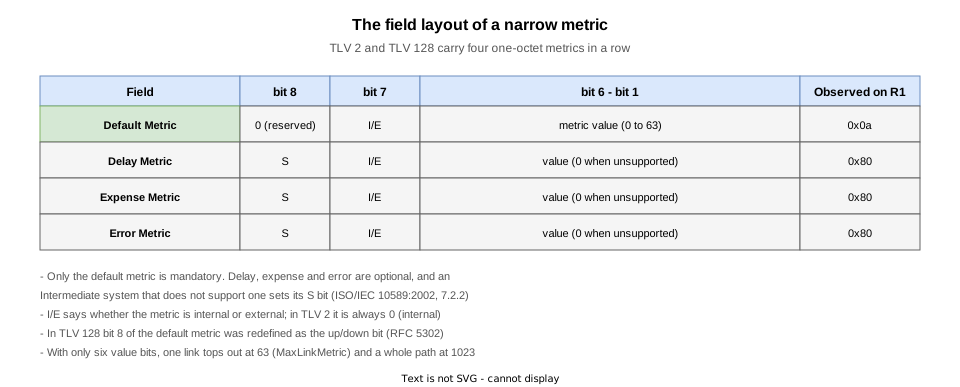
TLV 2 (Intermediate System Neighbours), defined in 9.8 / 9.9, carries four one-octet metrics per neighbour.
- bit 8: reserved (0) in the default metric. In delay, expense and error it is the S bit, and a 1 means that metric is unsupported
- bit 7: the I/E bit, saying whether the metric is internal or external. In TLV 2 it is always 0 (internal)
- bit 6 to bit 1: the metric value
Only six bits are left for the value. Table 2 fixes MaxLinkMetric = 63 and MaxPathMetric = 1023: 63 per link, 1023 per path.
TLV 128 (IP Internal Reachability, RFC 1195) lays its metrics out the same way. Bit 8 of its default metric was redefined by RFC 5302 as the up/down bit.
The name “narrow” came afterwards; the word does not appear in the text of the standard.
The structure of an LSP itself, and the way TLVs are laid out in it, is covered in IS-IS PDU types and header formats.
Wide metrics are TLVs added by RFC 5305

RFC 5305, “IS-IS Extensions for Traffic Engineering”, defines two new TLVs with wider metric fields.
| TLV | Name | Metric width |
|---|---|---|
| 22 | Extended IS Reachability | 24 bits (0 to 16777215) |
| 135 | Extended IP Reachability | 32 bits |
For a whole path the RFC sets MAX_PATH_METRIC = 0xFE000000 (below the 32-bit maximum so additions cannot overflow). A prefix advertised above it must not be considered during the normal SPF computation.
A link advertised with the maximum link metric (2^24-1 = 16777215) must not be considered either. The top of the range means “do not use this link”.
Wide and narrow are different TLVs, so a receiver that cannot interpret the same form cannot see that link.
The same RFC also defines sub-TLVs of TLV 22 for traffic engineering.
Configuring it on IOS XR
The choice of form goes under the address family of router isis; the per-link value goes under the address family of the interface.
router isis 1
 address-family ipv4 unicast
  metric-style wide
 !
 interface GigabitEthernet0/0/0/0
  address-family ipv4 unicast
   metric 1000000
metric-style takes three values.
| Value | TLVs generated | TLVs accepted |
|---|---|---|
narrow | TLV 2 / TLV 128 | TLV 2 / TLV 128 |
wide | TLV 22 / TLV 135 | TLV 22 / TLV 135 |
transition | both | both |
transition is for migrations: it advertises both forms and accepts both. The default is narrow.
metric takes a level; without one it applies to both. The router-wide default (10) can be changed with metric under the address family of router isis.
What happens when 64 or more is set under narrow
The CLI range is <1-16777214> regardless of metric-style, so metric 64 commits under narrow. Only the advertised value is clamped to 63.
RP/0/RP0/CPU0:R1(config)#router isis 1
RP/0/RP0/CPU0:R1(config-isis)# interface GigabitEthernet0/0/0/0
RP/0/RP0/CPU0:R1(config-isis-if)#  address-family ipv4 unicast
RP/0/RP0/CPU0:R1(config-isis-if-af)#   metric ?
  <1-16777214>  Default metric: <1-63> for narrow, <1-16777214> for wide
  fallback      Increase the link metric when an event occurs
  maximum       Maximum wide metric. All routers will exclude this link from their SPF
RP/0/RP0/CPU0:R1(config-isis-if-af)#   metric
% Incomplete command.
RP/0/RP0/CPU0:R1(config-isis-if-af)#commit
Wed Sep  9 09:48:14.636 UTC
RP/0/RP0/CPU0:R1(config-isis-if-af)#end
What you may type and what may be advertised are two different ranges. The range stops at 16777214 because 16777215 is assigned to the maximum keyword that excludes the link from SPF.
A metric applies to one direction only

A metric is assigned to the circuits leaving a router and advertised in its own LSP. If R1 raises R1 to R2, what R2 advertises for R2 to R1 does not change. Raising one direction alone leaves the path asymmetric.
Verifying on real equipment
The test topology

R1, R2 and R3 are chained, all level-2-only in area 49.0001, every link point-to-point, so addition and the per-direction effect show at the same time.
| Router | NET | Lo0 | Links |
|---|---|---|---|
| R1 | 49.0001.0010.0100.1001.00 | 1.1.1.1/32 | Gi0/0/0/0 10.1.2.1 |
| R2 | 49.0001.0020.0200.2002.00 | 2.2.2.2/32 | Gi0/0/0/0 10.1.2.2 / Gi0/0/0/1 10.2.3.2 |
| R3 | 49.0001.0030.0300.3003.00 | 3.3.3.3/32 | Gi0/0/0/0 10.2.3.3 |
The STEPs
| STEP | Change | Purpose |
|---|---|---|
| 0 | Defaults (narrow, metric 10) | Establish the baseline of what narrow advertises |
| 1 | metric 64 on R1’s Gi0/0/0/0, still narrow | How a value above the ceiling is advertised |
| 2 | metric-style wide on all three | The TLV swap, and the same 64 getting through unchanged |
| 3 | metric 1000000 on R1, still wide | Advertising a large value, and the per-direction effect |
| 4 | Remove metric and metric-style (final state) | Back to the initial state |
The default is narrow with a metric of 10 (STEP 0)
With nothing configured, metric-style is narrow and the link metric is 10.
  Topologies supported by IS-IS:
    IPv4 Unicast
      Rib connected
      Level-2
        Metric style (generate/accept): Narrow/Narrow
        Metric: 10
      No protocols redistributed
      Distance: 115
      Advertise Passive Interface Prefixes Only: No
generate (the form this router produces) and accept (the form it will interpret) are shown separately. Both are Narrow.
The link-state database at this point looks like this.
RP/0/RP0/CPU0:R1#show isis database detail
Wed Sep  9 09:29:26.745 UTC

IS-IS 1 (Level-2) Link State Database
LSPID                 LSP Seq Num  LSP Checksum  LSP Holdtime/Rcvd  ATT/P/OL
R1.00-00            * 0x00000005   0x2fea        1047 /*            0/0/0
  Area Address:   49.0001
  LSP MTU:        1492
  NLPID:          0xcc
  IP Address:     1.1.1.1
  Hostname:       R1
  Metric: 0          IP 1.1.1.1/32
  Metric: 10         IP 10.1.2.0/24
  Metric: 10         IS R2.00
R2.00-00              0x00000007   0xdd8d        1054 /1200         0/0/0
  Area Address:   49.0001
  LSP MTU:        1492
  NLPID:          0xcc
  IP Address:     2.2.2.2
  Hostname:       R2
  Metric: 0          IP 2.2.2.2/32
  Metric: 10         IP 10.1.2.0/24
  Metric: 10         IP 10.2.3.0/24
  Metric: 10         IS R1.00
  Metric: 10         IS R3.00
R3.00-00              0x00000006   0x8739        1053 /1200         0/0/0
  Area Address:   49.0001
  LSP MTU:        1492
  NLPID:          0xcc
  IP Address:     3.3.3.3
  Hostname:       R3
  Metric: 0          IP 3.3.3.3/32
  Metric: 10         IP 10.2.3.0/24
  Metric: 10         IS R2.00

 Total Level-2 LSP count: 3     Local Level-2 LSP count: 1
IS is a link (TLV 2) and IP a prefix (TLV 128). The loopback is Metric: 0 because it is the router’s own address.
The routing table shows the metrics of the links along the path, added together.
RP/0/RP0/CPU0:R1#show route isis
Wed Sep  9 09:29:25.319 UTC

i L2 2.2.2.2/32 [115/10] via 10.1.2.2, 00:02:28, GigabitEthernet0/0/0/0
i L2 3.3.3.3/32 [115/20] via 10.1.2.2, 00:02:23, GigabitEthernet0/0/0/0
i L2 10.2.3.0/24 [115/20] via 10.1.2.2, 00:02:28, GigabitEthernet0/0/0/0
[115/20] for 3.3.3.3/32 is 10 plus 10; 115 is the administrative distance.
It is worth looking at the packet as well. No.5 in the capture taken between R1 and R2 is the LSP R1 sent at this point.
$ tshark -r isis-metric-narrow.pcap -n -V -Y "frame.number == 5"
ISO 10589 ISIS Link State Protocol Data Unit
    PDU length: 90
    Remaining lifetime: 1200
    LSP-ID: 0010.0100.1001.00-00
    Sequence number: 0x00000009
    Checksum: 0x27ee [correct]
    [Checksum Status: Good]
    Type block(0x03): Partition Repair:0, Attached bits:0, Overload bit:0, IS type:3
        0... .... = Partition Repair: Not supported
        .000 0... = Attachment: 0
            .0.. .... = Error metric: Not set
            ..0. .... = Expense metric: Not set
            ...0 .... = Delay metric: Not set
            0... .... = Default metric: Not set
        .... .0.. = Overload bit: Not set
        .... ..11 = Type of Intermediate System: Level 2 (3)
    Area address(es) (t=1, l=4)
        Type: 1
        Length: 4
        Area address (3): 49.0001
    Originating neighbor buffer size (t=14, l=2)
        Type: 14
        Length: 2
        Neighbor originating buffer size: 1492
    Protocols supported (t=129, l=1)
        Type: 129
        Length: 1
        NLPID: IP (0xcc)
            NLPID: 0xcc
    IP Interface address(es) (t=132, l=4)
        Type: 132
        Length: 4
        IPv4 interface address: 1.1.1.1
    Hostname (t=137, l=2)
        Type: 137
        Length: 2
        Hostname: R1
    IP Internal reachability (t=128, l=24)
        Type: 128
        Length: 24
        IPv4 prefix: 1.1.1.1/32
            ..00 0000 = Default Metric: 0
            .0.. .... = Default Metric IE: Internal
            0... .... = Distribution: Up
            ..00 0000 = Delay Metric: 0
            1... .... = Delay Metric: Not Supported
            .0.. .... = Delay Metric: Internal
            ..00 0000 = Expense Metric: 0
            1... .... = Expense Metric: Not Supported
            .0.. .... = Expense Metric: Internal
            ..00 0000 = Error Metric: 0
            1... .... = Error Metric: Not Supported
            .0.. .... = Error Metric: Internal
        IPv4 prefix: 10.1.2.0/24
            ..00 1010 = Default Metric: 10
            .0.. .... = Default Metric IE: Internal
            0... .... = Distribution: Up
            ..00 0000 = Delay Metric: 0
            1... .... = Delay Metric: Not Supported
            .0.. .... = Delay Metric: Internal
            ..00 0000 = Expense Metric: 0
            1... .... = Expense Metric: Not Supported
            .0.. .... = Expense Metric: Internal
            ..00 0000 = Error Metric: 0
            1... .... = Error Metric: Not Supported
            .0.. .... = Error Metric: Internal
    IS Reachability (t=2, l=12)
        Type: 2
        Length: 12
        Reserved: 0x00
        IS Neighbor: 0020.0200.2002.00
            ..00 1010 = Default Metric: 10
            .0.. .... = Default Metric: Internal
            ..00 1010 = Delay Metric: 10
            0... .... = Delay Metric: Supported
            .0.. .... = Delay Metric: Internal
            ..00 1010 = Expense Metric: 10
            0... .... = Expense Metric: Supported
            .0.. .... = Expense Metric: Internal
            ..00 1010 = Error Metric: 10
            0... .... = Error Metric: Supported
            .0.. .... = Error Metric: Internal
IS Neighbor: 0020.0200.2002.00The Default Metric in TLV 128 is expanded as ..00 1010, six bits wide: the evidence of narrow. Delay, expense and error read Not Supported (S bit set).
Inside TLV 2 the delay, expense and error metrics are expanded as Supported, but the raw bytes are 0a 80 80 80, S bits set (tshark 4.6.8 repeats the default value there).
Setting a value above 63 while still narrow (STEP 1)
metric 64 goes on R1’s Gi0/0/0/0 with metric-style still narrow; the command commits.
 interface GigabitEthernet0/0/0/0
  point-to-point
  address-family ipv4 unicast
   metric 64
  !
 !
The value actually in use, however, is 63.
  IPv4 Unicast Topology:    Enabled
    Adjacency Formation:    Running
    Prefix Advertisement:   Running
          Policy (L1/L2):   -/-
    Metric (L1/L2):         63/63
    Metric fallback:
      Bandwidth (L1/L2):    Inactive/Inactive
      Anomaly (L1/L2):      Inactive/Inactive
    Weight (L1/L2):         0/0
    MPLS Max Label Stack:   1/3/7/7 (PRI/BKP/SRTE/SRAT)
    MPLS LDP Sync (L1/L2):  Disabled/Disabled
The value in the LSP is 63 as well. The configured 64 appears nowhere.
RP/0/RP0/CPU0:R1#show isis database detail
Wed Sep  9 09:33:56.253 UTC

IS-IS 1 (Level-2) Link State Database
LSPID                 LSP Seq Num  LSP Checksum  LSP Holdtime/Rcvd  ATT/P/OL
R1.00-00            * 0x00000006   0x812d        1043 /*            0/0/0
  Area Address:   49.0001
  LSP MTU:        1492
  NLPID:          0xcc
  IP Address:     1.1.1.1
  Hostname:       R1
  Metric: 0          IP 1.1.1.1/32
  Metric: 63         IP 10.1.2.0/24
  Metric: 63         IS R2.00
R2.00-00              0x00000007   0xdd8d        784  /1200         0/0/0
  Area Address:   49.0001
  LSP MTU:        1492
  NLPID:          0xcc
  IP Address:     2.2.2.2
  Hostname:       R2
  Metric: 0          IP 2.2.2.2/32
  Metric: 10         IP 10.1.2.0/24
  Metric: 10         IP 10.2.3.0/24
  Metric: 10         IS R1.00
  Metric: 10         IS R3.00
R3.00-00              0x00000006   0x8739        783  /1200         0/0/0
  Area Address:   49.0001
  LSP MTU:        1492
  NLPID:          0xcc
  IP Address:     3.3.3.3
  Hostname:       R3
  Metric: 0          IP 3.3.3.3/32
  Metric: 10         IP 10.2.3.0/24
  Metric: 10         IS R2.00

 Total Level-2 LSP count: 3     Local Level-2 LSP count: 1
The routing table is computed from 63 too.
RP/0/RP0/CPU0:R1#show route isis
Wed Sep  9 09:33:54.620 UTC

i L2 2.2.2.2/32 [115/63] via 10.1.2.2, 00:02:35, GigabitEthernet0/0/0/0
i L2 3.3.3.3/32 [115/73] via 10.1.2.2, 00:02:35, GigabitEthernet0/0/0/0
i L2 10.2.3.0/24 [115/73] via 10.1.2.2, 00:02:35, GigabitEthernet0/0/0/0
The configured value and the LSP value disagree, so check what is advertised with show isis database.
Switching to metric-style wide (STEP 2)
All three routers move to metric-style wide. The configured value stays at 64.
  Topologies supported by IS-IS:
    IPv4 Unicast
      Rib connected
      Level-2
        Metric style (generate/accept): Wide/Wide
        Metric: 10
      No protocols redistributed
      Distance: 115
      Advertise Passive Interface Prefixes Only: No
Both generation and acceptance are now Wide, and the database display changes too.
RP/0/RP0/CPU0:R1#show isis database detail
Wed Sep  9 09:37:28.888 UTC

IS-IS 1 (Level-2) Link State Database
LSPID                 LSP Seq Num  LSP Checksum  LSP Holdtime/Rcvd  ATT/P/OL
R1.00-00            * 0x00000007   0x39f2        1085 /*            0/0/0
  Area Address:   49.0001
  LSP MTU:        1492
  NLPID:          0xcc
  IP Address:     1.1.1.1
  Hostname:       R1
  Metric: 64         IS-Extended R2.00
  Metric: 0          IP-Extended 1.1.1.1/32
  Metric: 64         IP-Extended 10.1.2.0/24
R2.00-00              0x00000008   0x7617        1085 /1200         0/0/0
  Area Address:   49.0001
  LSP MTU:        1492
  NLPID:          0xcc
  IP Address:     2.2.2.2
  Hostname:       R2
  Metric: 10         IS-Extended R1.00
  Metric: 10         IS-Extended R3.00
  Metric: 0          IP-Extended 2.2.2.2/32
  Metric: 10         IP-Extended 10.1.2.0/24
  Metric: 10         IP-Extended 10.2.3.0/24
R3.00-00              0x00000007   0xa699        1085 /1200         0/0/0
  Area Address:   49.0001
  LSP MTU:        1492
  NLPID:          0xcc
  IP Address:     3.3.3.3
  Hostname:       R3
  Metric: 10         IS-Extended R2.00
  Metric: 0          IP-Extended 3.3.3.3/32
  Metric: 10         IP-Extended 10.2.3.0/24

 Total Level-2 LSP count: 3     Local Level-2 LSP count: 1
IS-Extended (TLV 22) and IP-Extended (TLV 135) replace them, and the same configured 64 is now advertised as 64.
RP/0/RP0/CPU0:R1#show route isis
Wed Sep  9 09:37:27.729 UTC

i L2 2.2.2.2/32 [115/64] via 10.1.2.2, 00:01:52, GigabitEthernet0/0/0/0
i L2 3.3.3.3/32 [115/74] via 10.1.2.2, 00:01:52, GigabitEthernet0/0/0/0
i L2 10.2.3.0/24 [115/74] via 10.1.2.2, 00:01:52, GigabitEthernet0/0/0/0
No.9 in the capture is the LSP R1 sent right after the switch to wide.
$ tshark -r isis-metric-wide.pcap -n -V -Y "frame.number == 9"
ISO 10589 ISIS Link State Protocol Data Unit
    PDU length: 90
    Remaining lifetime: 1200
    LSP-ID: 0010.0100.1001.00-00
    Sequence number: 0x00000007
    Checksum: 0x39f2 [correct]
    [Checksum Status: Good]
    Type block(0x03): Partition Repair:0, Attached bits:0, Overload bit:0, IS type:3
        0... .... = Partition Repair: Not supported
        .000 0... = Attachment: 0
            .0.. .... = Error metric: Not set
            ..0. .... = Expense metric: Not set
            ...0 .... = Delay metric: Not set
            0... .... = Default metric: Not set
        .... .0.. = Overload bit: Not set
        .... ..11 = Type of Intermediate System: Level 2 (3)
    Area address(es) (t=1, l=4)
        Type: 1
        Length: 4
        Area address (3): 49.0001
    Originating neighbor buffer size (t=14, l=2)
        Type: 14
        Length: 2
        Neighbor originating buffer size: 1492
    Protocols supported (t=129, l=1)
        Type: 129
        Length: 1
        NLPID: IP (0xcc)
            NLPID: 0xcc
    IP Interface address(es) (t=132, l=4)
        Type: 132
        Length: 4
        IPv4 interface address: 1.1.1.1
    Hostname (t=137, l=2)
        Type: 137
        Length: 2
        Hostname: R1
    Extended IS reachability (t=22, l=11)
        Type: 22
        Length: 11
        IS Neighbor: 0020.0200.2002.00
            IS neighbor ID: 0020.0200.2002.00
            Metric: 64
            SubCLV Length: 0 (no sub-TLVs present)
    Extended IP Reachability (t=135, l=25)
        Type: 135
        Length: 25
        Ext. IP Reachability: 1.1.1.1/32
            Metric: 0
            0... .... = Distribution: Up
            .1.. .... = Sub-TLV: Yes
            ..10 0000 = Prefix Length: 32
            IPv4 prefix: 1.1.1.1
            SubCLV Length: 3
            subTLV: Prefix Attribute Flags (c=4, l=1): Flags:--N
                Code: Prefix Attribute Flags (4)
                Length: 1
                Flags: 0x20, Node
                    0... .... = External Prefix: Not set
                    .0.. .... = Re-advertisement: Not set
                    ..1. .... = Node: Set
        Ext. IP Reachability: 10.1.2.0/24
            Metric: 64
            0... .... = Distribution: Up
            .1.. .... = Sub-TLV: Yes
            ..01 1000 = Prefix Length: 24
            IPv4 prefix: 10.1.2.0
            SubCLV Length: 3
            subTLV: Prefix Attribute Flags (c=4, l=1): Flags:---
                Code: Prefix Attribute Flags (4)
                Length: 1
                Flags: 0x00
                    0... .... = External Prefix: Not set
                    .0.. .... = Re-advertisement: Not set
..0. .... = Node: Not setTLV 2 and TLV 128 are gone; only TLV 22 and TLV 135 remain. The metric is a single number, Metric: 64, with no four-metric structure.
Changing metric-style rebuilds the LSPs, but it does not touch the adjacency.
RP/0/RP0/CPU0:R1#show isis adjacency-log
Wed Sep  9 09:37:29.342 UTC

  IS-IS 1  Level 2  Adjacency Log                Capacity: 100, Size: 2

When          System          Interface          State   Details
--- Wed Sep  9 2026 ---
09:26:50.626  R2              Gi0/0/0/0          d -> i
09:26:51.234  R2              Gi0/0/0/0          i -> u  New adjacency
                                                         IPv4 Unicast Up
Only the two boot-time entries are recorded. A metric is carried in LSPs, not matched in IIHs.
A large value under wide (STEP 3)
R1’s Gi0/0/0/0 goes to metric 1000000, a value narrow cannot express.
RP/0/RP0/CPU0:R1#show isis database detail
Wed Sep  9 09:40:17.373 UTC

IS-IS 1 (Level-2) Link State Database
LSPID                 LSP Seq Num  LSP Checksum  LSP Holdtime/Rcvd  ATT/P/OL
R1.00-00            * 0x00000008   0xafd8        1089 /*            0/0/0
  Area Address:   49.0001
  LSP MTU:        1492
  NLPID:          0xcc
  IP Address:     1.1.1.1
  Hostname:       R1
  Metric: 1000000    IS-Extended R2.00
  Metric: 0          IP-Extended 1.1.1.1/32
  Metric: 1000000    IP-Extended 10.1.2.0/24
R2.00-00              0x00000008   0x7617        917  /1200         0/0/0
  Area Address:   49.0001
  LSP MTU:        1492
  NLPID:          0xcc
  IP Address:     2.2.2.2
  Hostname:       R2
  Metric: 10         IS-Extended R1.00
  Metric: 10         IS-Extended R3.00
  Metric: 0          IP-Extended 2.2.2.2/32
  Metric: 10         IP-Extended 10.1.2.0/24
  Metric: 10         IP-Extended 10.2.3.0/24
R3.00-00              0x00000007   0xa699        916  /1200         0/0/0
  Area Address:   49.0001
  LSP MTU:        1492
  NLPID:          0xcc
  IP Address:     3.3.3.3
  Hostname:       R3
  Metric: 10         IS-Extended R2.00
  Metric: 0          IP-Extended 3.3.3.3/32
  Metric: 10         IP-Extended 10.2.3.0/24

 Total Level-2 LSP count: 3     Local Level-2 LSP count: 1
It is carried as 1000000 with no clamping, and the paths R1 sees cost that much more.
RP/0/RP0/CPU0:R1#show route isis
Wed Sep  9 09:40:15.963 UTC

i L2 2.2.2.2/32 [115/1000000] via 10.1.2.2, 00:01:48, GigabitEthernet0/0/0/0
i L2 3.3.3.3/32 [115/1000010] via 10.1.2.2, 00:01:48, GigabitEthernet0/0/0/0
i L2 10.2.3.0/24 [115/1000010] via 10.1.2.2, 00:01:48, GigabitEthernet0/0/0/0
The paths R3 sees, on the other hand, have not changed at all.
RP/0/RP0/CPU0:R3#show route isis
Wed Sep  9 09:40:48.623 UTC

i L2 1.1.1.1/32 [115/20] via 10.2.3.2, 00:05:13, GigabitEthernet0/0/0/0
i L2 2.2.2.2/32 [115/10] via 10.2.3.2, 00:05:13, GigabitEthernet0/0/0/0
i L2 10.1.2.0/24 [115/20] via 10.2.3.2, 00:05:13, GigabitEthernet0/0/0/0
From R3, 1.1.1.1/32 costs 10 plus 10; R1’s 1000000 never enters this path. A metric is a per-direction value.
Restoring the defaults (STEP 4)
Removing metric and metric-style returns the routers to the initial state (the STEP 0 and STEP 4 ..._run.txt files match).
Choosing between narrow and wide
For anything new, wide. 63 and 1023 are too tight, and traffic engineering extensions require it.
When migrating, switch every router in the same level together; one side alone leaves that link unreadable to the routers that have not switched. Use transition when a simultaneous change is impossible.
The lab in this article exercises only narrow and wide; transition and metric maximum were not verified.
Verification configs and show output
For every STEP the following were captured per router. The verification config is these ..._run.txt files (final state: STEP 4).
| File | Contents |
|---|---|
..._show.txt | show version / show interface description / show route / show route isis / show isis / show isis hostname / show isis interface / show isis interface brief / show isis neighbors / show isis neighbors detail / show isis database / show isis database detail / show isis topology / show isis adjacency / show isis adjacency-log / show isis spf-log / show isis lsp-log / show isis statistics / show cef |
..._log.txt | show logging narrowed to the range of that STEP (STEP 0 holds the whole history since boot) |
..._run.txt | show running-config at that STEP (that is, the verification config for the STEP) |
..._debug.txt | R1 at STEP 4 only. The CLI help shown by metric ? |
STEP 0: defaults (narrow, metric 10)
| Router | show output | syslog | running-config |
|---|---|---|---|
| R1 | show | log | run |
| R2 | show | log | run |
| R3 | show | log | run |
STEP 1: metric 64 on R1, still narrow
| Router | show output | syslog | running-config |
|---|---|---|---|
| R1 | show | log | run |
| R2 | show | log | run |
| R3 | show | log | run |
STEP 2: metric-style wide on all three
| Router | show output | syslog | running-config |
|---|---|---|---|
| R1 | show | log | run |
| R2 | show | log | run |
| R3 | show | log | run |
STEP 3: metric 1000000 on R1, still wide
| Router | show output | syslog | running-config |
|---|---|---|---|
| R1 | show | log | run |
| R2 | show | log | run |
| R3 | show | log | run |
STEP 4: metric and metric-style removed (final state)
| Router | show output | syslog | running-config |
|---|---|---|---|
| R1 | show | log | run |
| R2 | show | log | run |
| R3 | show | log | run |
R1 at STEP 4 also has a debug file holding the CLI help output.
There are two capture files.
Download the capture taken after returning to narrow, STEP 4 (isis-metric-narrow.pcap)
Download the capture taken while wide was in effect, STEP 2 and 3 (isis-metric-wide.pcap)
References
| Standard | Title | Summary |
|---|---|---|
| ISO/IEC 10589:2002 (2nd edition) | Intermediate System to Intermediate System intra-domain routeing information exchange protocol | The IS-IS specification itself. This article draws on 7.2.2, which defines the four metrics, Table 2, which fixes the architectural constants MaxLinkMetric = 63 and MaxPathMetric = 1023, and 9.8 / 9.9, which lay out the metric fields of TLV 2. |
| RFC 1195 | Use of OSI IS-IS for Routing in TCP/IP and Dual Environments | Defines TLV 128 (IP Internal Reachability) and the other TLVs that carry IP routes. |
| RFC 5302 | Domain-Wide Prefix Distribution with Two-Level IS-IS | Redefined bit 8 of the default metric in TLVs 128 and 130 as the up/down bit (obsoletes RFC 2966). |
| RFC 5305 | IS-IS Extensions for Traffic Engineering | Defines the wide-metric TLV 22 (24 bits) and TLV 135 (32 bits), and MAX_PATH_METRIC = 0xFE000000 (obsoletes RFC 3784). |
| RFC 1142 | OSI IS-IS Intra-domain Routing Protocol | A republication of the Draft Proposal of ISO 10589 (1990), now Historic. It must not be cited in place of ISO/IEC 10589 (RFC 7142). |
| RFC 7142 | Reclassification of RFC 1142 to Historic | States that the document to cite is ISO/IEC 10589:2002, 2nd edition. |
Related articles
- What is IS-IS
- IS-IS NSAP Addresses and the NET (System ID)
- IS-IS Multiple Area Addresses (Multihoming), Merging and Splitting Areas
- IS-IS Level 1 and Level 2 (the hierarchy)
- IS-IS Packet Types and Header Format
- IS-IS Adjacency Formation and States
- IS-IS DIS and the Pseudonode
- IS-IS Network Types (broadcast / point-to-point)
- IS-IS Metrics (narrow and wide)
- IS-IS Authentication (hello-password and lsp-password)
- IS-IS LSPs and the Link-State Database
- The Main IS-IS TLVs
- IS-IS Flooding and LSDB Synchronisation
- IS-IS SPF Computation and Route Selection
- IS-IS ECMP (Equal-Cost Multipath)
- The IS-IS ATT Bit and the Level 1 Default Route
- IS-IS Route Leaking and the Up/Down Bit
- IS-IS Route Summarization
- The IS-IS Overload Bit
- IS-IS IPv6 Support and Multi-Topology (TLV 236 / MT ID 2)
- IS-IS Hello and Holding Time
- IS-IS Convergence Timers (SPF / LSP Generation)
- IS-IS Flooding Timers (LSP Interval, Retransmission, CSNP / PSNP)
- IS-IS Link Failure and Path Switchover
- IS-IS Redistribution (connected / static)
- IS-IS Redistribution of BGP Routes