What an AS external-LSA is
An AS external-LSA (type 5) carries a destination that lives outside OSPF. When an ASBR redistributes static routes, BGP or anything else, one type 5 is born per destination.
This article has one theme. A type 5 is never rebuilt at an area boundary. Where a summary-LSA (type 3) and an ASBR summary-LSA (type 4) are created afresh by every ABR, what the ASBR built flows through the whole AS unchanged.
| Item | Type 3 and type 4 | Type 5 |
|---|---|---|
| Who originates it | an ABR (rebuilding it per area) | only an ASBR |
| How far it travels | only inside one area | the whole AS (except stub areas and NSSAs) |
| Advertising Router | changes from area to area | stays the original ASBR |
| Metric | recomputed by each ABR | unchanged (the seed metric) |
| What an ABR does | rebuilds and advertises | just forwards it |
The contents of a type 5, the difference between E1 and E2, path selection with several ASBRs and default-route generation are covered in OSPF external routes. This article stays on what is unique to type 5: never being rebuilt, link state ID collisions, and the external route tag.
Packet format
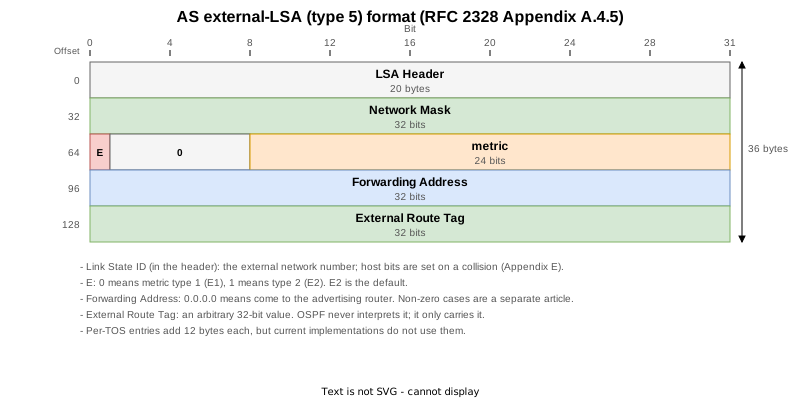
Two fields more than a type 3 or 4, so 36 bytes.
| Field | Size | Content |
|---|---|---|
| Network Mask | 4 bytes | the mask of the external destination |
| E | 1 bit | 0 for E1, 1 for E2. E2 is the default |
| metric | 24 bits | the seed metric; 20 by default |
| Forwarding Address | 4 bytes | 0.0.0.0 means “come to the advertising router” |
| External Route Tag | 4 bytes | an arbitrary 32-bit value that OSPF never interprets |
The conditions under which a forwarding address becomes non-zero are covered in OSPF Forwarding Address of AS External Routes.
Lab topology

All three areas are ordinary areas, so type 5 LSAs reach every one of them. R1 in area 1 is the ASBR, redistributing five static routes.
| STEP | Change | What it confirms |
|---|---|---|
| 0 | Right after boot | The same type 5 in all three areas (advertising router, sequence number and metric match) |
| 1 | 10.90.0.0/16 and 10.90.0.0/24 redistributed | Link state ID collision and host bits (Appendix E) |
| 2 | Restored | How the withdrawal propagates |
| 3 | Redistributed with tag 65001 | The external route tag is carried unchanged and the sequence number advances |
| 4 | Tag removed | The sequence number advances again |
| 5 | 192.168.1.0/24 no longer redistributed | The withdrawal reaches every area almost at once (5-10 ms) |
| 6 | Everything restored | The sequence number restarts at 0x80000001 |
Never rebuilt

Here is the type 5 that R1 originated in area 1 for 192.168.1.0/24, seen in each of the three areas. First, from the ASBR itself.
RP/0/RP0/CPU0:R1#show ospf database external self-originate
Wed Sep  9 06:57:58.666 UTC


            OSPF Router with ID (1.1.1.1) (Process ID 1)

		Type-5 AS External Link States

  LS age: 123
  Options: (No TOS-capability, DC)
  LS Type: AS External Link
  Link State ID: 192.168.1.0 (External Network Number)
  Advertising Router: 1.1.1.1
  LS Seq Number: 80000001
  Checksum: 0xd25
  Length: 36
  Network Mask: /24
	Metric Type: 2 (Larger than any link state path)
	TOS: 0
	Metric: 20
	Forward Address: 0.0.0.0
	External Route Tag: 0

  LS age: 123
Seen from R11, two areas away, every field matches.
RP/0/RP0/CPU0:R11#show ospf database external
Wed Sep  9 06:59:32.180 UTC


            OSPF Router with ID (11.11.11.11) (Process ID 1)

		Type-5 AS External Link States

  Routing Bit Set on this LSA
  LS age: 218
  Options: (No TOS-capability, DC)
  LS Type: AS External Link
  Link State ID: 192.168.1.0 (External Network Number)
  Advertising Router: 1.1.1.1
  LS Seq Number: 80000001
  Checksum: 0xd25
  Length: 36
  Network Mask: /24
	Metric Type: 2 (Larger than any link state path)
	TOS: 0
	Metric: 20
	Forward Address: 0.0.0.0
External Route Tag: 0| Item | Area 1 (the ASBR itself) | Area 2 (two areas away) |
|---|---|---|
| Link State ID | 192.168.1.0 | 192.168.1.0 |
| Advertising Router | 1.1.1.1 | 1.1.1.1 |
| LS Seq Number | 80000001 | 80000001 |
| Metric Type / Metric | 2 / 20 | 2 / 20 |
| Forward Address | 0.0.0.0 | 0.0.0.0 |
Even the sequence number is the same, and that settles it. With a type 3, every boundary meant a different ABR creating a new LSA with its own sequence number. With a type 5, one single LSA is simply handed out to all three areas. No ABR touches the contents.
A side effect is that routers in area 0 and area 2 learn the ASBR’s router ID (1.1.1.1) directly. Knowing the router ID does not tell them how to get there, which is exactly why a type 4 is needed alongside it.
A withdrawal reaches every area at almost the same instant
Not being rebuilt shows up directly in how fast a change travels. The static route 192.168.1.0/24 was deleted on R1 while area 0 and area 2 were captured at the same time.
Open Shortest Path First
    OSPF Header
        Version: 2
        Message Type: LS Update (4)
        Packet Length: 64
        Source OSPF Router: 2.2.2.2
        Area ID: 0.0.0.0 (Backbone)
        Checksum: 0xc9c8 [correct]
        Instance ID: Base IPv4 Unicast Instance (0)
        Auth Type: Null (0)
        Auth Data (none): 0000000000000000
    LS Update Packet
        Number of LSAs: 1
        LSA-type 5 (AS-External-LSA (ASBR)), len 36
            .000 1110 0001 0000 = LS Age (seconds): 3600
            0... .... .... .... = Do Not Age Flag: 0
            Options: 0x20, (DC) Demand Circuits
                0... .... = DN: Not set
                .0.. .... = (O) Opaque: Not set
                ..1. .... = (DC) Demand Circuits: Supported
                ...0 .... = (L) LLS Data block: Not Present
                .... 0... = (N) NSSA: Not supported
                .... .0.. = (MC) Multicast: Not capable
                .... ..0. = (E) External Routing: Not capable
                .... ...0 = (MT) Multi-Topology Routing: No
            LS Type: AS-External-LSA (ASBR) (5)
            Link State ID: 192.168.1.0
            Advertising Router: 1.1.1.1
            Sequence Number: 0x80000004
            Checksum: 0x3e05
            Length: 36
            Netmask: 255.255.255.0
            1... .... = External Type: Type 2 (metric is larger than any other link state path)
            .000 0000 = TOS: 0
            Metric: 16777215
            Forwarding Address: 0.0.0.0
External Route Tag: 0Open Shortest Path First
OSPF Header
Version: 2
Message Type: LS Update (4)
Packet Length: 64
Source OSPF Router: 3.3.3.3
Area ID: 0.0.0.2
Checksum: 0xc7c4 [correct]
Instance ID: Base IPv4 Unicast Instance (0)
Auth Type: Null (0)
Auth Data (none): 0000000000000000
LS Update Packet
Number of LSAs: 1
LSA-type 5 (AS-External-LSA (ASBR)), len 36
.000 1110 0001 0000 = LS Age (seconds): 3600
0... .... .... .... = Do Not Age Flag: 0
Options: 0x20, (DC) Demand Circuits
0... .... = DN: Not set
.0.. .... = (O) Opaque: Not set
..1. .... = (DC) Demand Circuits: Supported
...0 .... = (L) LLS Data block: Not Present
.... 0... = (N) NSSA: Not supported
.... .0.. = (MC) Multicast: Not capable
.... ..0. = (E) External Routing: Not capable
.... ...0 = (MT) Multi-Topology Routing: No
LS Type: AS-External-LSA (ASBR) (5)
Link State ID: 192.168.1.0
Advertising Router: 1.1.1.1
Sequence Number: 0x80000004
Checksum: 0x3e05
Length: 36
Netmask: 255.255.255.0
1... .... = External Type: Type 2 (metric is larger than any other link state path)
.000 0000 = TOS: 0
Metric: 16777215
Forwarding Address: 0.0.0.0
External Route Tag: 0The advertising router and the sequence number (0x80000004) are identical, and the withdrawal uses the same LS Age 3600 plus Metric 16777215 as a type 3. What differs is the timing.
| LSA type | Area 0 | Area 2 | Difference |
|---|---|---|---|
| Type 3 | 12:52:24.688 | 12:52:24.878 | 190 ms |
| Type 4 | 14:46:45.212 | 14:46:45.338 | 126 ms |
| Type 5 | 16:18:19.775 | 16:18:19.785 | 10 ms |
For types 3 and 4 an ABR has to recompute its LSDB, build a new LSA and flood it, which costs one step. A type 5 skips all of that and simply passes the LSA it received to the next neighbour, so only flooding latency remains. The same measurement was repeated five times and every difference fell between 5 and 10 ms.
“Rebuilt or not” is something you can actually measure, as a difference in convergence time.
When link state IDs collide

The link state ID of a type 5 is the network number of the destination, and the mask lives in the body. So redistributing both 10.90.0.0/16 and 10.90.0.0/24 gives the same link state ID, 10.90.0.0, to both.
An LSA is identified by the triple of LS type, link state ID and advertising router, so the two routes from one ASBR would be indistinguishable. RFC 2328 Appendix E says to set host bits to tell them apart. Here it is on real hardware.
  Routing Bit Set on this LSA
  LS age: 192
  Options: (No TOS-capability, DC)
  LS Type: AS External Link
  Link State ID: 10.90.0.0 (External Network Number)
  Advertising Router: 1.1.1.1
  LS Seq Number: 80000001
  Checksum: 0xb2d
  Length: 36
  Network Mask: /16
	Metric Type: 2 (Larger than any link state path)
	TOS: 0
	Metric: 20
	Forward Address: 0.0.0.0
	External Route Tag: 0

  Routing Bit Set on this LSA
  LS age: 192
  Options: (No TOS-capability, DC)
  LS Type: AS External Link
  Link State ID: 10.90.0.255 (External Network Number)
  Advertising Router: 1.1.1.1
  LS Seq Number: 80000001
  Checksum: 0xb2d
  Length: 36
  Network Mask: /24
	Metric Type: 2 (Larger than any link state path)
	TOS: 0
	Metric: 20
	Forward Address: 0.0.0.0
External Route Tag: 0| Redistributed route | Link State ID | Network Mask |
|---|---|---|
10.90.0.0/16 | 10.90.0.0 | /16 |
10.90.0.0/24 | 10.90.0.255 | /24 |
The more specific route (/24) got host bits in its link state ID. The value 10.90.0.255 is not the destination; it is only an identifier that keeps the two LSAs apart. The destination is still read correctly as 10.90.0.0/24 from the Network Mask: /24 in the body.
The capture shows both type 5 LSAs travelling in one LS Update.
Open Shortest Path First
    OSPF Header
        Version: 2
        Message Type: LS Update (4)
        Packet Length: 100
        Source OSPF Router: 2.2.2.2
        Area ID: 0.0.0.0 (Backbone)
        Checksum: 0x89fd [correct]
        Instance ID: Base IPv4 Unicast Instance (0)
        Auth Type: Null (0)
        Auth Data (none): 0000000000000000
    LS Update Packet
        Number of LSAs: 2
        LSA-type 5 (AS-External-LSA (ASBR)), len 36
            .000 0000 0000 0010 = LS Age (seconds): 2
            0... .... .... .... = Do Not Age Flag: 0
            Options: 0x20, (DC) Demand Circuits
                0... .... = DN: Not set
                .0.. .... = (O) Opaque: Not set
                ..1. .... = (DC) Demand Circuits: Supported
                ...0 .... = (L) LLS Data block: Not Present
                .... 0... = (N) NSSA: Not supported
                .... .0.. = (MC) Multicast: Not capable
                .... ..0. = (E) External Routing: Not capable
                .... ...0 = (MT) Multi-Topology Routing: No
            LS Type: AS-External-LSA (ASBR) (5)
            Link State ID: 10.90.0.0
            Advertising Router: 1.1.1.1
            Sequence Number: 0x80000001
            Checksum: 0x0b2d
            Length: 36
            Netmask: 255.255.0.0
            1... .... = External Type: Type 2 (metric is larger than any other link state path)
            .000 0000 = TOS: 0
            Metric: 20
            Forwarding Address: 0.0.0.0
            External Route Tag: 0
        LSA-type 5 (AS-External-LSA (ASBR)), len 36
            .000 0000 0000 0010 = LS Age (seconds): 2
            0... .... .... .... = Do Not Age Flag: 0
            Options: 0x20, (DC) Demand Circuits
                0... .... = DN: Not set
                .0.. .... = (O) Opaque: Not set
                ..1. .... = (DC) Demand Circuits: Supported
                ...0 .... = (L) LLS Data block: Not Present
                .... 0... = (N) NSSA: Not supported
                .... .0.. = (MC) Multicast: Not capable
                .... ..0. = (E) External Routing: Not capable
                .... ...0 = (MT) Multi-Topology Routing: No
            LS Type: AS-External-LSA (ASBR) (5)
            Link State ID: 10.90.0.255
            Advertising Router: 1.1.1.1
            Sequence Number: 0x80000001
            Checksum: 0x0b2d
            Length: 36
            Netmask: 255.255.255.0
            1... .... = External Type: Type 2 (metric is larger than any other link state path)
            .000 0000 = TOS: 0
            Metric: 20
            Forwarding Address: 0.0.0.0
External Route Tag: 0Link State ID: 10.90.0.0 and Link State ID: 10.90.0.255 sit side by side with netmasks of 255.255.0.0 and 255.255.255.0.
In practice this happens when an aggregate and its components are both redistributed. Spotting an odd link state ID ending in .255 or .15 in show ospf database external is much less confusing once you know it is the result of avoiding a collision.
The external route tag
A type 5 can carry a 32-bit tag. OSPF never interprets the value and only carries it. It is used to prevent loops when redistributing onward into another protocol, or to branch policy.
This is how redistribute static tag 65001 on R1 looks from area 2.
RP/0/RP0/CPU0:R11#show ospf database external
Wed Sep  9 07:12:46.096 UTC


            OSPF Router with ID (11.11.11.11) (Process ID 1)

		Type-5 AS External Link States

  Routing Bit Set on this LSA
  LS age: 206
  Options: (No TOS-capability, DC)
  LS Type: AS External Link
  Link State ID: 192.168.1.0 (External Network Number)
  Advertising Router: 1.1.1.1
  LS Seq Number: 80000002
  Checksum: 0x5bed
  Length: 36
  Network Mask: /24
	Metric Type: 2 (Larger than any link state path)
	TOS: 0
	Metric: 20
	Forward Address: 0.0.0.0
	External Route Tag: 65001
External Route Tag: 65001 arrived intact across two area boundaries, and the advertising router is still 1.1.1.1.
The sequence numbers as the tag was added and removed were also recorded.
| STEP | Change | External Route Tag | LS Seq Number |
|---|---|---|---|
| 0 | right after boot | 0 | 80000001 |
| 3 | tag 65001 applied | 65001 | 80000002 |
| 4 | tag removed | 0 | 80000003 |
Changing only the tag still rebuilds the LSA and advances the sequence number. The tag is part of the contents, so that is expected — but it also means that re-tagging in production floods the whole AS.
Results per STEP
| STEP | Change | What area 2 showed |
|---|---|---|
| 0 | right after boot | five type 5 LSAs; every field matches in all three areas |
| 1 | 10.90.0.0/16 and /24 redistributed | the link state IDs split into 10.90.0.0 and 10.90.0.255 |
| 2 | reverted | back to five |
| 3 | tag 65001 applied | tag 65001 reaches every area; sequence number +1 |
| 4 | tag removed | back to tag 0; sequence number +1 again |
| 5 | 192.168.1.0/24 redistribution stopped | the withdrawal reaches every area at almost the same instant (10 ms) |
| 6 | everything restored (final state) | a brand-new LSA starting again at 80000001 |
STEP 6 is worth a look: the sequence number after recovery is back to 80000001. The LSA was deleted from the LSDB when it was withdrawn in STEP 5, so what came back is an entirely new LSA. Same destination, but once it is gone the numbering starts from one.
Where a type 5 does not reach
A type 5 floods the whole AS, with two exceptions.
| Area type | Type 5 | Instead |
|---|---|---|
| ordinary area | arrives | — |
| stub area | blocked | the ABR originates a type 3 default route |
| NSSA | blocked | an ASBR inside the NSSA uses type 7 |
Both designs replace the detail of external routes with a default route. Dividing a network into areas does not stop type 5 LSAs — they reach the whole AS regardless — and stub areas and NSSAs exist precisely to stop them.
Summary
| What you want to know | Where to look |
|---|---|
| Which ASBR originated the route | the advertising router (unchanged across areas) |
| Whether it is E1 or E2 | Metric Type |
| What an odd link state ID means | host bits set to avoid a collision (Appendix E) |
| Whether a tag is attached | External Route Tag |
| Whether it was withdrawn | LS Age 3600 or Metric 16777215 |
Reading a type 3 or 4 means always asking who is speaking and from where. A type 5 needs none of that. The originator and the values are the same in every area, so whatever LSDB you look at, you see the same thing — and that is the defining feature of type 5.
References
| Document | Section | Content |
|---|---|---|
| RFC 2328 | Section 12.4.4 | originating type 5 LSAs: flooded through the whole AS and never rebuilt by an ABR |
| RFC 2328 | Appendix A.4.5 | the packet format (the E bit, forwarding address and external route tag) |
| RFC 2328 | Appendix E | setting host bits when link state IDs collide |
| RFC 2328 | Section 16.4 | the type 5 calculation, which needs reachability to the ASBR or the forwarding address |
| RFC 2328 | Section 3.6 | the rule that keeps type 5 LSAs out of stub areas |
Lab setup
Seven XRd routers (IOS XR 26.1.1) in CML across three areas. All three areas are ordinary areas, so type 5 LSAs can be watched reaching every one of them. Captures were taken in area 0 (R2 - R3) and area 2 (R3 - R11) at the same time in order to measure how simultaneous a withdrawal is.
Download the area 0 capture (R2 - R3)
Download the area 2 capture (R3 - R11)
Verification config and show output
Three kinds of file were collected from all seven routers at every STEP, split per router. The verification config is the ..._run.txt file (the final state is the one from STEP 6).
| File | Content |
|---|---|
..._show.txt | show version / show interface description / show route / show route ospf / show ospf / show ospf interface / show ospf interface brief / show ospf neighbor / show ospf neighbor detail / show ospf database / show ospf database router / show ospf database network / show ospf statistics interface / show ospf database external self-originate / show ospf database external / show ospf database database-summary / show ospf border-routers / show ospf routes |
..._log.txt | show logging narrowed to the range of that STEP |
..._run.txt | show running-config at that STEP (the verification config) |
show ospf database external self-originate prints content only on an ASBR. Only an ASBR can create a type 5, so finding the router whose output is not empty identifies the ASBR.
STEP 0: right after boot
| Router | show output | syslog | running-config |
|---|---|---|---|
| R1 | show | log | run |
| R2 | show | log | run |
| R3 | show | log | run |
| R4 | show | log | run |
| R11 | show | log | run |
| R12 | show | log | run |
| R13 | show | log | run |
STEP 1: 10.90.0.0/16 and 10.90.0.0/24 redistributed (link state IDs collide)
| Router | show output | syslog | running-config |
|---|---|---|---|
| R1 | show | log | run |
| R2 | show | log | run |
| R3 | show | log | run |
| R4 | show | log | run |
| R11 | show | log | run |
| R12 | show | log | run |
| R13 | show | log | run |
STEP 2: reverted
| Router | show output | syslog | running-config |
|---|---|---|---|
| R1 | show | log | run |
| R2 | show | log | run |
| R3 | show | log | run |
| R4 | show | log | run |
| R11 | show | log | run |
| R12 | show | log | run |
| R13 | show | log | run |
STEP 3: tag 65001 applied
| Router | show output | syslog | running-config |
|---|---|---|---|
| R1 | show | log | run |
| R2 | show | log | run |
| R3 | show | log | run |
| R4 | show | log | run |
| R11 | show | log | run |
| R12 | show | log | run |
| R13 | show | log | run |
STEP 4: tag removed
| Router | show output | syslog | running-config |
|---|---|---|---|
| R1 | show | log | run |
| R2 | show | log | run |
| R3 | show | log | run |
| R4 | show | log | run |
| R11 | show | log | run |
| R12 | show | log | run |
| R13 | show | log | run |
STEP 5: redistribution of 192.168.1.0/24 stopped
| Router | show output | syslog | running-config |
|---|---|---|---|
| R1 | show | log | run |
| R2 | show | log | run |
| R3 | show | log | run |
| R4 | show | log | run |
| R11 | show | log | run |
| R12 | show | log | run |
| R13 | show | log | run |
STEP 6: everything restored (final state)
| Router | show output | syslog | running-config |
|---|---|---|---|
| R1 | show | log | run |
| R2 | show | log | run |
| R3 | show | log | run |
| R4 | show | log | run |
| R11 | show | log | run |
| R12 | show | log | run |
| R13 | show | log | run |
Related articles
- What is OSPF
- OSPF Router ID
- OSPF Behavior When Router IDs Collide
- OSPF Packet Types and Header Format
- OSPF Authentication
- OSPF Neighbor States
- OSPF Options Field
- OSPF DR and BDR
- OSPF Network Types
- OSPF Cost (Metric)
- OSPF Equal-Cost Multi-Path (ECMP)
- OSPF External Routes (Redistributing Static Routes)
- OSPF RFC1583 Compatibility (External Route Selection Rules)
- OSPF Forwarding Address of AS External Routes
- OSPF Multiple Areas and the ABR
- OSPF Virtual Links
- OSPF Stub and Totally Stubby Areas
- OSPF NSSA and Totally NSSA
- OSPF Default Route
- OSPF Route Summarization
- OSPF LSAs and the LSA Header
- OSPF Hello and Dead Intervals
- OSPF Convergence Timers (SPF / LSA Throttling)
- OSPF LSA Refresh and Pacing
- OSPF router-LSA (type 1)
- OSPF network-LSA (type 2)
- OSPF summary-LSA (type 3)
- OSPF ASBR summary-LSA (type 4)
- OSPF AS external-LSA (type 5)
- OSPF NSSA External-LSA (Type 7)