What an ASBR summary-LSA is
An ASBR summary-LSA (type 4) is the LSA that says nothing but where an ASBR is. Its format is the same as a summary-LSA (type 3), but what it carries is different: a type 3 points at a destination network, while a type 4 points at a single router.
| Item | Type 3 (summary) | Type 4 (ASBR summary) |
|---|---|---|
| Link State ID | the network number of the destination | the router ID of the ASBR |
| Network Mask | the mask of the destination | unused (/0) |
| Metric | cost from the ABR to the destination | cost from the ABR to the ASBR |
| Who originates it | an ABR | an ABR (the same) |
| What it is for | announcing a destination outside the area | making a type 5 usable |
Why does the location of a router need announcing? An AS external-LSA (type 5) floods the whole AS, but all it contains is the external destination and the router ID of the ASBR. A router that receives one cannot build a route without knowing how to reach that ASBR. When the ASBR lives in another area its router-LSA never arrives, so an ABR announces its position with a type 4 instead.
OSPF multiple areas and the ABR covered the contents of a type 4 and the reachability tests. This article stays on why and when a type 4 appears, and when it goes away.
Packet format
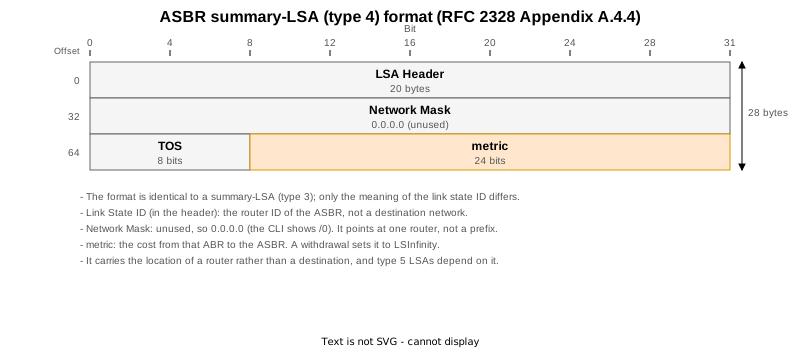
Byte for byte, this is the same as a type 3. The only differences are what the link state ID means and the fact that the network mask is unused. A single router needs no mask, so the field is 0.0.0.0 and the CLI shows /0.
The length is the same 28 bytes.
Lab topology

| Router | Area | Role |
|---|---|---|
| R1 | 1 | ASBR (redistributes 192.168.1.0/24 and four more static routes) |
| R2 | 0 / 1 | ABR |
| R3, R4 | 0 / 2 | ABR (two of them) |
| R11, R12, R13 | 2 | internal routers |
R1 is the only ASBR. For routers in area 2 to use its external routes, R1’s position has to travel across two area boundaries.
| STEP | Change | What it confirms |
|---|---|---|
| 0 | Right after boot | The contents of a type 4 (link state ID = the ASBR’s router ID, network mask /0) and where it exists |
| 1 | R1 stops redistributing | The router-LSA’s E bit clears; types 4 and 5 disappear |
| 2 | Redistribution restored | Recovery |
| 3 | R2 redistributes as well | How type 4 changes when an ABR becomes an ASBR (it never creates one for itself) |
| 4 | R2 stops redistributing | Recovery |
| 5 | cost 10 on R2’s area 1 side | A type 4’s metric is the ABR’s cost to the ASBR |
| 6 | Everything restored | Final state |
The E bit of a router-LSA is the trigger

An ABR does not invent a type 4 on its own. It creates one after seeing an ASBR declare itself in its own router-LSA by setting the E bit.
Here is R1’s router-LSA, with an AS Boundary Router line just above Number of Links.
RP/0/RP0/CPU0:R1#show ospf database router self-originate
Wed Sep  9 05:43:44.301 UTC


            OSPF Router with ID (1.1.1.1) (Process ID 1)

		Router Link States (Area 1)

  LS age: 106
  Options: (No TOS-capability, DC)
  LS Type: Router Links
  Link State ID: 1.1.1.1
  Advertising Router: 1.1.1.1
  LS Seq Number: 80000003
  Checksum: 0x7f4d
  Length: 60
  AS Boundary Router
   Number of Links: 3

    Link connected to: a Stub Network
     (Link ID) Network/subnet number: 1.1.1.1
     (Link Data) Network Mask: 255.255.255.255
      Number of TOS metrics: 0
       TOS 0 Metrics: 1

    Link connected to: another Router (point-to-point)
     (Link ID) Neighboring Router ID: 2.2.2.2
     (Link Data) Router Interface address: 10.0.12.1
      Number of TOS metrics: 0
       TOS 0 Metrics: 1

    Link connected to: a Stub Network
     (Link ID) Network/subnet number: 10.0.12.0
     (Link Data) Network Mask: 255.255.255.0
      Number of TOS metrics: 0
       TOS 0 Metrics: 1
Seeing that E bit, R2 originates a type 4 into area 0.
RP/0/RP0/CPU0:R2#show ospf database asbr-summary self-originate
Wed Sep  9 05:44:06.375 UTC


            OSPF Router with ID (2.2.2.2) (Process ID 1)

		Summary ASB Link States (Area 0)

  LS age: 128
  Options: (No TOS-capability, DC)
  LS Type: Summary Links (AS Boundary Router)
  Link State ID: 1.1.1.1 (AS Boundary Router address)
  Advertising Router: 2.2.2.2
  LS Seq Number: 80000001
  Checksum: 0x1b14
  Length: 28
  Network Mask: /0
TOS: 0 Metric: 1 | Field | Value | Meaning |
|---|---|---|
| Link State ID | 1.1.1.1 | the router ID of R1, the ASBR — not a destination network |
| Advertising Router | 2.2.2.2 | R2, the ABR that advertised it |
| Network Mask | /0 | unused; a mask is meaningless when pointing at one router |
| Metric | 1 | R2’s cost to R1 |
The annotation (AS Boundary Router address) also distinguishes it from a type 3’s (Summary Network Number).
In area 2, R3 and R4 advertise the same ASBR.
RP/0/RP0/CPU0:R3#show ospf database asbr-summary self-originate
Wed Sep  9 05:44:37.863 UTC


            OSPF Router with ID (3.3.3.3) (Process ID 1)

		Summary ASB Link States (Area 2)

  LS age: 160
  Options: (No TOS-capability, DC)
  LS Type: Summary Links (AS Boundary Router)
  Link State ID: 1.1.1.1 (AS Boundary Router address)
  Advertising Router: 3.3.3.3
  LS Seq Number: 80000001
  Checksum: 0x723
  Length: 28
  Network Mask: /0
	TOS: 0 	Metric: 2
R3 is an ABR with interfaces in both area 0 and area 2, yet it advertises only into area 2. Area 0 already has R2’s, and R3 itself learned about R1 through area 0. Just as with type 3, what was learned from the backbone is never pushed back into the backbone.
The packets show it. This is No.117 from the area 0 capture.
Open Shortest Path First
    OSPF Header
        Version: 2
        Message Type: LS Update (4)
        Packet Length: 56
        Source OSPF Router: 2.2.2.2
        Area ID: 0.0.0.0 (Backbone)
        Checksum: 0x3681 [correct]
        Instance ID: Base IPv4 Unicast Instance (0)
        Auth Type: Null (0)
        Auth Data (none): 0000000000000000
    LS Update Packet
        Number of LSAs: 1
        LSA-type 4 (Summary-LSA (ASBR)), len 28
            .000 0000 0000 0001 = LS Age (seconds): 1
            0... .... .... .... = Do Not Age Flag: 0
            Options: 0x22, (DC) Demand Circuits, (E) External Routing
                0... .... = DN: Not set
                .0.. .... = (O) Opaque: Not set
                ..1. .... = (DC) Demand Circuits: Supported
                ...0 .... = (L) LLS Data block: Not Present
                .... 0... = (N) NSSA: Not supported
                .... .0.. = (MC) Multicast: Not capable
                .... ..1. = (E) External Routing: Capable
                .... ...0 = (MT) Multi-Topology Routing: No
            LS Type: Summary-LSA (ASBR) (4)
            Link State ID: 1.1.1.1
            Advertising Router: 2.2.2.2
            Sequence Number: 0x80000001
            Checksum: 0x1b14
            Length: 28
            Netmask: 0.0.0.0
            TOS: 0
Metric: 1Netmask: 0.0.0.0 is right there, and LSA-type 4 (Summary-LSA (ASBR)) pairs with the (IP network) of a type 3.
The same ASBR is advertised by R3 in area 2.
Open Shortest Path First
    OSPF Header
        Version: 2
        Message Type: LS Update (4)
        Packet Length: 56
        Source OSPF Router: 3.3.3.3
        Area ID: 0.0.0.2
        Checksum: 0x466b [correct]
        Instance ID: Base IPv4 Unicast Instance (0)
        Auth Type: Null (0)
        Auth Data (none): 0000000000000000
    LS Update Packet
        Number of LSAs: 1
        LSA-type 4 (Summary-LSA (ASBR)), len 28
            .000 0000 0000 0001 = LS Age (seconds): 1
            0... .... .... .... = Do Not Age Flag: 0
            Options: 0x22, (DC) Demand Circuits, (E) External Routing
                0... .... = DN: Not set
                .0.. .... = (O) Opaque: Not set
                ..1. .... = (DC) Demand Circuits: Supported
                ...0 .... = (L) LLS Data block: Not Present
                .... 0... = (N) NSSA: Not supported
                .... .0.. = (MC) Multicast: Not capable
                .... ..1. = (E) External Routing: Capable
                .... ...0 = (MT) Multi-Topology Routing: No
            LS Type: Summary-LSA (ASBR) (4)
            Link State ID: 1.1.1.1
            Advertising Router: 3.3.3.3
            Sequence Number: 0x80000001
            Checksum: 0x0723
            Length: 28
            Netmask: 0.0.0.0
            TOS: 0
Metric: 2The link state ID is the same 1.1.1.1, the advertising router is 3.3.3.3 and the metric is 2. Like a type 3, it is rebuilt at the area boundary.
There is no type 4 in the area that holds the ASBR
Area 1, on the other hand, has no type 4 at all, because R1 itself is there.
RP/0/RP0/CPU0:R1#show ospf database asbr-summary
Wed Sep  9 05:43:43.700 UTC


            OSPF Router with ID (1.1.1.1) (Process ID 1)
The output ends at the heading. Routers in area 1 already hold R1’s router-LSA and can see the E bit, so there is nothing to tell them. A type 4 exists only for an ASBR in another area.
At STEP 0, then, type 4 LSAs sit like this.
| Area | Type 4 | Why |
|---|---|---|
| Area 1 | none | R1, the ASBR, is in this area |
| Area 0 | one from R2 (metric 1) | R1 is in the neighbouring area 1 |
| Area 2 | one each from R3 and R4 (metric 2) | two ABRs, so two LSAs |
What changes when the configuration changes
Redistribution was stopped on R1, and R2 was made an ASBR too, to see how the type 4 LSAs follow.
| STEP | Change | R1’s E bit | R2’s E bit | Type 4 in area 2 | Type 5 |
|---|---|---|---|---|---|
| 0 | right after boot | set | clear | 2 | 5 |
| 1 | redistribution stopped on R1 | clear | clear | 0 | 0 |
| 2 | restored | set | clear | 2 | 5 |
| 3 | R2 redistributes too | set | set | 4 | 6 |
| 4 | R2 stops redistributing | set | clear | 2 | 5 |
| 5 | cost 10 on R2’s area 1 interface | set | clear | 2 (metric 2 to 11) | 5 |
| 6 | everything restored (final state) | set | clear | 2 | 5 |
Stop being an ASBR and the E bit, the type 4 and the type 5 all go at once
Running no redistribute static on R1 stops it being an ASBR.
RP/0/RP0/CPU0:R1#show ospf database router self-originate
Wed Sep  9 05:48:43.319 UTC


            OSPF Router with ID (1.1.1.1) (Process ID 1)

		Router Link States (Area 1)

  LS age: 118
  Options: (No TOS-capability, DC)
  LS Type: Router Links
  Link State ID: 1.1.1.1
  Advertising Router: 1.1.1.1
  LS Seq Number: 80000004
  Checksum: 0x7756
  Length: 60
   Number of Links: 3

    Link connected to: a Stub Network
     (Link ID) Network/subnet number: 1.1.1.1
     (Link Data) Network Mask: 255.255.255.255
      Number of TOS metrics: 0
       TOS 0 Metrics: 1

    Link connected to: another Router (point-to-point)
     (Link ID) Neighboring Router ID: 2.2.2.2
     (Link Data) Router Interface address: 10.0.12.1
      Number of TOS metrics: 0
       TOS 0 Metrics: 1

    Link connected to: a Stub Network
     (Link ID) Network/subnet number: 10.0.12.0
     (Link Data) Network Mask: 255.255.255.0
      Number of TOS metrics: 0
       TOS 0 Metrics: 1
The AS Boundary Router line is gone. There are still three link entries: the only thing that changed is one bit of the flags.
And losing that one bit withdraws the type 4 LSAs in area 0 and area 2, and every type 5 as well. That is the STEP 1 row of the table above: zero type 4 and zero type 5.
Here is the withdrawal on the wire.
Open Shortest Path First
    OSPF Header
        Version: 2
        Message Type: LS Update (4)
        Packet Length: 56
        Source OSPF Router: 2.2.2.2
        Area ID: 0.0.0.0 (Backbone)
        Checksum: 0x3367 [correct]
        Instance ID: Base IPv4 Unicast Instance (0)
        Auth Type: Null (0)
        Auth Data (none): 0000000000000000
    LS Update Packet
        Number of LSAs: 1
        LSA-type 4 (Summary-LSA (ASBR)), len 28
            .000 1110 0001 0000 = LS Age (seconds): 3600
            0... .... .... .... = Do Not Age Flag: 0
            Options: 0x22, (DC) Demand Circuits, (E) External Routing
                0... .... = DN: Not set
                .0.. .... = (O) Opaque: Not set
                ..1. .... = (DC) Demand Circuits: Supported
                ...0 .... = (L) LLS Data block: Not Present
                .... 0... = (N) NSSA: Not supported
                .... .0.. = (MC) Multicast: Not capable
                .... ..1. = (E) External Routing: Capable
                .... ...0 = (MT) Multi-Topology Routing: No
            LS Type: Summary-LSA (ASBR) (4)
            Link State ID: 1.1.1.1
            Advertising Router: 2.2.2.2
            Sequence Number: 0x80000002
            Checksum: 0x0f20
            Length: 28
            Netmask: 0.0.0.0
            TOS: 0
Metric: 16777215As with a type 3, both LS Age 3600 (MaxAge) and Metric 16777215 (LSInfinity) are set.
Lining up the absolute timestamps shows the order in which the withdrawal crosses the areas.
| Time | Area | What happened |
|---|---|---|
| 14:46:45.212 | 0 | R2 withdraws its type 4 |
| 14:46:45.338 | 2 | R3 withdraws (126 ms later) |
| 14:46:45.419 | 2 | R4 withdraws |
The E bit of a router-LSA clears, the type 4 in area 0 goes, then the type 4 LSAs in area 2 go — a measurable chain. In operations that means: when external routes vanish, check the ASBR’s E bit first.
When an ABR becomes an ASBR as well
This is the most confusing corner of type 4. R2 is the ABR between area 0 and area 1 — so what happens when R2 itself starts redistributing?
R2’s router-LSA sets both flags, in area 0 and in area 1.
RP/0/RP0/CPU0:R2#show ospf database router self-originate
Wed Sep  9 05:59:05.518 UTC


            OSPF Router with ID (2.2.2.2) (Process ID 1)

		Router Link States (Area 0)

  LS age: 177
  Options: (No TOS-capability, DC)
  LS Type: Router Links
  Link State ID: 2.2.2.2
  Advertising Router: 2.2.2.2
  LS Seq Number: 80000005
  Checksum: 0x101c
  Length: 84
  Area Border Router
  AS Boundary Router
   Number of Links: 5

    Link connected to: a Stub Network
     (Link ID) Network/subnet number: 2.2.2.2
     (Link Data) Network Mask: 255.255.255.255
      Number of TOS metrics: 0
       TOS 0 Metrics: 1

    Link connected to: another Router (point-to-point)
     (Link ID) Neighboring Router ID: 3.3.3.3
     (Link Data) Router Interface address: 10.0.23.2
      Number of TOS metrics: 0
       TOS 0 Metrics: 1

    Link connected to: a Stub Network
     (Link ID) Network/subnet number: 10.0.23.0
     (Link Data) Network Mask: 255.255.255.0
      Number of TOS metrics: 0
       TOS 0 Metrics: 1

    Link connected to: another Router (point-to-point)
     (Link ID) Neighboring Router ID: 4.4.4.4
     (Link Data) Router Interface address: 10.0.24.2
      Number of TOS metrics: 0
       TOS 0 Metrics: 1

    Link connected to: a Stub Network
     (Link ID) Network/subnet number: 10.0.24.0
     (Link Data) Network Mask: 255.255.255.0
      Number of TOS metrics: 0
       TOS 0 Metrics: 1


		Router Link States (Area 1)

  LS age: 177
  Options: (No TOS-capability, DC)
  LS Type: Router Links
  Link State ID: 2.2.2.2
  Advertising Router: 2.2.2.2
  LS Seq Number: 80000003
  Checksum: 0xdbff
  Length: 48
  Area Border Router
  AS Boundary Router
   Number of Links: 2

    Link connected to: another Router (point-to-point)
     (Link ID) Neighboring Router ID: 1.1.1.1
     (Link Data) Router Interface address: 10.0.12.2
      Number of TOS metrics: 0
       TOS 0 Metrics: 1

    Link connected to: a Stub Network
     (Link ID) Network/subnet number: 10.0.12.0
     (Link Data) Network Mask: 255.255.255.0
      Number of TOS metrics: 0
       TOS 0 Metrics: 1
So does R2 originate a type 4 for itself? No.
RP/0/RP0/CPU0:R2#show ospf database asbr-summary self-originate
Wed Sep  9 05:59:04.167 UTC


            OSPF Router with ID (2.2.2.2) (Process ID 1)

		Summary ASB Link States (Area 0)

  LS age: 449
  Options: (No TOS-capability, DC)
  LS Type: Summary Links (AS Boundary Router)
  Link State ID: 1.1.1.1 (AS Boundary Router address)
  Advertising Router: 2.2.2.2
  LS Seq Number: 80000001
  Checksum: 0x1b14
  Length: 28
  Network Mask: /0
	TOS: 0 	Metric: 1
Only Link State ID: 1.1.1.1, which is R1. A router never advertises its own position — routers in area 0 and area 1 hold R2’s router-LSA directly and need no help.
Seen from area 2, though, R2 is exactly “an ASBR in another area”. R3 and R4 originate a type 4 for R2 into area 2.
RP/0/RP0/CPU0:R11#show ospf database asbr-summary
Wed Sep  9 06:00:19.452 UTC


            OSPF Router with ID (11.11.11.11) (Process ID 1)

		Summary ASB Link States (Area 2)

  Routing Bit Set on this LSA
  LS age: 525
  Options: (No TOS-capability, DC)
  LS Type: Summary Links (AS Boundary Router)
  Link State ID: 1.1.1.1 (AS Boundary Router address)
  Advertising Router: 3.3.3.3
  LS Seq Number: 80000001
  Checksum: 0x723
  Length: 28
  Network Mask: /0
	TOS: 0 	Metric: 2

  LS age: 527
  Options: (No TOS-capability, DC)
  LS Type: Summary Links (AS Boundary Router)
  Link State ID: 1.1.1.1 (AS Boundary Router address)
  Advertising Router: 4.4.4.4
  LS Seq Number: 80000001
  Checksum: 0xe83d
  Length: 28
  Network Mask: /0
	TOS: 0 	Metric: 2

  Routing Bit Set on this LSA
  LS age: 252
  Options: (No TOS-capability, DC)
  LS Type: Summary Links (AS Boundary Router)
  Link State ID: 2.2.2.2 (AS Boundary Router address)
  Advertising Router: 3.3.3.3
  LS Seq Number: 80000001
  Checksum: 0xce58
  Length: 28
  Network Mask: /0
	TOS: 0 	Metric: 1

  LS age: 254
  Options: (No TOS-capability, DC)
  LS Type: Summary Links (AS Boundary Router)
  Link State ID: 2.2.2.2 (AS Boundary Router address)
  Advertising Router: 4.4.4.4
  LS Seq Number: 80000001
  Checksum: 0xb072
  Length: 28
  Network Mask: /0
	TOS: 0 	Metric: 1
Two for 1.1.1.1 (from R3 and R4) and two for 2.2.2.2 (from R3 and R4 as well). The capture caught the moment R3 originated the new one for 2.2.2.2.
Open Shortest Path First
    OSPF Header
        Version: 2
        Message Type: LS Update (4)
        Packet Length: 56
        Source OSPF Router: 3.3.3.3
        Area ID: 0.0.0.2
        Checksum: 0x7d34 [correct]
        Instance ID: Base IPv4 Unicast Instance (0)
        Auth Type: Null (0)
        Auth Data (none): 0000000000000000
    LS Update Packet
        Number of LSAs: 1
        LSA-type 4 (Summary-LSA (ASBR)), len 28
            .000 0000 0000 0001 = LS Age (seconds): 1
            0... .... .... .... = Do Not Age Flag: 0
            Options: 0x22, (DC) Demand Circuits, (E) External Routing
                0... .... = DN: Not set
                .0.. .... = (O) Opaque: Not set
                ..1. .... = (DC) Demand Circuits: Supported
                ...0 .... = (L) LLS Data block: Not Present
                .... 0... = (N) NSSA: Not supported
                .... .0.. = (MC) Multicast: Not capable
                .... ..1. = (E) External Routing: Capable
                .... ...0 = (MT) Multi-Topology Routing: No
            LS Type: Summary-LSA (ASBR) (4)
            Link State ID: 2.2.2.2
            Advertising Router: 3.3.3.3
            Sequence Number: 0x80000001
            Checksum: 0xce58
            Length: 28
            Netmask: 0.0.0.0
            TOS: 0
Metric: 1Nothing at all crossed area 0 at that moment. R2 is in area 0, so routers there simply read R2’s router-LSA and need no type 4.
| Area | Type 4 for 2.2.2.2 | Why |
|---|---|---|
| Area 0 | none | R2 is in this area |
| Area 1 | none | R2 is in this area too |
| Area 2 | two, from R3 and R4 | R2 is an ASBR in another area |
The division of labour is that an ABR never originates a type 4 for itself, but a different ABR does it for the area beyond. In RFC 2328 section 12.4.3 a type 4 is built from the routing-table entry for an ASBR, and a router has no route to itself, so an ABR never produces one about itself.
The metric accumulates step by step
Setting cost 10 on R2’s area 1 interface puts R1 further away from R2. The metric of the type 4 in area 0 goes from 1 to 10, and the type 4 in area 2 follows from 2 to 11.
| Time | Area | Metric |
|---|---|---|
| 15:06:31.188 | 0 | 1 to 10 |
| 15:06:31.328 | 2 | 2 to 11 (140 ms later) |
The 11 in area 2 is R3’s cost to R2 (1) plus the 10 that R2 declared — exactly the same accumulation as a type 3.
The dependency on type 5
STEP 1 already answers what happens without a type 4: when the type 4 went, the type 5 went with it.
The order matters, though. In STEP 1 R1 stopped redistributing, so the type 5 LSAs were withdrawn in their own right; this topology cannot produce a state where only the type 4 is missing. RFC 2328 section 16.4 says that when calculating a type 5, an external route is discarded if the ASBR is unreachable.
How a router in area 2 sees R1 shows up in show ospf border-routers.
RP/0/RP0/CPU0:R11#show ospf border-routers
Wed Sep  9 05:45:27.648 UTC

OSPF 1 Internal Routing Table

Codes: i - Intra-area route, I - Inter-area route

I 1.1.1.1 [3] via 172.16.3.3, GigabitEthernet0/0/0/0, ASBR , Area 2, SPF 7
i 3.3.3.3 [1] via 172.16.3.3, GigabitEthernet0/0/0/0, ABR , Area 2, SPF 7
i 4.4.4.4 [12] via 10.1.11.13, GigabitEthernet0/0/0/1, ABR , Area 2, SPF 7
ABRs and ASBRs are listed together, and R1 (1.1.1.1) is reachable as an ASBR. If that line is missing, external routes go unused no matter how many type 5 LSAs arrive. When an external route will not install, look here first.
Summary
| What you want to know | Where to look |
|---|---|
| Whether a router is an ASBR | AS Boundary Router in its router-LSA (the E bit) |
| Where an ASBR is advertised to be | the link state ID of a type 4 (the ASBR’s router ID) |
| Through which ABR, at what cost | the advertising router and metric of the type 4 |
| Whether the ASBR is reachable | show ospf border-routers |
| Why an external route will not install | follow E bit, type 4, border-routers, type 5 in that order |
A type 4 is not something you configure; it is an LSA that appears automatically as a consequence of the E bit. In troubleshooting it is usually quicker to look at the E bit upstream of it than at the type 4 itself.
References
| Document | Section | Content |
|---|---|---|
| RFC 2328 | Section 12.4.3 | originating type 4 LSAs: an ABR does not create one for itself, and none is sent into the area holding the ASBR |
| RFC 2328 | Appendix A.4.4 | type 3 and type 4 share a format; a type 4 does not use the network mask |
| RFC 2328 | Appendix A.4.2 | the E bit of a router-LSA (declaring itself an ASBR) |
| RFC 2328 | Section 16.4 | the type 5 calculation, which discards an external route when the ASBR is unreachable |
Lab setup
Seven XRd routers (IOS XR 26.1.1) in CML across three areas. Captures were taken at two points at once, in area 0 (R2 - R3) and in area 2 (R3 - R11), to see the same ASBR advertised as two different type 4 LSAs and to measure the delay between them.
Download the area 0 capture (R2 - R3)
Download the area 2 capture (R3 - R11)
Verification config and show output
Three kinds of file were collected from all seven routers at every STEP, split per router. The verification config is the ..._run.txt file (the final state is the one from STEP 6).
| File | Content |
|---|---|
..._show.txt | show version / show interface description / show route / show route ospf / show ospf / show ospf interface / show ospf interface brief / show ospf neighbor / show ospf neighbor detail / show ospf database / show ospf database router / show ospf database network / show ospf statistics interface / show ospf database asbr-summary self-originate / show ospf database asbr-summary / show ospf database router self-originate / show ospf database external / show ospf border-routers / show ospf routes / show ospf database database-summary |
..._log.txt | show logging narrowed to the range of that STEP |
..._run.txt | show running-config at that STEP (the verification config) |
Collecting both asbr-summary self-originate and router self-originate is what made this article work: whether the E bit is set and whether that ABR originates a type 4 can be compared inside the same set of files.
STEP 0: right after boot (R1 is the only ASBR)
| Router | show output | syslog | running-config |
|---|---|---|---|
| R1 | show | log | run |
| R2 | show | log | run |
| R3 | show | log | run |
| R4 | show | log | run |
| R11 | show | log | run |
| R12 | show | log | run |
| R13 | show | log | run |
STEP 1: redistribution stopped on R1
| Router | show output | syslog | running-config |
|---|---|---|---|
| R1 | show | log | run |
| R2 | show | log | run |
| R3 | show | log | run |
| R4 | show | log | run |
| R11 | show | log | run |
| R12 | show | log | run |
| R13 | show | log | run |
STEP 2: restored
| Router | show output | syslog | running-config |
|---|---|---|---|
| R1 | show | log | run |
| R2 | show | log | run |
| R3 | show | log | run |
| R4 | show | log | run |
| R11 | show | log | run |
| R12 | show | log | run |
| R13 | show | log | run |
STEP 3: R2 redistributes too (ABR and ASBR)
| Router | show output | syslog | running-config |
|---|---|---|---|
| R1 | show | log | run |
| R2 | show | log | run |
| R3 | show | log | run |
| R4 | show | log | run |
| R11 | show | log | run |
| R12 | show | log | run |
| R13 | show | log | run |
STEP 4: R2 stops redistributing
| Router | show output | syslog | running-config |
|---|---|---|---|
| R1 | show | log | run |
| R2 | show | log | run |
| R3 | show | log | run |
| R4 | show | log | run |
| R11 | show | log | run |
| R12 | show | log | run |
| R13 | show | log | run |
STEP 5: cost 10 on R2’s area 1 interface
| Router | show output | syslog | running-config |
|---|---|---|---|
| R1 | show | log | run |
| R2 | show | log | run |
| R3 | show | log | run |
| R4 | show | log | run |
| R11 | show | log | run |
| R12 | show | log | run |
| R13 | show | log | run |
STEP 6: everything restored (final state)
| Router | show output | syslog | running-config |
|---|---|---|---|
| R1 | show | log | run |
| R2 | show | log | run |
| R3 | show | log | run |
| R4 | show | log | run |
| R11 | show | log | run |
| R12 | show | log | run |
| R13 | show | log | run |
Related articles
- What is OSPF
- OSPF Router ID
- OSPF Behavior When Router IDs Collide
- OSPF Packet Types and Header Format
- OSPF Authentication
- OSPF Neighbor States
- OSPF Options Field
- OSPF DR and BDR
- OSPF Network Types
- OSPF Cost (Metric)
- OSPF Equal-Cost Multi-Path (ECMP)
- OSPF External Routes (Redistributing Static Routes)
- OSPF RFC1583 Compatibility (External Route Selection Rules)
- OSPF Forwarding Address of AS External Routes
- OSPF Multiple Areas and the ABR
- OSPF Virtual Links
- OSPF Stub and Totally Stubby Areas
- OSPF NSSA and Totally NSSA
- OSPF Default Route
- OSPF Route Summarization
- OSPF LSAs and the LSA Header
- OSPF Hello and Dead Intervals
- OSPF Convergence Timers (SPF / LSA Throttling)
- OSPF LSA Refresh and Pacing
- OSPF router-LSA (type 1)
- OSPF network-LSA (type 2)
- OSPF summary-LSA (type 3)
- OSPF ASBR summary-LSA (type 4)
- OSPF AS external-LSA (type 5)
- OSPF NSSA External-LSA (Type 7)