What an LSA is
Every OSPF router describes the state of its links in units called LSAs (link state advertisements). The collection of the LSAs a router has received is its LSDB (link state database), and the SPF calculation that builds the routing table runs over it. Types 1 through 7 have all appeared in the earlier articles; this one gathers the structure of an LSA itself in one place: the header fields, the list of types, and how their lifetime is managed.
| Term | Description |
|---|---|
| LSA | The unit that describes link state: a 20-byte common header plus a body that depends on the type |
| LSDB | The database of received LSAs. Routers in the same area hold the same contents |
| LSU (link state update) | The OSPF packet (type 4) that carries LSAs. One LSU can carry several LSAs |
| Flooding | Propagating an LSA to the neighbors. How far it travels depends on the LSA type |
| LS Age | Seconds since the LSA was originated; used to manage its lifetime |
How LSAs relate to packets is covered in OSPF packet types and header format. This article looks at the LSAs inside the LSU.
The 20 bytes of the LSA header
Every type of LSA starts with the same 20 bytes.
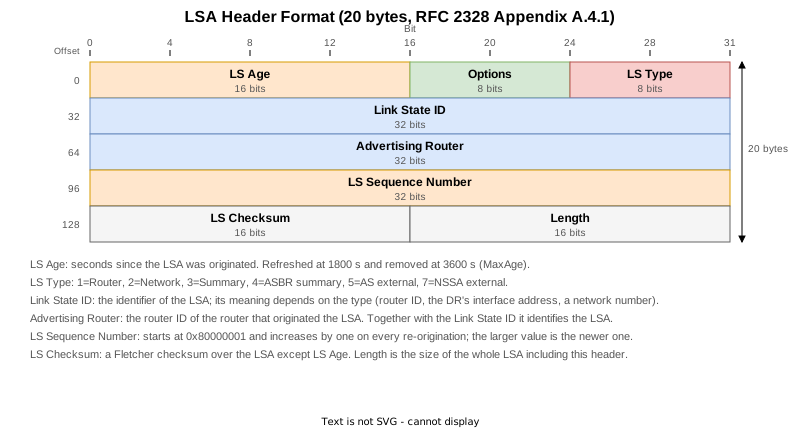
| Field | Size | Content |
|---|---|---|
| LS Age | 16 bits | Seconds since the LSA was originated. The originator re-originates it every 1800 s (LSRefreshTime). An LSA that reaches 3600 s (MaxAge) is no longer used in the routing calculation; it is reflooded and then taken out of the LSDB. The top bit is the DoNotAge flag |
| Options | 8 bits | Bits that describe the area: E (external routing), N (NSSA), DC and others. See the Options field |
| LS Type | 8 bits | The type of the LSA: 1 to 5, 7, and 9 to 11 |
| Link State ID | 32 bits | The identifier of the LSA; its meaning depends on the type (a router ID, the DR’s interface address, a network number) |
| Advertising Router | 32 bits | The router ID of the router that originated the LSA |
| LS Sequence Number | 32 bits | Starts at 0x80000001 and increases by one on each re-origination |
| LS Checksum | 16 bits | A Fletcher checksum over the LSA excluding LS Age |
| Length | 16 bits | The length of the whole LSA including this header, in bytes |
The key point is that an LSA is identified by the triple of LS Type, Link State ID and Advertising Router (RFC 2328 section 13.1). Two LSAs with the same triple are two instances of the same LSA, and the rules further down decide which one is newer.
On a real device show ospf database <type> <link state ID> prints the header as it is. Here is the Router-LSA R11 originated for itself.
RP/0/RP0/CPU0:R11#show ospf database router 11.11.11.11
Mon Sep  7 23:33:39.298 UTC


            OSPF Router with ID (11.11.11.11) (Process ID 1)

		Router Link States (Area 2)

  LS age: 313
  Options: (No TOS-capability, DC)
  LS Type: Router Links
  Link State ID: 11.11.11.11
  Advertising Router: 11.11.11.11
  LS Seq Number: 80000004
  Checksum: 0xc1d7
  Length: 72
   Number of Links: 4
Length: 72 is the size of the whole LSA: the 20-byte header followed by four link entries (Number of Links: 4).
Seen from the packet side, the same header is broken out bit by bit. This is No.528 of the capture (the refresh LSU discussed below), where the top bit of LS Age is shown separately as the Do Not Age Flag.
Open Shortest Path First
    OSPF Header
        Version: 2
        Message Type: LS Update (4)
        Packet Length: 56
        Source OSPF Router: 3.3.3.3
        Area ID: 0.0.0.0 (Backbone)
        Checksum: 0xf7bb [correct]
        Instance ID: Base IPv4 Unicast Instance (0)
        Auth Type: Null (0)
        Auth Data (none): 0000000000000000
    LS Update Packet
        Number of LSAs: 1
        LSA-type 3 (Summary-LSA (IP network)), len 28
            .000 0000 0000 0001 = LS Age (seconds): 1
            0... .... .... .... = Do Not Age Flag: 0
            Options: 0x22, (DC) Demand Circuits, (E) External Routing
                0... .... = DN: Not set
                .0.. .... = (O) Opaque: Not set
                ..1. .... = (DC) Demand Circuits: Supported
                ...0 .... = (L) LLS Data block: Not Present
                .... 0... = (N) NSSA: Not supported
                .... .0.. = (MC) Multicast: Not capable
                .... ..1. = (E) External Routing: Capable
                .... ...0 = (MT) Multi-Topology Routing: No
            LS Type: Summary-LSA (IP network) (3)
            Link State ID: 11.11.11.11
            Advertising Router: 3.3.3.3
            Sequence Number: 0x80000004
            Checksum: 0x41be
            Length: 28
            Netmask: 255.255.255.255
            TOS: 0
Metric: 2The LSA types
LSAs are divided by purpose, and how far each type travels differs.

| Type | Name | Originated by | Scope | Article |
|---|---|---|---|---|
| 1 | Router-LSA | Every router | Its area | What is OSPF |
| 2 | Network-LSA | The DR | Its area | DR and BDR |
| 3 | Summary-LSA | An ABR | Its area (regenerated by the ABR for the next one) | Multiple areas and the ABR |
| 4 | ASBR Summary-LSA | An ABR | Its area (same) | Multiple areas and the ABR |
| 5 | AS External-LSA | An ASBR | The whole AS (except stub areas and NSSAs) | External routes |
| 7 | NSSA External-LSA | An ASBR inside an NSSA | Only that NSSA | NSSA |
| 9 / 10 / 11 | Opaque LSA | Routers using an extension | A link / an area / the AS | RFC 5250; not used in this lab |
Type 6 (MOSPF) is deprecated, and type 8 is the Link-LSA of OSPFv3.
For type 1, how many entries one interface becomes and which field moves when the configuration changes are covered in OSPF router-LSA (type 1).
Counting them on real devices
show ospf database database-summary shows the number of LSAs of each type, per area, on one screen. This lab has one broadcast segment in area 0 and one in area 2 and makes area 2 an NSSA, so types 1, 2, 3, 4, 5 and 7 all exist.
R2 on the backbone side comes first. Area 0 has a type 2 (Network 1) and a type 4 (Summary ASBR 1), and the type 5 LSAs that flood the whole AS show up in the process-wide total.
RP/0/RP0/CPU0:R2#show ospf database database-summary
Mon Sep  7 23:31:03.909 UTC


            OSPF Router with ID (2.2.2.2) (Process ID 1)

Area 0 database summary
  LSA Type      Count    Delete   Maxage
  Router        3        0        0
  Network       1        0        0
  Summary Net   16       0        0
  Summary ASBR  1        0        0
  Type-7 Ext    0        0        0
  Opaque Link   0        0        0
  Opaque Area   0        0        0
  Subtotal      21       0        0

Area 1 database summary
  LSA Type      Count    Delete   Maxage
  Router        2        0        0
  Network       0        0        0
  Summary Net   12       0        0
  Summary ASBR  2        0        0
  Type-7 Ext    0        0        0
  Opaque Link   0        0        0
  Opaque Area   0        0        0
  Subtotal      16       0        0

Process 1 database summary
  Router        5        0        0
  Network       1        0        0
  Summary Net   28       0        0
  Summary ASBR  3        0        0
  Type-7 Ext    0        0        0
  Opaque Link   0        0        0
  Opaque Area   0        0        0
  Type-5 Ext    2        0        0
  Opaque AS     0        0        0
  Total         39       0        0
R13, inside the NSSA that is area 2, has no type 5 and one type 7 instead, because external routes enter an NSSA as type 7.
RP/0/RP0/CPU0:R13#show ospf database database-summary
Mon Sep  7 23:33:10.542 UTC


            OSPF Router with ID (13.13.13.13) (Process ID 1)

Area 2 database summary
  LSA Type      Count    Delete   Maxage
  Router        5        0        0
  Network       1        0        0
  Summary Net   14       0        0
  Summary ASBR  0        0        0
  Type-7 Ext    1        0        0
  Opaque Link   0        0        0
  Opaque Area   0        0        0
  Subtotal      21       0        0

Process 1 database summary
  Router        5        0        0
  Network       1        0        0
  Summary Net   14       0        0
  Summary ASBR  0        0        0
  Type-7 Ext    1        0        0
  Opaque Link   0        0        0
  Opaque Area   0        0        0
  Type-5 Ext    0        0        0
  Opaque AS     0        0        0
  Total         21       0        0
Both show zero opaque LSAs (types 9, 10 and 11): no extension such as MPLS-TE or Segment Routing is enabled here, so none are originated.
RP/0/RP0/CPU0:R13#show ospf database opaque-area
Mon Sep  7 23:33:08.081 UTC


            OSPF Router with ID (13.13.13.13) (Process ID 1)
Deciding which instance of an LSA is newer
When two instances of the same LSA (same LS Type, Link State ID and Advertising Router) exist, section 13.1 of RFC 2328 decides which is newer in this order.
| Order | Compared | Rule |
|---|---|---|
| 1 | LS Sequence Number | The larger one is newer (compared as signed 32-bit integers) |
| 2 | LS Checksum | With equal sequence numbers, the larger checksum is newer |
| 3 | MaxAge | If only one has an age of MaxAge (3600), that one is newer |
| 4 | Difference in LS Age | If the ages differ by more than 15 minutes (MaxAgeDiff), the younger one is newer |
| — | Otherwise | The two instances are considered identical |
Watching the sequence number increase is easy. Changing the cost of R11’s Loopback0 from 1 to 5 makes R11 re-originate its Router-LSA.
(R11)
router ospf 1
 area 2
  interface Loopback0
   cost 5
Before the change the header read LS Seq Number: 80000004 and Checksum: 0xc1d7.
  LS age: 313
  Options: (No TOS-capability, DC)
  LS Type: Router Links
  Link State ID: 11.11.11.11
  Advertising Router: 11.11.11.11
  LS Seq Number: 80000004
  Checksum: 0xc1d7
  Length: 72
   Number of Links: 4

    Link connected to: a Stub Network
     (Link ID) Network/subnet number: 11.11.11.11
     (Link Data) Network Mask: 255.255.255.255
      Number of TOS metrics: 0
       TOS 0 Metrics: 1
Afterwards the sequence number has gone up by one to 80000005, LS Age is back near zero and the checksum has changed. The metric of Loopback0 is now 5.
  LS age: 10
  Options: (No TOS-capability, DC)
  LS Type: Router Links
  Link State ID: 11.11.11.11
  Advertising Router: 11.11.11.11
  LS Seq Number: 80000005
  Checksum: 0x88c
  Length: 72
   Number of Links: 4

    Link connected to: a Stub Network
     (Link ID) Network/subnet number: 11.11.11.11
     (Link Data) Network Mask: 255.255.255.255
      Number of TOS metrics: 0
       TOS 0 Metrics: 5
Putting the cost back to 1 does not return the sequence number to 80000004; it moves on to 80000006. The sequence number increases monotonically regardless of the content, from 0x80000001 (InitialSequenceNumber) up to 0x7fffffff (MaxSequenceNumber), at which point the LSA has to be flushed with MaxAge and started again (RFC 2328 section 12.1.6).
  LS age: 11
  Options: (No TOS-capability, DC)
  LS Type: Router Links
  Link State ID: 11.11.11.11
  Advertising Router: 11.11.11.11
  LS Seq Number: 80000006
  Checksum: 0xbdd9
  Length: 72
   Number of Links: 4

    Link connected to: a Stub Network
     (Link ID) Network/subnet number: 11.11.11.11
     (Link Data) Network Mask: 255.255.255.255
      Number of TOS metrics: 0
       TOS 0 Metrics: 1
The lifetime of an LSA
LSAs are not left alone once created; they are managed on a timer. The important caveat is that the values in the RFC and the defaults on a real device are not necessarily the same. Start with the architectural constants of RFC 2328 (appendix B).
| Constant | Value in RFC 2328 | Meaning |
|---|---|---|
| LSRefreshTime | 30 minutes (1800 s) | When LS Age reaches this, the LSA is re-originated even if nothing changed |
| MaxAge | 1 hour (3600 s) | The upper limit of an LSA’s age. An LSA at MaxAge is not used in the routing calculation and is removed |
| MinLSInterval | 5 s | The minimum interval between re-originations of the same LSA |
| MinLSArrival | 1 s | The minimum interval at which instances of the same LSA are accepted; anything faster is discarded |
| CheckAge | 5 minutes | The checksum is verified whenever LS Age hits a multiple of this |
| MaxAgeDiff | 15 minutes | The maximum spread in LS Age that flooding can introduce |
| LSInfinity | 0xffffff (16777215) | The metric value meaning “unreachable” |
The RFC calls these architectural constants and does not expect them to be configured. On a real device, however, several of them are far smaller than the RFC value. The IOS XR defaults are visible in show ospf.
RP/0/RP0/CPU0:R3#show ospf | include msecs
Tue Sep  8 01:20:11.036 UTC
 Initial SPF schedule delay 50 msecs
 Minimum hold time between two consecutive SPFs 200 msecs
 Maximum wait time between two consecutive SPFs 5000 msecs
 Initial LSA throttle delay 50 msecs
 Minimum hold time for LSA throttle 200 msecs
 Maximum wait time for LSA throttle 5000 msecs
 Minimum LSA interval 200 msecs. Minimum LSA arrival 100 msecs
 Flood pacing interval 33 msecs. Retransmission pacing interval 66 msecs
RP/0/RP0/CPU0:R3#show ospf | include refresh interval
Tue Sep  8 01:20:11.825 UTC
 LSA refresh interval 1800 seconds
Side by side with the RFC, MinLSInterval and MinLSArrival are an order of magnitude shorter.
| Item | RFC 2328 | Default on XRd 26.1.1 | IOS XR command |
|---|---|---|---|
| LSA refresh interval | 1800 s | 1800 s (the same) | timers lsa refresh <1800-2700> |
| MinLSInterval (minimum interval between re-originations) | 5 s | 200 ms | timers throttle lsa all <0-600000> (ms) |
| MinLSArrival (minimum interval between accepted instances) | 1 s | 100 ms | timers lsa min-arrival <0-600000> (ms) |
| MaxAge | 3600 s | 3600 s (the withdrawal carries LS Age 3600) | Not configurable |
| Grouping of LSA work | Not specified | LSA group pacing | timers lsa group-pacing <10-1800> |
| Flooding interval | Not specified | 33 ms | timers pacing flood |
| LSA generation throttle | Not specified | 50 ms initial / 200 ms hold / 5000 ms max | timers throttle lsa all |
Only the refresh interval and MaxAge match the RFC as they are; the rate limits on generating and accepting LSAs are values the implementation chose, because equipment today converges far faster than RFC 2328 assumed in 1998. The Initial LSA throttle delay 50 msecs / Minimum hold time 200 msecs / Maximum wait time 5000 msecs lines are an exponential back-off applied when a link flaps, which is another feature the RFC does not define.
show ospf.The refresh at 1800 seconds
An LSA is re-originated periodically even when nothing about it has changed, because otherwise its age would reach MaxAge and it would disappear. Following the type 3 LSA R3 originates for 11.11.11.11:
| Time | LS age | LS Seq |
|---|---|---|
| 00:07:47 | 1833 | 0x80000003 |
| 00:08:51 | 1896 | 0x80000003 |
| 00:09:54 | 25 | 0x80000004 |
Looking at the details right after the refresh, LS Age is back near zero and the sequence number has gone up to 0x80000004. The checksum changed too (it was 0x0043bd in the listing just before) — because the sequence number in the header changed; the content of the route (Metric: 2) is the same.
RP/0/RP0/CPU0:R3#show ospf database summary 11.11.11.11
Tue Sep  8 00:10:02.633 UTC


            OSPF Router with ID (3.3.3.3) (Process ID 1)

		Summary Net Link States (Area 0)

  LS age: 31
  Options: (No TOS-capability, DC)
  LS Type: Summary Links (Network)
  Link State ID: 11.11.11.11 (Summary Network Number)
  Advertising Router: 3.3.3.3
  LS Seq Number: 80000004
  Checksum: 0x41be
  Length: 28
  Network Mask: /32
	TOS: 0 	Metric: 2
The capture shows the same re-origination with timestamps: the same LSA crossed the link at 434.4 s (0x80000003) and at 2368.8 s (0x80000004), an interval of 1934 seconds. RFC 2328 sets LSRefreshTime to exactly 1800 seconds, so the measurement is about 130 seconds longer: IOS XR processes LSAs in groups (LSA group pacing, timers lsa group-pacing), so an LSA that is due for a refresh waits until the next group runs. That is also why the configurable range of timers lsa refresh is 1800-2700 seconds: it allows for those extra seconds.
0x80000001 or 0x80000002 was originated recently. That makes the sequence number a quick way to tell, during troubleshooting, whether an LSA has been re-originated.Removal at MaxAge (3600 seconds)
An LSA for a destination that is no longer reachable is removed by reflooding it with LS Age set to 3600 (MaxAge). This is what happened when R12’s Loopback0 was taken out of OSPF.
(R12)
router ospf 1
 area 2
  no interface Loopback0
The type 3 LSA disappears from R3’s LSDB and so does the route.
RP/0/RP0/CPU0:R3#show ospf database summary 12.12.12.12
Mon Sep  7 23:40:49.818 UTC


            OSPF Router with ID (3.3.3.3) (Process ID 1)
RP/0/RP0/CPU0:R3#show route 12.12.12.12/32
Mon Sep  7 23:40:50.663 UTC

% Network not in table
No.144 of the attached capture is the packet that did it: LS Age (seconds): 3600, the withdrawal by MaxAge. The LS Age field is 16 bits with the top bit used as the DoNotAge flag, which is why tshark prints it as .000 1110 0001 0000 = LS Age (seconds): 3600.
Open Shortest Path First
    OSPF Header
        Version: 2
        Message Type: LS Update (4)
        Packet Length: 56
        Source OSPF Router: 3.3.3.3
        Area ID: 0.0.0.0 (Backbone)
        Checksum: 0x2472 [correct]
        Instance ID: Base IPv4 Unicast Instance (0)
        Auth Type: Null (0)
        Auth Data (none): 0000000000000000
    LS Update Packet
        Number of LSAs: 1
        LSA-type 3 (Summary-LSA (IP network)), len 28
            .000 1110 0001 0000 = LS Age (seconds): 3600
            0... .... .... .... = Do Not Age Flag: 0
            Options: 0x22, (DC) Demand Circuits, (E) External Routing
                0... .... = DN: Not set
                .0.. .... = (O) Opaque: Not set
                ..1. .... = (DC) Demand Circuits: Supported
                ...0 .... = (L) LLS Data block: Not Present
                .... 0... = (N) NSSA: Not supported
                .... .0.. = (MC) Multicast: Not capable
                .... ..1. = (E) External Routing: Capable
                .... ...0 = (MT) Multi-Topology Routing: No
            LS Type: Summary-LSA (IP network) (3)
            Link State ID: 12.12.12.12
            Advertising Router: 3.3.3.3
            Sequence Number: 0x80000002
            Checksum: 0x03fc
            Length: 28
            Netmask: 255.255.255.255
            TOS: 0
Metric: 16777215There is a second way to withdraw a route: setting the metric to LSInfinity (0xffffff, 16777215). Summary-LSAs and AS External-LSAs can use it, and the route summarization article shows an ABR using MaxAge and LSInfinity together when it withdraws the individual type 3 LSAs.
| Method | When it is used | How it looks in the LSDB |
|---|---|---|
| MaxAge (3600) | Any LSA; known as premature aging | LS Age becomes 3600 and the LSA eventually disappears |
LSInfinity (0xffffff) | Summary-LSAs and AS External-LSAs | The LSA remains but is treated as unreachable |
Reading an LSA header on a real device
show ospf database without a type lists the LSAs one per line, and that line maps onto the main header fields.
RP/0/RP0/CPU0:R3#show ospf database
Tue Sep  8 00:06:20.202 UTC


            OSPF Router with ID (3.3.3.3) (Process ID 1)

		Router Link States (Area 0)

Link ID         ADV Router      Age         Seq#       Checksum Link count
2.2.2.2         2.2.2.2         362         0x80000005 0x00d076 4
3.3.3.3         3.3.3.3         325         0x80000004 0x004e61 2
4.4.4.4         4.4.4.4         310         0x80000004 0x000b80 3

		Net Link States (Area 0)

Link ID         ADV Router      Age         Seq#       Checksum
10.0.23.3       3.3.3.3         325         0x80000002 0x007f75

Summary Net Link States (Area 0)| Column | Header field |
|---|---|
| Link ID | Link State ID |
| ADV Router | Advertising Router |
| Age | LS Age |
| Seq# | LS Sequence Number |
| Checksum | LS Checksum |
| Link count | Router-LSAs only; the number of links in the body |
Adding the type (show ospf database router and so on) expands the full header and the body. Reading LS Age and Seq# side by side tells you at a glance whether an LSA was just re-originated or has been sitting there getting old.
Lab topology
The outputs in this article come from a seven-router, three-area lab. Two things differ from the usual setup so that every LSA type appears in a single lab.
| Change | Reason |
|---|---|
| One link in area 0 (R2 - R3) and one in area 2 (R11 - R13) are broadcast | A DR is elected, which originates a type 2 (Network-LSA) |
| Area 2 is an NSSA and R13 inside it redistributes a static route | That produces a type 7 (NSSA External-LSA) |
R1 in area 1 also redistributes a static route, so areas 0 and 1 hold type 5 and type 4 LSAs. The result is that R2 sees types 1, 2, 3, 4 and 5 while R13 sees types 1, 2, 3 and 7.
Each STEP, what it changes and what it confirms:
| STEP | Change | What it confirms |
|---|---|---|
| 0 | Right after boot | An LSDB with every type; the real values of each header field |
| 1 | R11’s Loopback0 cost set to 5 | The sequence number advances by one, LS age returns to 0, the checksum changes |
| 2 | Cost restored | The sequence number advances again even though the contents are back (monotonic) |
| 3 | R12’s Loopback0 removed from OSPF | The type 3 is withdrawn with MaxAge (3600) |
| 4 | Restored, then a wait of 30 minutes or more | An unchanged LSA is refreshed (1934 s measured) |
| 5 | Final state | No change |
Verification config and show output
For each STEP the following three files were collected from all seven routers, split per router. The verification config is the ..._run.txt file (the final state is the one from STEP 5).
| File | Content |
|---|---|
..._show.txt | show version / show interface description / show route / show route ospf / show ospf / show ospf interface / show ospf interface brief / show ospf neighbor / show ospf neighbor detail / show ospf database / show ospf database router / show ospf database network / show ospf statistics interface / show ospf database summary / show ospf database asbr-summary / show ospf database external / show ospf database nssa-external / show ospf database opaque-area / show ospf border-routers / show ospf routes / show ospf database database-summary / show ospf trace events |
..._log.txt | show logging narrowed to that STEP |
..._run.txt | show running-config at that point in time (that is, the verification config for that STEP) |
STEP 0: right after boot, with every type present
| Router | show output | syslog | running-config |
|---|---|---|---|
| R1 | show | log | run |
| R2 | show | log | run |
| R3 | show | log | run |
| R4 | show | log | run |
| R11 | show | log | run |
| R12 | show | log | run |
| R13 | show | log | run |
This STEP also has R11’s own Router-LSA.
STEP 1: R11’s Loopback0 is set to cost 5 — the Router-LSA is re-originated and the sequence number goes up by one
| Router | show output | syslog | running-config |
|---|---|---|---|
| R1 | show | log | run |
| R2 | show | log | run |
| R3 | show | log | run |
| R4 | show | log | run |
| R11 | show | log | run |
| R12 | show | log | run |
| R13 | show | log | run |
This STEP also has the Router-LSA on R11.
STEP 2: the cost is put back — the sequence number goes up again rather than back
| Router | show output | syslog | running-config |
|---|---|---|---|
| R1 | show | log | run |
| R2 | show | log | run |
| R3 | show | log | run |
| R4 | show | log | run |
| R11 | show | log | run |
| R12 | show | log | run |
| R13 | show | log | run |
This STEP also has the Router-LSA on R11.
STEP 3: R12’s Loopback0 is taken out of OSPF — the LSA is withdrawn with MaxAge
| Router | show output | syslog | running-config |
|---|---|---|---|
| R1 | show | log | run |
| R2 | show | log | run |
| R3 | show | log | run |
| R4 | show | log | run |
| R11 | show | log | run |
| R12 | show | log | run |
| R13 | show | log | run |
This STEP also has the LSA and route being gone on R3.
STEP 4: R12’s Loopback0 is restored and the refresh is awaited — the LSA is re-originated with no change
| Router | show output | syslog | running-config |
|---|---|---|---|
| R1 | show | log | run |
| R2 | show | log | run |
| R3 | show | log | run |
| R4 | show | log | run |
| R11 | show | log | run |
| R12 | show | log | run |
| R13 | show | log | run |
This STEP also has the LSDB before the refresh on R3, right after the refresh on R3, 25 seconds after the refresh on R3.
STEP 5: final state — nothing changed
| Router | show output | syslog | running-config |
|---|---|---|---|
| R1 | show | log | run |
| R2 | show | log | run |
| R3 | show | log | run |
| R4 | show | log | run |
| R11 | show | log | run |
| R12 | show | log | run |
| R13 | show | log | run |
This STEP also has the actual LSA timer values (show ospf | include msecs) on R3, the timers lsa ? help (what can be configured) on R3, the timers lsa group-pacing ? help (the configurable range) on R3.
The capture ran for 45 minutes on the backbone side (between R2 and R3), filtered with ip proto 89. It contains the refresh (No.97 and No.528) and the MaxAge withdrawal (No.144).
References
| RFC | Title | Summary |
|---|---|---|
| RFC 2328 | OSPF Version 2 | The LSA header format (appendix A.4.1), the field definitions (section 12.1), the sequence number (section 12.1.6), deciding which instance is newer (section 13.1), aging and MaxAge (section 14) and the architectural constants (appendix B). |
| RFC 5250 | The OSPF Opaque LSA Option | The definition of the opaque LSAs, types 9, 10 and 11. |
Related articles
- What is OSPF
- OSPF Router ID
- OSPF Behavior When Router IDs Collide
- OSPF Packet Types and Header Format
- OSPF Authentication
- OSPF Neighbor States
- OSPF Options Field
- OSPF DR and BDR
- OSPF Network Types
- OSPF Cost (Metric)
- OSPF Equal-Cost Multi-Path (ECMP)
- OSPF External Routes (Redistributing Static Routes)
- OSPF RFC1583 Compatibility (External Route Selection Rules)
- OSPF Forwarding Address of AS External Routes
- OSPF Multiple Areas and the ABR
- OSPF Virtual Links
- OSPF Stub and Totally Stubby Areas
- OSPF NSSA and Totally NSSA
- OSPF Default Route
- OSPF Route Summarization
- OSPF LSAs and the LSA Header
- OSPF Hello and Dead Intervals
- OSPF Convergence Timers (SPF / LSA Throttling)
- OSPF LSA Refresh and Pacing
- OSPF router-LSA (type 1)
- OSPF network-LSA (type 2)
- OSPF summary-LSA (type 3)
- OSPF ASBR summary-LSA (type 4)
- OSPF AS external-LSA (type 5)
- OSPF NSSA External-LSA (Type 7)