What the OSPF Neighbor States Are
An OSPF router goes through several states between discovering another router on the link with Hello packets and establishing an adjacency by synchronizing the LSDB. The state is kept per neighbor and is shown in the State column of show ospf neighbor.
When troubleshooting, “which state is it stuck in” points almost directly at the cause. Stuck at Init means the Hellos arrive but the peer does not see us; stuck around ExStart means the MTUs do not match, and so on. This article goes through what each state means and what triggers each transition, then follows a real transition on real devices (Cisco IOS XR) using debug output. For the contents of the packets themselves, see OSPF Packet Types and Header Format.
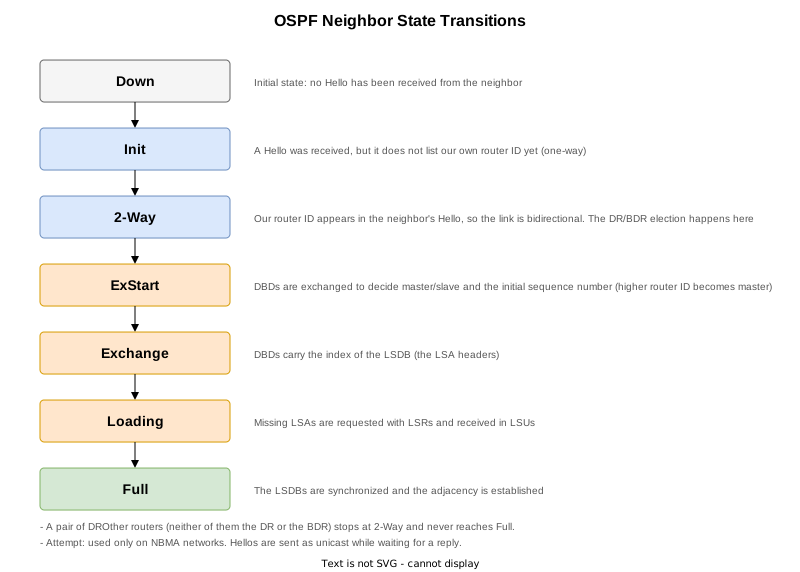
List of Neighbor States
| State | Description |
|---|---|
| Down | The initial state, in which no Hello has been received from the neighbor. A neighbor also returns to this state when the Dead interval expires. |
| Attempt | Used only on NBMA networks. Hellos are sent as unicast to a manually configured neighbor while waiting for a reply. |
| Init | A Hello has been received from the neighbor, but that Hello does not list our own router ID. Communication has only been confirmed in one direction. |
| 2-Way | Our own router ID appears in the neighbor’s Hello, so communication is confirmed in both directions. On a multi-access network the DR/BDR election happens at this point. |
| ExStart | In preparation for synchronizing the LSDB, DBDs are exchanged to decide master/slave and the initial sequence number. The router with the higher router ID becomes the master. |
| Exchange | DBDs are exchanged carrying the index of the LSDB (the list of LSA headers). |
| Loading | The LSAs found to be missing from the DBDs are requested with LSRs and received in LSUs. |
| Full | The LSDBs are synchronized and the adjacency is established. |
How Packets and States Correspond
Each state corresponds one-to-one with the packets exchanged.
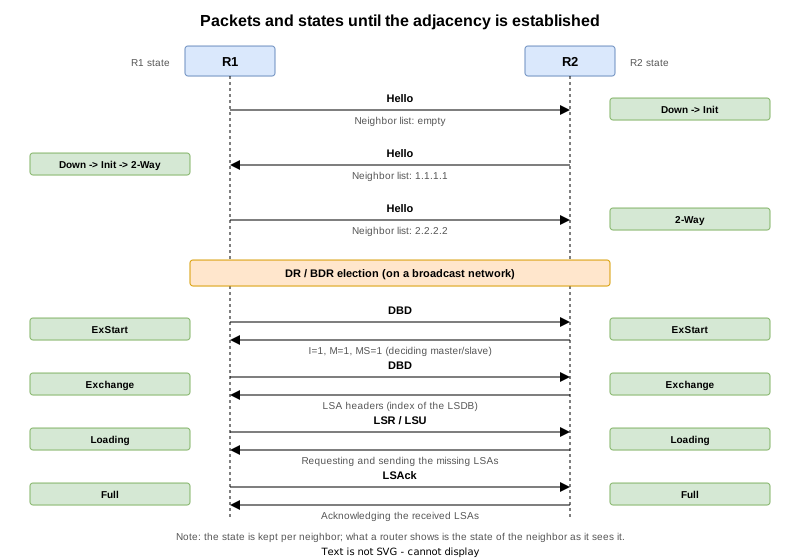
- Init: the moment a Hello is received from the peer. Our own router ID is not in the peer’s neighbor list yet.
- 2-Way: the moment our own router ID is found in the peer’s Hello, which confirms two-way communication.
- ExStart: the first DBDs (with the I, M and MS bits all set) are exchanged and the router with the higher router ID becomes the master.
- Exchange: DBDs carrying LSA headers are exchanged.
- Loading: the missing LSAs are requested with LSRs and received in LSUs.
- Full: all the requested LSAs have arrived and the LSDBs are synchronized.
Because the state is kept independently for each neighbor, the state R1 sees for R2 and the state R2 sees for R1 do not necessarily match while the transition is in progress.
show ospf neighbor displays is “the state of the neighbor as this router sees it”. An asymmetric situation, where only one side is stuck at ExStart, is possible, so check the output on both sides when troubleshooting.When the State Stops at 2-Way
On a multi-access network, routers that are neither the DR nor the BDR (DROther routers) do not form adjacencies with each other and stay at 2-Way. This is not a fault: it is how OSPF concentrates the LSA exchange through the DR. Even though DROther routers do not synchronize their LSDBs with each other, the same LSAs reach them through the DR, so the LSDBs across the area still match. The DR/BDR election is covered in DR and BDR.
On an Ethernet link with only two routers, one becomes the DR and the other the BDR, so both reach Full.
What to Suspect When the State Does Not Advance
| State it stops at | Common causes |
|---|---|
| Stays Down | The Hellos are not arriving: the interface is down, OSPF was not enabled, the interface is passive, an ACL is blocking the packets, and so on. |
| Stays Init | Hellos are only getting through in one direction: mismatched authentication, an ACL on one side only, a topology where multicast does not pass, and so on. |
| Stays 2-Way (other than DROther pairs) | Mismatched Hello parameters. The neighbor relationship does not form unless the area ID, Hello/Dead intervals, subnet mask and stub area flag all match. |
| Repeats ExStart / Exchange | A mismatch in interface MTU is the classic cause. If the Interface MTU carried in a DBD is larger than the receiver’s own MTU, the receiver discards that DBD. The state does not stay put but cycles through Init, 2-Way, ExStart and Down (see the test below). |
| Stays Loading | The requested LSAs do not come back, because of corrupted LSAs, packet loss and so on. |
Verification on Real Devices
Test Environment
The test uses the same setup as What Is OSPF?: three Cisco IOS XR routers (XRd 26.1.1) connected in a line in a single area.

The test runs in four stages (STEP 0 to 3). The show output, syslog and running-config collected from all three routers at every STEP, plus the debug ospf 1 adj output, are gathered per STEP under Configurations Used and show Output at the end of the article. The sections below quote only part of them.
| STEP | Change | What it confirms |
|---|---|---|
| 0 | Initial state (clear ospf 1 process run on R1 to capture the transitions) | All links in area 0; R1-R2-R3 are Full |
| 1 | MTU on R1 Gi0/0/0/0 changed to 1400 | MTU mismatch; R1-R2 does not reach Full |
| 2 | mtu-ignore configured on R1 | Full is reached again |
| 3 | mtu-ignore and MTU 1400 both removed | Back to the initial state (final state) |
Logging the State Transitions (STEP 0)
On IOS XR, debug ospf <process id> adj records the adjacency establishment in detail. The debug output also goes into the log buffer, so it can be read back later with show logging.
RP/0/RP0/CPU0:R1#debug ospf 1 adj
Sat Sep  5 15:56:47.404 UTC
RP/0/RP0/CPU0:R1#show debug
Sat Sep  5 15:56:47.550 UTC

####  debug flags set from tty 'vty0'  ####
ospf 1 adj flag is ON with value 0
With that in place, clear ospf 1 process was run on R1 to re-establish the adjacency. The path from 2-Way to Full comes out as it happens.
RP/0/RP0/CPU0:Sep  5 15:56:54.665 UTC: ospf[1035]:  2 Way Communication to 2.2.2.2 on GigabitEthernet0/0/0/0, state 2WAY
RP/0/RP0/CPU0:Sep  5 15:56:54.665 UTC: ospf[1035]:  Backup event seen before WAIT timer on GigabitEthernet0/0/0/0, vrf default vrfid 0x60000000
RP/0/RP0/CPU0:Sep  5 15:56:54.665 UTC: ospf[1035]:  DR/BDR election on GigabitEthernet0/0/0/0
RP/0/RP0/CPU0:Sep  5 15:56:54.665 UTC: ospf[1035]:  Elect BDR Router ID 1.1.1.1(IP Addr 10.1.2.1)
RP/0/RP0/CPU0:Sep  5 15:56:54.665 UTC: ospf[1035]:  Elect DR Router ID 2.2.2.2(IP Addr 10.1.2.2)
RP/0/RP0/CPU0:Sep  5 15:56:54.665 UTC: ospf[1035]:  Elect BDR Router ID 1.1.1.1(IP Addr 10.1.2.1)
RP/0/RP0/CPU0:Sep  5 15:56:54.665 UTC: ospf[1035]:  Elect DR Router ID 2.2.2.2(IP Addr 10.1.2.2)
RP/0/RP0/CPU0:Sep  5 15:56:54.665 UTC: ospf[1035]:        DR: 2.2.2.2(Id) 10.1.2.2(IP Addr)
RP/0/RP0/CPU0:Sep  5 15:56:54.665 UTC: ospf[1035]:       BDR: 1.1.1.1(Id) 10.1.2.1(IP Addr)
RP/0/RP0/CPU0:Sep  5 15:56:54.665 UTC: ospf[1035]:  Send DBD  to 2.2.2.2(10.1.2.2) on GigabitEthernet0/0/0/0 seq 0x73875e02 opt 0x52 flag 0x7 len 32, vrf default vrfid 0x60000000
RP/0/RP0/CPU0:Sep  5 15:56:54.665 UTC: ospf[1035]:  Extended options bit out 0x1, GigabitEthernet0/0/0/0 (lls_len 12 bytes)
RP/0/RP0/CPU0:Sep  5 15:56:54.671 UTC: ospf[1035]:  Rcv DBD  from 2.2.2.2(10.1.2.2) on GigabitEthernet0/0/0/0 seq 0x733b91e2 opt 0x52 flag 0x7 len 32 mtu 1500 state EXSTART vrf default vrfid 0x60000000
RP/0/RP0/CPU0:Sep  5 15:56:54.671 UTC: ospf[1035]:  NBR Negotiation Done. We are the SLAVE for nbr 2.2.2.2 on GigabitEthernet0/0/0/0, area 0
RP/0/RP0/CPU0:Sep  5 15:56:54.671 UTC: ospf[1035]: build dbd: took 0 ms for nbr 2.2.2.2, count=1, vrf default vrfid 0x60000000
RP/0/RP0/CPU0:Sep  5 15:56:54.671 UTC: ospf[1035]:  Send DBD  to 2.2.2.2(10.1.2.2) on GigabitEthernet0/0/0/0 seq 0x733b91e2 opt 0x52 flag 0x2 len 52, vrf default vrfid 0x60000000
RP/0/RP0/CPU0:Sep  5 15:56:54.671 UTC: ospf[1035]:  Extended options bit out 0x1, GigabitEthernet0/0/0/0 (lls_len 12 bytes)
RP/0/RP0/CPU0:Sep  5 15:56:54.676 UTC: ospf[1035]:  Rcv DBD  from 2.2.2.2(10.1.2.2) on GigabitEthernet0/0/0/0 seq 0x733b91e3 opt 0x52 flag 0x1 len 92 mtu 1500 state EXCHANGE vrf default vrfid 0x60000000
RP/0/RP0/CPU0:Sep  5 15:56:54.677 UTC: ospf[1035]:  Exchange Done with 2.2.2.2 on GigabitEthernet0/0/0/0
RP/0/RP0/CPU0:Sep  5 15:56:54.677 UTC: ospf[1035]:  sent LS REQ packet to 10.1.2.2, length 36, vrf default vrfid 0x60000000
RP/0/RP0/CPU0:Sep  5 15:56:54.677 UTC: ospf[1035]:  Send DBD  to 2.2.2.2(10.1.2.2) on GigabitEthernet0/0/0/0 seq 0x733b91e3 opt 0x52 flag 0 len 32, vrf default vrfid 0x60000000
RP/0/RP0/CPU0:Sep  5 15:56:54.677 UTC: ospf[1035]:  Extended options bit out 0x1, GigabitEthernet0/0/0/0 (lls_len 12 bytes)
RP/0/RP0/CPU0:Sep  5 15:56:54.683 UTC: ospf[1035]:  Synchronized with 2.2.2.2 on GigabitEthernet0/0/0/0, state FULL, vrf default vrfid 0x60000000
The states described earlier in the article appear in order.
| Debug line | Corresponding state |
|---|---|
2 Way Communication to 2.2.2.2 ... state 2WAY | 2-Way: two-way communication confirmed |
Send DBD ... flag 0x7 | ExStart: the first DBD with the I, M and MS bits set |
NBR Negotiation Done. We are the SLAVE for nbr 2.2.2.2 | ExStart: R2, with the higher router ID, becomes the master |
Rcv DBD ... flag 0x1 ... state EXCHANGE | Exchange: the list of LSA headers is being exchanged |
Exchange Done with 2.2.2.2 / sent LS REQ packet | Loading: the missing LSAs are requested with LSRs |
Synchronized with 2.2.2.2 ... state FULL | Full: the LSDBs are synchronized |
flag 0x7 means the I (Init), M (More) and MS (Master) bits are all set; flag 0x1 means only MS is left. The meaning of the DBD flags is covered in OSPF Packet Types and Header Format.
How the State Appears in show ospf neighbor (STEP 0)
This is R1 after it converges. The State column reads FULL/DR.
RP/0/RP0/CPU0:R1#show ospf neighbor
Sat Sep  5 16:00:04.031 UTC

* Indicates MADJ interface
# Indicates Neighbor awaiting BFD session up

Neighbors for OSPF 1

Neighbor ID     Pri   State           Dead Time   Address         Interface
2.2.2.2         1     FULL/DR         00:00:31    10.1.2.2        GigabitEthernet0/0/0/0
    Neighbor is up for 00:01:24

Total neighbor count: 1
The part after the / in FULL/DR is the role that neighbor holds on the segment (DR / BDR / DROTHER). That is covered in DR and BDR.
Running show ospf interface immediately after clear ospf 1 process shows the waiting state before the election.
RP/0/RP0/CPU0:R1#clear ospf 1 process
Sat Sep  5 15:58:34.220 UTC
Reset OSPF process 1? [no]: yes
RP/0/RP0/CPU0:R1#show ospf interface GigabitEthernet0/0/0/0
Sat Sep  5 15:58:34.500 UTC

GigabitEthernet0/0/0/0 is up, line protocol is up
  Internet Address 10.1.2.1/24, Area 0, SID 0, Strict-SPF SID 0
  Label stack Primary label 0 Backup label 0 SRTE label 0
  Process ID 1, Router ID 1.1.1.1, Network Type BROADCAST, Cost: 1
  Transmit Delay is 1 sec, State WAITING, Priority 1, MTU 1500, MaxPktSz 1500
  Forward reference No, Unnumbered no,  Bandwidth 1000000
  RIB LC sync Yes
  No designated router on this network
  No backup designated router on this network
  Timer intervals configured, Hello 10, Dead 40, Wait 40, Retransmit 5
    Hello due in 00:00:08:592
    Wait time before Designated router selection 00:00:39
  Index 1/1, flood queue length 0
  Next 0(0)/0(0)
  Last flood scan length is 1, maximum is 1
  Last flood scan time is 0 msec, maximum is 0 msec
  LS Ack List: current length 0, high water mark 4
  Neighbor Count is 0, Adjacent neighbor count is 0
  Suppress hello for 0 neighbor(s)
  Multi-area interface Count is 0
  Segment Routing Forwarding MPLS enabled: Yes
  Adjacency hold timer expired last : Never
  Exchange timer expired last : Never
State WAITING is the interface state: no DR or BDR has been decided yet. The neighbor state transitions start after this.
When Full Is Not Reached Because of an MTU Mismatch (STEP 1)
The MTU of R1’s Gi0/0/0/0 is changed to 1400 bytes, creating a mismatch with R2 (the default 1500).
interface GigabitEthernet0/0/0/0
 mtu 1400
!
The debug output shows R1 detecting that the MTU in the DBD it received from R2 (1500) is larger than its own, and retransmitting its DBD over and over.
RP/0/RP0/CPU0:R1#RP/0/RP0/CPU0:Sep  5 16:01:28.120 UTC: ospf[1035]:  Rcv DBD  from 2.2.2.2(10.1.2.2) on GigabitEthernet0/0/0/0 seq 0x766b8d31 opt 0x52 flag 0x7 len 32 mtu 1500 state EXSTART vrf default vrfid 0x60000000
RP/0/RP0/CPU0:Sep  5 16:01:28.120 UTC: ospf[1035]: Nbr 2.2.2.2 has larger interface MTU
RP/0/RP0/CPU0:Sep  5 16:01:28.129 UTC: ospf[1035]:  Retransmitting DBD to 2.2.2.2 on GigabitEthernet0/0/0/0
RP/0/RP0/CPU0:Sep  5 16:01:28.129 UTC: ospf[1035]:  Retransmitting DBD to 2.2.2.2 on GigabitEthernet0/0/0/0
RP/0/RP0/CPU0:Sep  5 16:01:28.129 UTC: ospf[1035]:  Send DBD  to 2.2.2.2(10.1.2.2) on GigabitEthernet0/0/0/0 seq 0x6c0848cd opt 0x52 flag 0x7 len 32, vrf default vrfid 0x60000000
After enough retransmissions it goes down with too many DBD retransmissions.
RP/0/RP0/CPU0:Sep 5 16:02:20.598 UTC: ospf[1035]: %ROUTING-OSPF-5-ADJCHG : Process 1, Nbr 2.2.2.2 on GigabitEthernet0/0/0/0 in area 0 from EXSTART to DOWN, Neighbor Down: too many DBD retransmissions, vrf default vrfid 0x60000000 It does not simply stay at ExStart; it cycles ExStart -> Down -> Init -> ExStart. The state you see therefore depends on when you run show ospf neighbor. At the moment of this collection both sides were DOWN.
RP/0/RP0/CPU0:R1#show ospf neighbor
Sat Sep  5 16:03:23.203 UTC

* Indicates MADJ interface
# Indicates Neighbor awaiting BFD session up

Neighbors for OSPF 1

Neighbor ID     Pri   State           Dead Time   Address         Interface
2.2.2.2         1     DOWN/DROTHER       -        10.1.2.2        GigabitEthernet0/0/0/0

Total neighbor count: 1RP/0/RP0/CPU0:R2#show ospf neighbor
Sat Sep 5 16:03:47.552 UTC
* Indicates MADJ interface
# Indicates Neighbor awaiting BFD session up
Neighbors for OSPF 1
Neighbor ID Pri State Dead Time Address Interface
1.1.1.1 1 DOWN/DROTHER - 10.1.2.1 GigabitEthernet0/0/0/0
3.3.3.3 1 FULL/DR 00:00:30 10.2.3.3 GigabitEthernet0/0/0/1
Neighbor is up for 00:08:04
Total neighbor count: 2R2 keeps its adjacency with R3 (FULL/DR); only the link with R1 is affected.
R1’s interface MTU is 1400 bytes, but the MTU OSPF reports is 1386. That is because it reports the IP payload MTU, with the 14-byte Ethernet header subtracted.
RP/0/RP0/CPU0:R1#show ospf interface
Sat Sep  5 16:03:21.491 UTC

GigabitEthernet0/0/0/0 is up, line protocol is up
  Internet Address 10.1.2.1/24, Area 0, SID 0, Strict-SPF SID 0
  Label stack Primary label 0 Backup label 0 SRTE label 0
  Process ID 1, Router ID 1.1.1.1, Network Type BROADCAST, Cost: 1
  Transmit Delay is 1 sec, State DR, Priority 1, MTU 1386, MaxPktSz 1386
  Forward reference No, Unnumbered no,  Bandwidth 1000000
  RIB LC sync Yes
  Designated Router (ID) 1.1.1.1, Interface address 10.1.2.1
  No backup designated router on this network
  Timer intervals configured, Hello 10, Dead 40, Wait 40, Retransmit 5
    Hello due in 00:00:04:307
  Index 1/1, flood queue length 0
  Next 0(0)/0(0)
  Last flood scan length is 1, maximum is 1
  Last flood scan time is 0 msec, maximum is 0 msec
  LS Ack List: current length 0, high water mark 4
  Neighbor Count is 1, Adjacent neighbor count is 0
  Suppress hello for 0 neighbor(s)
  Multi-area interface Count is 0
  Segment Routing Forwarding MPLS enabled: Yes
  Adjacency hold timer expired last : Never
  Exchange timer expired last : Never
Working Around It with mtu-ignore (STEP 2)
Matching the MTUs is the proper fix, but when that is not possible, mtu-ignore disables the MTU check on DBDs. Here it was configured on R1, the side with the smaller MTU.
router ospf 1
 area 0
  interface GigabitEthernet0/0/0/0
   mtu-ignore
  !
 !
!RP/0/RP0/CPU0:R1#show ospf neighbor
Sat Sep 5 16:06:17.144 UTC
* Indicates MADJ interface
# Indicates Neighbor awaiting BFD session up
Neighbors for OSPF 1
Neighbor ID Pri State Dead Time Address Interface
2.2.2.2 1 FULL/DR 00:00:37 10.1.2.2 GigabitEthernet0/0/0/0
Neighbor is up for 00:01:45
Total neighbor count: 1The MTU is still 1386 bytes, but Full is reached.
RP/0/RP0/CPU0:R1#show ospf interface
Sat Sep  5 16:06:15.495 UTC

GigabitEthernet0/0/0/0 is up, line protocol is up
  Internet Address 10.1.2.1/24, Area 0, SID 0, Strict-SPF SID 0
  Label stack Primary label 0 Backup label 0 SRTE label 0
  Process ID 1, Router ID 1.1.1.1, Network Type BROADCAST, Cost: 1
  Transmit Delay is 1 sec, State BDR, Priority 1, MTU 1386, MaxPktSz 1386
  Forward reference No, Unnumbered no,  Bandwidth 1000000
  RIB LC sync Yes
  Designated Router (ID) 2.2.2.2, Interface address 10.1.2.2
  Backup Designated router (ID) 1.1.1.1, Interface address 10.1.2.1
  Timer intervals configured, Hello 10, Dead 40, Wait 40, Retransmit 5
    Hello due in 00:00:02:945
  Index 1/1, flood queue length 0
  Next 0(0)/0(0)
  Last flood scan length is 1, maximum is 1
  Last flood scan time is 0 msec, maximum is 0 msec
  LS Ack List: current length 0, high water mark 4
  Neighbor Count is 1, Adjacent neighbor count is 1
    Adjacent with neighbor 2.2.2.2  (Designated Router)
  Suppress hello for 0 neighbor(s)
  Multi-area interface Count is 0
  Segment Routing Forwarding MPLS enabled: Yes
  Adjacency hold timer expired last : Never
  Exchange timer expired last : Never
After this check, both mtu-ignore and MTU 1400 were removed to restore the initial state (STEP 3).
Configurations Used and show Output
At every STEP the following four files were collected from each of the three routers. The ..._run.txt files are the configurations used (the final state is the one from STEP 3).
| File | Contents |
|---|---|
..._show.txt | show version / show interface description / show route / show route ospf / show ospf / show ospf interface / show ospf interface brief / show ospf neighbor / show ospf neighbor detail / show ospf database / show ospf database router / show ospf database network / show ospf statistics interface |
..._log.txt | show logging narrowed to that STEP. A marker is written with logmsg at the start of each STEP and its timestamp passed to show logging start (STEP 0 alone holds the whole history since boot). |
..._run.txt | show running-config at that STEP (that is, the configuration used at that STEP) |
..._debug.txt | debug ospf 1 adj output, collected separately for the article (R1 only, STEP 0 and STEP 1) |
STEP 0: initial state (clear ospf 1 process run on R1 to capture the transitions) - all links in area 0; R1-R2-R3 are Full
| Router | show output | syslog | running-config | debug |
|---|---|---|---|---|
| R1 | show | log | run | debug |
| R2 | show | log | run | - |
| R3 | show | log | run | - |
STEP 1: MTU on R1 Gi0/0/0/0 changed to 1400 - MTU mismatch; R1-R2 does not reach Full
| Router | show output | syslog | running-config | debug |
|---|---|---|---|---|
| R1 | show | log | run | debug |
| R2 | show | log | run | - |
| R3 | show | log | run | - |
STEP 2: mtu-ignore configured on R1 - Full is reached again
| Router | show output | syslog | running-config | debug |
|---|---|---|---|---|
| R1 | show | log | run | - |
| R2 | show | log | run | - |
| R3 | show | log | run | - |
STEP 3: mtu-ignore and MTU 1400 both removed (final state) - back to the initial state
| Router | show output | syslog | running-config | debug |
|---|---|---|---|---|
| R1 | show | log | run | - |
| R2 | show | log | run | - |
| R3 | show | log | run | - |
The state before the election (State WAITING), taken immediately after clear ospf 1 process, is in this file.
STEP 0 R1 show output right after the restart
The packets exchanged while the adjacency is established are covered with a capture in OSPF Packet Types and Header Format.
References
| RFC | Title | Summary |
|---|---|---|
| RFC 2328 | OSPF Version 2 | The neighbor state machine is defined in Section 10 (The Neighbor Data Structure). |
Related Articles
- What is OSPF
- OSPF Router ID
- OSPF Behavior When Router IDs Collide
- OSPF Packet Types and Header Format
- OSPF Authentication
- OSPF Neighbor States
- OSPF Options Field
- OSPF DR and BDR
- OSPF Network Types
- OSPF Cost (Metric)
- OSPF Equal-Cost Multi-Path (ECMP)
- OSPF External Routes (Redistributing Static Routes)
- OSPF RFC1583 Compatibility (External Route Selection Rules)
- OSPF Forwarding Address of AS External Routes
- OSPF Multiple Areas and the ABR
- OSPF Virtual Links
- OSPF Stub and Totally Stubby Areas
- OSPF NSSA and Totally NSSA
- OSPF Default Route
- OSPF Route Summarization
- OSPF LSAs and the LSA Header
- OSPF Hello and Dead Intervals
- OSPF Convergence Timers (SPF / LSA Throttling)
- OSPF LSA Refresh and Pacing
- OSPF router-LSA (type 1)
- OSPF network-LSA (type 2)
- OSPF summary-LSA (type 3)
- OSPF ASBR summary-LSA (type 4)
- OSPF AS external-LSA (type 5)
- OSPF NSSA External-LSA (Type 7)