What an NSSA external-LSA is
An NSSA external-LSA (type 7) is the LSA an ASBR inside an NSSA uses to carry external routes. An NSSA refuses type 5 LSAs, so an ASBR inside it originates a type 7 and the ABR at the exit rebuilds it as a type 5. An AS external-LSA (type 5), by contrast, is never rebuilt at an area boundary.
This article checks against RFC 3101 and real hardware what the rebuild rewrites, what the forwarding address is for, and what happens when two routers originate the same route.
How it differs from a type 5
Section 2.3 of RFC 3101 lists six points under “Type-7 LSAs are identical to Type-5 LSAs except for the following”. The layout is the same; the handling differs.
| # | Difference |
|---|---|
| 1 | The LS type in the header is 7 |
| 2 | It is flooded only within the originating NSSA (the same scope as types 1 and 2) |
| 3 | It lives in the area data structure; a type 5 lives in the AS data structure |
| 4 | The NSSA border routers choose which type 7 LSAs become type 5 LSAs |
| 5 | The header options carry a P (propagate) bit |
| 6 | A type 7 that is to be translated must have a non-zero forwarding address |
Points 4 and 6 are the heart of this article. The NSSA area type itself (the N bit, totally NSSA) is explained in OSPF NSSA and totally NSSA.
Packet format
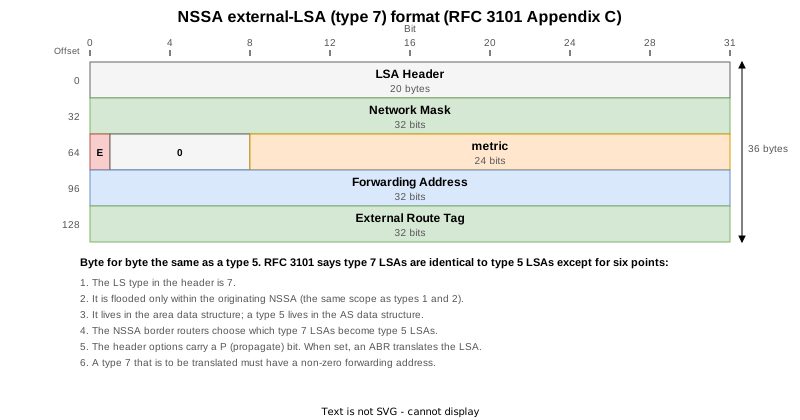
A 20-byte header plus a 16-byte body: 36 bytes, the same as a type 5 (RFC 3101 Appendix C; the fields are defined in RFC 2328 Appendix A.4.5).
| Field | Size | Content |
|---|---|---|
| Network Mask | 4 bytes | The mask of the external destination |
| E | 1 bit | 0 means E1, 1 means E2. E2 is the default |
| metric | 3 bytes | The external cost |
| Forwarding Address | 4 bytes | Must be non-zero on a type 7 with the P bit set |
| External Route Tag | 4 bytes | An arbitrary 32-bit value |
Test topology

Seven XRd routers (IOS XR 26.1.1) on CML. Area 2 is the NSSA, and of its ABRs R3 and R4, R4, with the higher router ID, is the translator. R5 and R6 are ASBRs inside the NSSA; each can redistribute 192.168.99.0/24, which sits behind GW (a router not running OSPF), with the same next hop 10.2.0.254. R1 and R2 in area 0 are ordinary ASBRs used for comparison with type 5.
Every router-to-router link is point-to-point. Only the LAN joining R5, R6 and GW is broadcast, because three devices share that segment.
| STEP | Change | What it confirms |
|---|---|---|
| 0 | Initial state (R6 redistributes 192.168.99.0/24, R1 redistributes 192.168.1.0/24) | What changes between a type 7 and its translated type 5; the translator and the forwarding address |
| 1 | R6 stops redistributing | The type 7 and the translated type 5 are withdrawn together |
| 2 | R6 redistributes again | Both are rebuilt from 0x80000001 |
| 3 | R5 redistributes the same route as R6 | With destination, cost and forwarding address all matching, R5 originates no type 7 |
| 4 | R2 also redistributes R1’s 192.168.1.0/24 | As type 5 LSAs, both stay |
| 5 | R5’s metric set to 10 | With different costs both are listed, and the translated type 5 carries R5’s contents |
| 6 | R5’s metric back to 20 | Equivalent again, so R5 withdraws |
| 7 | R5’s next hop changed to 10.2.0.6 | A different forwarding address alone keeps both listed |
| 8 | nssa default-information-originate on R4 (final state) | The ABR’s default type 7 has the P bit clear and forwarding address 0.0.0.0 |
The sections that follow are organised by property of the type 7, not in STEP order.
What translation rewrites
When an NSSA has several ABRs, the one with the highest router ID does the translating (RFC 3101 Section 3.1). The translator picks only type 7 LSAs with the P bit set and a non-zero forwarding address, and builds a type 5 by these rules (Section 3.2).
- Network, mask, path type (E1/E2), metric, forwarding address and tag are copied from the type 7
- The advertising router becomes the translator’s own router ID
- The LS type becomes 5. A type 5 has no P bit, so it disappears from the options too

Here R4 (4.4.4.4) has a higher router ID than R3 (3.3.3.3), so R4 is the translator. In the area 2 part of show ospf, only R4 has the translation line.
    Area 2
	Number of interfaces in this area is 1
	It is a NSSA area
Perform type-7/type-5 LSA translation Area 2
Number of interfaces in this area is 1
It is a NSSA areaThis is the LSU that went onto the NSSA LAN right after R6 redistributed again (STEP 2). One LSU carries the type 7 and R6’s router-LSA. The type 7 has the P bit set, and its forwarding address is R6’s next hop 10.2.0.254.
Open Shortest Path First
    OSPF Header
        Version: 2
        Message Type: LS Update (4)
        Packet Length: 136
        Source OSPF Router: 6.6.6.6
        Area ID: 0.0.0.2
        Checksum: 0x341f [correct]
        Instance ID: Base IPv4 Unicast Instance (0)
        Auth Type: Null (0)
        Auth Data (none): 0000000000000000
    LS Update Packet
        Number of LSAs: 2
        LSA-type 7 (NSSA AS-External-LSA), len 36
            .000 0000 0000 0001 = LS Age (seconds): 1
            0... .... .... .... = Do Not Age Flag: 0
            Options: 0x28, (DC) Demand Circuits, (P) Propagate
                0... .... = DN: Not set
                .0.. .... = (O) Opaque: Not set
                ..1. .... = (DC) Demand Circuits: Supported
                ...0 .... = (L) LLS Data block: Not Present
                .... 1... = (P) Propagate: Set
                .... .0.. = (MC) Multicast: Not capable
                .... ..0. = (E) External Routing: Not capable
                .... ...0 = (MT) Multi-Topology Routing: No
            LS Type: NSSA AS-External-LSA (7)
            Link State ID: 192.168.99.0
            Advertising Router: 6.6.6.6
            Sequence Number: 0x80000001
            Checksum: 0x2086
            Length: 36
            Netmask: 255.255.255.0
            1... .... = External Type: Type 2 (metric is larger than any other link state path)
            .000 0000 = TOS: 0
            Metric: 20
            Forwarding Address: 10.2.0.254
            External Route Tag: 0
        LSA-type 1 (Router-LSA), len 72
            .000 0000 0000 0001 = LS Age (seconds): 1
            0... .... .... .... = Do Not Age Flag: 0
            Options: 0x28, (DC) Demand Circuits, (N) NSSA
                0... .... = DN: Not set
                .0.. .... = (O) Opaque: Not set
                ..1. .... = (DC) Demand Circuits: Supported
                ...0 .... = (L) LLS Data block: Not Present
                .... 1... = (N) NSSA: Supported
                .... .0.. = (MC) Multicast: Not capable
                .... ..0. = (E) External Routing: Not capable
                .... ...0 = (MT) Multi-Topology Routing: No
            LS Type: Router-LSA (1)
            Link State ID: 6.6.6.6
            Advertising Router: 6.6.6.6
            Sequence Number: 0x80000008
            Checksum: 0xd823
            Length: 72
            Flags: 0x02, (E) AS boundary router
                0... .... = (H) Host: No
                ..0. .... = (S) Shortcut-capable ABR: No
                ...0 .... = (N) NSSA translation: No
                .... 0... = (W) Wild-card multicast receiver: No
                .... .0.. = (V) Virtual link endpoint: No
                .... ..1. = (E) AS boundary router: Yes
                .... ...0 = (B) Area border router: No
            Number of Links: 4
            Type: Stub     ID: 6.6.6.6         Data: 255.255.255.255 Metric: 1
                Link ID: 6.6.6.6 - IP network/subnet number
                Link Data: 255.255.255.255
                Link Type: 3 - Connection to a stub network
                Number of Metrics: 0 - TOS
                0 Metric: 1
            Type: PTP      ID: 4.4.4.4         Data: 10.2.46.6       Metric: 1
                Link ID: 4.4.4.4 - Neighboring router's Router ID
                Link Data: 10.2.46.6
                Link Type: 1 - Point-to-point connection to another router
                Number of Metrics: 0 - TOS
                0 Metric: 1
            Type: Stub     ID: 10.2.46.0       Data: 255.255.255.0   Metric: 1
                Link ID: 10.2.46.0 - IP network/subnet number
                Link Data: 255.255.255.0
                Link Type: 3 - Connection to a stub network
                Number of Metrics: 0 - TOS
                0 Metric: 1
            Type: Transit  ID: 10.2.0.6        Data: 10.2.0.6        Metric: 1
                Link ID: 10.2.0.6 - IP address of Designated Router
                Link Data: 10.2.0.6
                Link Type: 2 - Connection to a transit network
                Number of Metrics: 0 - TOS
0 Metric: 156 ms later R4 sent this type 5 into area 0. The advertising router is now 4.4.4.4 and the P bit is gone. Network, mask, E2, metric 20, forwarding address and tag match the type 7.
Open Shortest Path First
    OSPF Header
        Version: 2
        Message Type: LS Update (4)
        Packet Length: 64
        Source OSPF Router: 4.4.4.4
        Area ID: 0.0.0.0 (Backbone)
        Checksum: 0xaef8 [correct]
        Instance ID: Base IPv4 Unicast Instance (0)
        Auth Type: Null (0)
        Auth Data (none): 0000000000000000
    LS Update Packet
        Number of LSAs: 1
        LSA-type 5 (AS-External-LSA (ASBR)), len 36
            .000 0000 0000 0001 = LS Age (seconds): 1
            0... .... .... .... = Do Not Age Flag: 0
            Options: 0x20, (DC) Demand Circuits
                0... .... = DN: Not set
                .0.. .... = (O) Opaque: Not set
                ..1. .... = (DC) Demand Circuits: Supported
                ...0 .... = (L) LLS Data block: Not Present
                .... 0... = (N) NSSA: Not supported
                .... .0.. = (MC) Multicast: Not capable
                .... ..0. = (E) External Routing: Not capable
                .... ...0 = (MT) Multi-Topology Routing: No
            LS Type: AS-External-LSA (ASBR) (5)
            Link State ID: 192.168.99.0
            Advertising Router: 4.4.4.4
            Sequence Number: 0x80000001
            Checksum: 0xf0c7
            Length: 36
            Netmask: 255.255.255.0
            1... .... = External Type: Type 2 (metric is larger than any other link state path)
            .000 0000 = TOS: 0
            Metric: 20
            Forwarding Address: 10.2.0.254
External Route Tag: 0What the forwarding address does
The forwarding address of a type 7 is the next hop of the redistributed route, copied as is, provided that next hop sits on a network of an interface active in the NSSA (RFC 3101 Section 2.3). A type 7 with the P bit set must have a non-zero forwarding address; without the P bit it may be 0.0.0.0.
The translated type 5 carries the same address, so routers in area 0 forward towards the forwarding address, not towards the translator. RFC 3101 describes this as efficient routing when the NSSA has several exits. An ordinary type 5 from an ASBR in area 0 has forwarding address 0.0.0.0, and traffic heads for the ASBR itself (R1’s 192.168.1.0/24 here).
In this lab R4 originates the type 5, yet R1 does not pass through R4. In the STEP 0 traceroutes, R1 goes via R3 and R5 and R2 via R4 and R6, both reaching 10.2.0.254. Each is the shortest path to 10.2.0.254.
RP/0/RP0/CPU0:R1#ping 192.168.99.1 source 1.1.1.1 count 50 timeout 1
Sun Sep 13 15:47:30.372 UTC
Type escape sequence to abort.
Sending 50, 100-byte ICMP Echos to 192.168.99.1 timeout is 1 seconds:
!!!!!!!!!!!!!!!!!!!!!!!!!!!!!!!!!!!!!!!!!!!!!!!!!!
Success rate is 100 percent (50/50), round-trip min/avg/max = 10/13/50 ms
RP/0/RP0/CPU0:R1#traceroute 192.168.99.1 source 1.1.1.1
Sun Sep 13 15:47:32.354 UTC

Type escape sequence to abort.
Tracing the route to 192.168.99.1

 1  10.0.13.3 25 msec  4 msec  3 msec
 2  10.2.35.5 10 msec  9 msec  5 msec
3 10.2.0.254 25 msec * 13 msec RP/0/RP0/CPU0:R2#ping 192.168.99.1 source 2.2.2.2 count 50 timeout 1
Sun Sep 13 15:48:11.226 UTC
Type escape sequence to abort.
Sending 50, 100-byte ICMP Echos to 192.168.99.1 timeout is 1 seconds:
!!!!!!!!!!!!!!!!!!!!!!!!!!!!!!!!!!!!!!!!!!!!!!!!!!
Success rate is 100 percent (50/50), round-trip min/avg/max = 9/11/34 ms
RP/0/RP0/CPU0:R2#traceroute 192.168.99.1 source 2.2.2.2
Sun Sep 13 15:48:12.789 UTC
Type escape sequence to abort.
Tracing the route to 192.168.99.1
1 10.0.24.4 61 msec 6 msec 7 msec
2 10.2.46.6 12 msec 8 msec 50 msec
3 10.2.0.254 15 msec * 14 msec The default type 7 from an ABR
When an ABR injects a default route into the NSSA as a type 7, the P bit must be clear (RFC 3101 Section 2.4). With no P bit, the forwarding address may be 0.0.0.0 and the translator does not translate it (Section 3.2 (1)).
This is the type 7 after nssa default-information-originate on R4 in STEP 8. The LSU comes from R6 because R6, the DR on the LAN, refloods the LSA it received from R4.
Open Shortest Path First
    OSPF Header
        Version: 2
        Message Type: LS Update (4)
        Packet Length: 64
        Source OSPF Router: 6.6.6.6
        Area ID: 0.0.0.2
        Checksum: 0x3567 [correct]
        Instance ID: Base IPv4 Unicast Instance (0)
        Auth Type: Null (0)
        Auth Data (none): 0000000000000000
    LS Update Packet
        Number of LSAs: 1
        LSA-type 7 (NSSA AS-External-LSA), len 36
            .000 0000 0000 0010 = LS Age (seconds): 2
            0... .... .... .... = Do Not Age Flag: 0
            Options: 0x20, (DC) Demand Circuits
                0... .... = DN: Not set
                .0.. .... = (O) Opaque: Not set
                ..1. .... = (DC) Demand Circuits: Supported
                ...0 .... = (L) LLS Data block: Not Present
                .... 0... = (P) Propagate: Not set
                .... .0.. = (MC) Multicast: Not capable
                .... ..0. = (E) External Routing: Not capable
                .... ...0 = (MT) Multi-Topology Routing: No
            LS Type: NSSA AS-External-LSA (7)
            Link State ID: 0.0.0.0
            Advertising Router: 4.4.4.4
            Sequence Number: 0x80000001
            Checksum: 0x940d
            Length: 36
            Netmask: 0.0.0.0
            1... .... = External Type: Type 2 (metric is larger than any other link state path)
            .000 0000 = TOS: 0
            Metric: 1
            Forwarding Address: 0.0.0.0
External Route Tag: 0This type 7 is not translated, and no LSU appears in the area 0 capture. The default route exists only inside the NSSA.
RP/0/RP0/CPU0:R5#show route ospf
Sun Sep 13 16:32:37.900 UTC

O*N2 0.0.0.0/0 [110/1] via 10.2.0.6, 00:03:13, GigabitEthernet0/0/0/1
O IA 1.1.1.1/32 [110/3] via 10.2.35.3, 01:34:26, GigabitEthernet0/0/0/0
O IA 2.2.2.2/32 [110/4] via 10.2.35.3, 01:33:46, GigabitEthernet0/0/0/0
                [110/4] via 10.2.0.6, 01:33:46, GigabitEthernet0/0/0/1
O IA 3.3.3.3/32 [110/2] via 10.2.35.3, 01:34:26, GigabitEthernet0/0/0/0
O IA 4.4.4.4/32 [110/3] via 10.2.35.3, 01:33:46, GigabitEthernet0/0/0/0
                [110/3] via 10.2.0.6, 01:33:46, GigabitEthernet0/0/0/1
O    6.6.6.6/32 [110/2] via 10.2.0.6, 01:33:46, GigabitEthernet0/0/0/1
O IA 10.0.13.0/24 [110/2] via 10.2.35.3, 01:34:26, GigabitEthernet0/0/0/0
O IA 10.0.24.0/24 [110/3] via 10.2.35.3, 01:33:46, GigabitEthernet0/0/0/0
                  [110/3] via 10.2.0.6, 01:33:46, GigabitEthernet0/0/0/1
O IA 10.0.34.0/24 [110/2] via 10.2.35.3, 01:34:26, GigabitEthernet0/0/0/0
O 10.2.46.0/24 [110/2] via 10.2.0.6, 01:33:46, GigabitEthernet0/0/0/1RP/0/RP0/CPU0:R1#show route ospf
Sun Sep 13 16:30:10.027 UTC
O 2.2.2.2/32 [110/4] via 10.0.13.3, 01:31:53, GigabitEthernet0/0/0/0
O 3.3.3.3/32 [110/2] via 10.0.13.3, 01:32:02, GigabitEthernet0/0/0/0
O 4.4.4.4/32 [110/3] via 10.0.13.3, 01:31:56, GigabitEthernet0/0/0/0
O IA 5.5.5.5/32 [110/3] via 10.0.13.3, 01:31:58, GigabitEthernet0/0/0/0
O IA 6.6.6.6/32 [110/4] via 10.0.13.3, 01:31:56, GigabitEthernet0/0/0/0
O 10.0.24.0/24 [110/3] via 10.0.13.3, 01:31:56, GigabitEthernet0/0/0/0
O 10.0.34.0/24 [110/2] via 10.0.13.3, 01:32:02, GigabitEthernet0/0/0/0
O IA 10.2.0.0/24 [110/3] via 10.0.13.3, 01:31:58, GigabitEthernet0/0/0/0
O IA 10.2.35.0/24 [110/2] via 10.0.13.3, 01:32:02, GigabitEthernet0/0/0/0
O IA 10.2.46.0/24 [110/3] via 10.0.13.3, 01:31:56, GigabitEthernet0/0/0/0
O E2 192.168.99.0/24 [110/20] via 10.0.13.3, 00:11:05, GigabitEthernet0/0/0/0Two routers advertising the same route
When two routers inside an NSSA originate type 7 LSAs with the same destination, cost and non-zero forwarding address, the less preferred one flushes its own type 7 (RFC 3101 Section 2.4). Preference is decided in this order.
- The LSA with the P bit set wins
- With equal P bits, the higher router ID wins
If any of the three differs, both type 7 LSAs stay in the NSSA. The translator turns into a type 5 only a type 7 it has installed. It rebuilds an existing translated type 5 when the path type or cost changes, or when the forwarding address no longer maps to a translatable type 7 (Section 3.2 (2)).
Type 5 LSAs in area 0 have no such flushing rule. If two routers advertise the same destination, both stay.

R5 (5.5.5.5) and R6 (6.6.6.6) both set the P bit, so R5, with the lower router ID, is the less preferred one. Applied to each STEP:
| STEP | R5’s type 7 | The three conditions | Inside the NSSA | Translated type 5 |
|---|---|---|---|---|
| 3 | Same as R6 (metric 20, FA 10.2.0.254) | Match | R6’s only | Unchanged |
| 5 | Metric 10 | Cost differs | Two | Rebuilt with R5’s contents (metric 10) |
| 6 | Metric back to 20 | Match | R5 flushes, R6’s only | Rebuilt with R6’s contents |
| 7 | FA 10.2.0.6 | FA differs | Two | Still R6’s contents |
With all three matching, R5 advertises no type 7 (STEP 3)
This is R5’s syslog right after the same static route and redistribution were added. It says it will not redistribute because R6 already advertises the route.
RP/0/RP0/CPU0:Sep 13 16:03:35.694 UTC: ospf[1035]: %ROUTING-OSPF-6-NOTREDIST3 : build_ex_route(): don't redistribute net 192.168.99.0/24, 6.6.6.6 advertises it already R5 has no self-originated type 7.
RP/0/RP0/CPU0:R5#show ospf database nssa-external self-originate
Sun Sep 13 16:06:57.575 UTC


            OSPF Router with ID (5.5.5.5) (Process ID 1)
Both type 5 LSAs stay (STEP 4)
With R2 also redistributing R1’s 192.168.1.0/24, area 0 holds two type 5 LSAs.
RP/0/RP0/CPU0:R3#show ospf database external
Sun Sep 13 16:11:04.846 UTC


            OSPF Router with ID (3.3.3.3) (Process ID 1)

		Type-5 AS External Link States

  Routing Bit Set on this LSA
  LS age: 391
  Options: (No TOS-capability, DC)
  LS Type: AS External Link
  Link State ID: 192.168.1.0 (External Network Number)
  Advertising Router: 1.1.1.1
  LS Seq Number: 80000003
  Checksum: 0x927
  Length: 36
  Network Mask: /24
	Metric Type: 2 (Larger than any link state path)
	TOS: 0
	Metric: 20
	Forward Address: 0.0.0.0
	External Route Tag: 0

  LS age: 138
  Options: (No TOS-capability, DC)
  LS Type: AS External Link
  Link State ID: 192.168.1.0 (External Network Number)
  Advertising Router: 2.2.2.2
  LS Seq Number: 80000001
  Checksum: 0xee3f
  Length: 36
  Network Mask: /24
	Metric Type: 2 (Larger than any link state path)
	TOS: 0
	Metric: 20
	Forward Address: 0.0.0.0
	External Route Tag: 0

  Routing Bit Set on this LSA
  LS age: 763
  Options: (No TOS-capability, DC)
  LS Type: AS External Link
  Link State ID: 192.168.99.0 (External Network Number)
  Advertising Router: 4.4.4.4
  LS Seq Number: 80000001
  Checksum: 0xf0c7
  Length: 36
  Network Mask: /24
	Metric Type: 2 (Larger than any link state path)
	TOS: 0
	Metric: 20
	Forward Address: 10.2.0.254
	External Route Tag: 0
A different cost gives two LSAs and a rebuilt type 5 (STEP 5)
With R5’s metric at 10, two type 7 LSAs sit in the NSSA. Routing Bit Set on this LSA marks the LSA R4 installed, and it appears only on R5’s, the one with the lower metric.
RP/0/RP0/CPU0:R4#show ospf database nssa-external
Sun Sep 13 16:16:45.511 UTC


            OSPF Router with ID (4.4.4.4) (Process ID 1)

		Type-7 AS External Link States (Area 2)

  Routing Bit Set on this LSA
  LS age: 174
  Options: (No TOS-capability, Type 7/5 translation, DC)
  LS Type: AS External Link
  Link State ID: 192.168.99.0 (External Network Number)
  Advertising Router: 5.5.5.5
  LS Seq Number: 80000001
  Checksum: 0xd9da
  Length: 36
  Network Mask: /24
	Metric Type: 2 (Larger than any link state path)
	TOS: 0
	Metric: 10
	Forward Address: 10.2.0.254
	External Route Tag: 0

  LS age: 1104
  Options: (No TOS-capability, Type 7/5 translation, DC)
  LS Type: AS External Link
  Link State ID: 192.168.99.0 (External Network Number)
  Advertising Router: 6.6.6.6
  LS Seq Number: 80000001
  Checksum: 0x2086
  Length: 36
  Network Mask: /24
	Metric Type: 2 (Larger than any link state path)
	TOS: 0
	Metric: 20
	Forward Address: 10.2.0.254
	External Route Tag: 0
Area 0 still has one type 5, now with metric 10 and sequence 80000002. The advertising router is still 4.4.4.4.
RP/0/RP0/CPU0:R1#show ospf database external
Sun Sep 13 16:14:49.438 UTC


            OSPF Router with ID (1.1.1.1) (Process ID 1)

		Type-5 AS External Link States

  LS age: 615
  Options: (No TOS-capability, DC)
  LS Type: AS External Link
  Link State ID: 192.168.1.0 (External Network Number)
  Advertising Router: 1.1.1.1
  LS Seq Number: 80000003
  Checksum: 0x927
  Length: 36
  Network Mask: /24
	Metric Type: 2 (Larger than any link state path)
	TOS: 0
	Metric: 20
	Forward Address: 0.0.0.0
	External Route Tag: 0

  Routing Bit Set on this LSA
  LS age: 364
  Options: (No TOS-capability, DC)
  LS Type: AS External Link
  Link State ID: 192.168.1.0 (External Network Number)
  Advertising Router: 2.2.2.2
  LS Seq Number: 80000001
  Checksum: 0xee3f
  Length: 36
  Network Mask: /24
	Metric Type: 2 (Larger than any link state path)
	TOS: 0
	Metric: 20
	Forward Address: 0.0.0.0
	External Route Tag: 0

  Routing Bit Set on this LSA
  LS age: 57
  Options: (No TOS-capability, DC)
  LS Type: AS External Link
  Link State ID: 192.168.99.0 (External Network Number)
  Advertising Router: 4.4.4.4
  LS Seq Number: 80000002
  Checksum: 0x8a37
  Length: 36
  Network Mask: /24
	Metric Type: 2 (Larger than any link state path)
	TOS: 0
	Metric: 10
	Forward Address: 10.2.0.254
	External Route Tag: 0
Matching again makes R5 flush (STEP 6)
Setting R5’s metric back to 20 produces the same syslog as STEP 3.
RP/0/RP0/CPU0:Sep 13 16:19:04.175 UTC: ospf[1035]: %ROUTING-OSPF-6-NOTREDIST3 : build_ex_route(): don't redistribute net 192.168.99.0/24, 6.6.6.6 advertises it already R5 then sent this flushing LSU, with LS age 3600 (MaxAge). 168 ms later R4 rebuilt the type 5 with the metric 20 contents (sequence 0x80000003).
Open Shortest Path First
    OSPF Header
        Version: 2
        Message Type: LS Update (4)
        Packet Length: 64
        Source OSPF Router: 5.5.5.5
        Area ID: 0.0.0.2
        Checksum: 0x1173 [correct]
        Instance ID: Base IPv4 Unicast Instance (0)
        Auth Type: Null (0)
        Auth Data (none): 0000000000000000
    LS Update Packet
        Number of LSAs: 1
        LSA-type 7 (NSSA AS-External-LSA), len 36
            .000 1110 0001 0000 = LS Age (seconds): 3600
            0... .... .... .... = Do Not Age Flag: 0
            Options: 0x28, (DC) Demand Circuits, (P) Propagate
                0... .... = DN: Not set
                .0.. .... = (O) Opaque: Not set
                ..1. .... = (DC) Demand Circuits: Supported
                ...0 .... = (L) LLS Data block: Not Present
                .... 1... = (P) Propagate: Set
                .... .0.. = (MC) Multicast: Not capable
                .... ..0. = (E) External Routing: Not capable
                .... ...0 = (MT) Multi-Topology Routing: No
            LS Type: NSSA AS-External-LSA (7)
            Link State ID: 192.168.99.0
            Advertising Router: 5.5.5.5
            Sequence Number: 0x80000002
            Checksum: 0x734a
            Length: 36
            Netmask: 255.255.255.0
            1... .... = External Type: Type 2 (metric is larger than any other link state path)
            .000 0000 = TOS: 0
            Metric: 16777215
            Forwarding Address: 10.2.0.254
External Route Tag: 0A different forwarding address alone also gives two LSAs (STEP 7)
Changing R5’s next hop to 10.2.0.6 changes the forwarding address of R5’s type 7 to 10.2.0.6. The cost is the same, so R4 installs both.
RP/0/RP0/CPU0:R4#show ospf database nssa-external
Sun Sep 13 16:27:04.030 UTC


            OSPF Router with ID (4.4.4.4) (Process ID 1)

		Type-7 AS External Link States (Area 2)

  Routing Bit Set on this LSA
  LS age: 171
  Options: (No TOS-capability, Type 7/5 translation, DC)
  LS Type: AS External Link
  Link State ID: 192.168.99.0 (External Network Number)
  Advertising Router: 5.5.5.5
  LS Seq Number: 80000001
  Checksum: 0xa003
  Length: 36
  Network Mask: /24
	Metric Type: 2 (Larger than any link state path)
	TOS: 0
	Metric: 20
	Forward Address: 10.2.0.6
	External Route Tag: 0

  Routing Bit Set on this LSA
  LS age: 1722
  Options: (No TOS-capability, Type 7/5 translation, DC)
  LS Type: AS External Link
  Link State ID: 192.168.99.0 (External Network Number)
  Advertising Router: 6.6.6.6
  LS Seq Number: 80000001
  Checksum: 0x2086
  Length: 36
  Network Mask: /24
	Metric Type: 2 (Larger than any link state path)
	TOS: 0
	Metric: 20
	Forward Address: 10.2.0.254
	External Route Tag: 0
The translated type 5 still maps to forwarding address 10.2.0.254, the same as R6’s type 7, so it is not rebuilt and no LSU appears in the area 0 capture.
Withdrawal and re-origination
An LSA is withdrawn by setting its LS age to MaxAge (3600 seconds) and flooding it again (RFC 2328 Section 14.1). When a type 7 is withdrawn, the translator also withdraws the type 5 built from it (RFC 3101 Section 3.3). An LSA originated again after leaving the LSDB starts from the initial sequence number 0x80000001 (RFC 2328 Section 12.1.6).
This is the capture from STEP 1, when R6 stopped redistributing. R6’s type 7 and, 121 ms later, R4’s type 5 both went out with LS age 3600. Both carry metric 16777215 (LSInfinity).
Open Shortest Path First
    OSPF Header
        Version: 2
        Message Type: LS Update (4)
        Packet Length: 64
        Source OSPF Router: 6.6.6.6
        Area ID: 0.0.0.2
        Checksum: 0x7709 [correct]
        Instance ID: Base IPv4 Unicast Instance (0)
        Auth Type: Null (0)
        Auth Data (none): 0000000000000000
    LS Update Packet
        Number of LSAs: 1
        LSA-type 7 (NSSA AS-External-LSA), len 36
            .000 1110 0001 0000 = LS Age (seconds): 3600
            0... .... .... .... = Do Not Age Flag: 0
            Options: 0x28, (DC) Demand Circuits, (P) Propagate
                0... .... = DN: Not set
                .0.. .... = (O) Opaque: Not set
                ..1. .... = (DC) Demand Circuits: Supported
                ...0 .... = (L) LLS Data block: Not Present
                .... 1... = (P) Propagate: Set
                .... .0.. = (MC) Multicast: Not capable
                .... ..0. = (E) External Routing: Not capable
                .... ...0 = (MT) Multi-Topology Routing: No
            LS Type: NSSA AS-External-LSA (7)
            Link State ID: 192.168.99.0
            Advertising Router: 6.6.6.6
            Sequence Number: 0x80000003
            Checksum: 0x08a3
            Length: 36
            Netmask: 255.255.255.0
            1... .... = External Type: Type 2 (metric is larger than any other link state path)
            .000 0000 = TOS: 0
            Metric: 16777215
            Forwarding Address: 6.6.6.6
External Route Tag: 0Open Shortest Path First
OSPF Header
Version: 2
Message Type: LS Update (4)
Packet Length: 64
Source OSPF Router: 4.4.4.4
Area ID: 0.0.0.0 (Backbone)
Checksum: 0x6c1e [correct]
Instance ID: Base IPv4 Unicast Instance (0)
Auth Type: Null (0)
Auth Data (none): 0000000000000000
LS Update Packet
Number of LSAs: 1
LSA-type 5 (AS-External-LSA (ASBR)), len 36
.000 1110 0001 0000 = LS Age (seconds): 3600
0... .... .... .... = Do Not Age Flag: 0
Options: 0x20, (DC) Demand Circuits
0... .... = DN: Not set
.0.. .... = (O) Opaque: Not set
..1. .... = (DC) Demand Circuits: Supported
...0 .... = (L) LLS Data block: Not Present
.... 0... = (N) NSSA: Not supported
.... .0.. = (MC) Multicast: Not capable
.... ..0. = (E) External Routing: Not capable
.... ...0 = (MT) Multi-Topology Routing: No
LS Type: AS-External-LSA (ASBR) (5)
Link State ID: 192.168.99.0
Advertising Router: 4.4.4.4
Sequence Number: 0x80000003
Checksum: 0x24a6
Length: 36
Netmask: 255.255.255.0
1... .... = External Type: Type 2 (metric is larger than any other link state path)
.000 0000 = TOS: 0
Metric: 16777215
Forwarding Address: 10.2.0.254
External Route Tag: 0When redistribution comes back in STEP 2, the type 7 and the type 5 are both rebuilt at 0x80000001 (the captures in “What translation rewrites”).
References
| Document | Section | Content |
|---|---|---|
| RFC 3101 | Section 2.3 | Definition of type 7. The six differences from type 5, choosing the forwarding address |
| RFC 3101 | Section 2.4 | Originating type 7. Flushing an equivalent type 7, the P bit of an ABR’s default type 7 |
| RFC 3101 | Section 3.1 | Translator election |
| RFC 3101 | Section 3.2 | Translating type 7 into type 5 |
| RFC 3101 | Section 3.3 | Flushing translated type 5 LSAs |
| RFC 3101 | Appendix C | Type 7 packet format |
| RFC 2328 | Appendix A.4.5 | Type 5 packet format |
| RFC 2328 | Section 12.1.6 | LS sequence number |
| RFC 2328 | Section 14.1 | Premature aging of LSAs |
Test configs and show output
At every STEP the following files were collected from all seven routers, one file per router. The test config is the ..._run.txt (the final state is STEP 8’s).
| File | Content |
|---|---|
..._show.txt | show version / show interface description / show route / show route ospf / show ospf / show ospf interface / show ospf interface brief / show ospf neighbor / show ospf neighbor detail / show ospf database / show ospf database router / show ospf database network / show ospf statistics interface / show ospf database nssa-external / show ospf database nssa-external self-originate / show ospf database external / show ospf database database-summary |
..._log.txt | show logging limited to that STEP |
..._run.txt | show running-config at that STEP (the test config of that STEP) |
..._trace.txt | show ospf trace spf_ext / show ospf trace adj_cycle / show ospf trace events / show ospf trace adj |
..._ping.txt | ping and traceroute from R1 and R2 to GW (192.168.99.1) |
..._commit.cfg | show configuration commit changes last 1 on the router changed in that STEP |
STEP 0: Initial state (R6 redistributes 192.168.99.0/24, R1 redistributes 192.168.1.0/24)
| Router | show output | syslog | running-config | trace | ping | Config applied |
|---|---|---|---|---|---|---|
| R1 | show | log | run | trace | ping | - |
| R2 | show | log | run | trace | ping | - |
| R3 | show | log | run | trace | - | - |
| R4 | show | log | run | trace | - | - |
| R5 | show | log | run | trace | - | - |
| R6 | show | log | run | trace | - | - |
| GW | show | log | run | trace | - | - |
STEP 1: R6 stops redistributing
| Router | show output | syslog | running-config | trace | ping | Config applied |
|---|---|---|---|---|---|---|
| R1 | show | log | run | trace | ping | - |
| R2 | show | log | run | trace | ping | - |
| R3 | show | log | run | trace | - | - |
| R4 | show | log | run | trace | - | - |
| R5 | show | log | run | trace | - | - |
| R6 | show | log | run | trace | - | commit |
| GW | show | log | run | trace | - | - |
STEP 2: R6 redistributes again
| Router | show output | syslog | running-config | trace | ping | Config applied |
|---|---|---|---|---|---|---|
| R1 | show | log | run | trace | ping | - |
| R2 | show | log | run | trace | ping | - |
| R3 | show | log | run | trace | - | - |
| R4 | show | log | run | trace | - | - |
| R5 | show | log | run | trace | - | - |
| R6 | show | log | run | trace | - | commit |
| GW | show | log | run | trace | - | - |
STEP 3: R5 redistributes the same route as R6
| Router | show output | syslog | running-config | trace | ping | Config applied |
|---|---|---|---|---|---|---|
| R1 | show | log | run | trace | ping | - |
| R2 | show | log | run | trace | ping | - |
| R3 | show | log | run | trace | - | - |
| R4 | show | log | run | trace | - | - |
| R5 | show | log | run | trace | - | commit |
| R6 | show | log | run | trace | - | - |
| GW | show | log | run | trace | - | - |
STEP 4: R2 also redistributes R1’s 192.168.1.0/24
| Router | show output | syslog | running-config | trace | ping | Config applied |
|---|---|---|---|---|---|---|
| R1 | show | log | run | trace | ping | - |
| R2 | show | log | run | trace | ping | commit |
| R3 | show | log | run | trace | - | - |
| R4 | show | log | run | trace | - | - |
| R5 | show | log | run | trace | - | - |
| R6 | show | log | run | trace | - | - |
| GW | show | log | run | trace | - | - |
STEP 5: R5’s metric set to 10
| Router | show output | syslog | running-config | trace | ping | Config applied |
|---|---|---|---|---|---|---|
| R1 | show | log | run | trace | ping | - |
| R2 | show | log | run | trace | ping | - |
| R3 | show | log | run | trace | - | - |
| R4 | show | log | run | trace | - | - |
| R5 | show | log | run | trace | - | commit |
| R6 | show | log | run | trace | - | - |
| GW | show | log | run | trace | - | - |
STEP 6: R5’s metric back to 20
| Router | show output | syslog | running-config | trace | ping | Config applied |
|---|---|---|---|---|---|---|
| R1 | show | log | run | trace | ping | - |
| R2 | show | log | run | trace | ping | - |
| R3 | show | log | run | trace | - | - |
| R4 | show | log | run | trace | - | - |
| R5 | show | log | run | trace | - | commit |
| R6 | show | log | run | trace | - | - |
| GW | show | log | run | trace | - | - |
STEP 7: R5’s next hop changed to 10.2.0.6
| Router | show output | syslog | running-config | trace | ping | Config applied |
|---|---|---|---|---|---|---|
| R1 | show | log | run | trace | ping | - |
| R2 | show | log | run | trace | ping | - |
| R3 | show | log | run | trace | - | - |
| R4 | show | log | run | trace | - | - |
| R5 | show | log | run | trace | - | commit |
| R6 | show | log | run | trace | - | - |
| GW | show | log | run | trace | - | - |
STEP 8: nssa default-information-originate on R4 (final state)
| Router | show output | syslog | running-config | trace | ping | Config applied |
|---|---|---|---|---|---|---|
| R1 | show | log | run | trace | ping | - |
| R2 | show | log | run | trace | ping | - |
| R3 | show | log | run | trace | - | - |
| R4 | show | log | run | trace | - | commit |
| R5 | show | log | run | trace | - | - |
| R6 | show | log | run | trace | - | - |
| GW | show | log | run | trace | - | - |
Packet captures were taken per STEP at two points: the NSSA LAN (R6 - LAN-SW) and area 0 (R3 - R4). The LSUs quoted above are No.2 (NSSA LAN) and No.1 (area 0) in STEP 1, No.2 (both) in STEP 2, and No.2 in STEP 6 and No.3 in STEP 8 (NSSA LAN).
| STEP | NSSA LAN (R6 - LAN-SW) | area 0 (R3 - R4) |
|---|---|---|
| 0 | pcap | pcap |
| 1 | pcap | pcap |
| 2 | pcap | pcap |
| 3 | pcap | pcap |
| 4 | pcap | pcap |
| 5 | pcap | pcap |
| 6 | pcap | pcap |
| 7 | pcap | pcap |
| 8 | pcap | pcap |
Related articles
- What is OSPF
- OSPF Router ID
- OSPF Behavior When Router IDs Collide
- OSPF Packet Types and Header Format
- OSPF Authentication
- OSPF Neighbor States
- OSPF Options Field
- OSPF DR and BDR
- OSPF Network Types
- OSPF Cost (Metric)
- OSPF Equal-Cost Multi-Path (ECMP)
- OSPF External Routes (Redistributing Static Routes)
- OSPF RFC1583 Compatibility (External Route Selection Rules)
- OSPF Forwarding Address of AS External Routes
- OSPF Multiple Areas and the ABR
- OSPF Virtual Links
- OSPF Stub and Totally Stubby Areas
- OSPF NSSA and Totally NSSA
- OSPF Default Route
- OSPF Route Summarization
- OSPF LSAs and the LSA Header
- OSPF Hello and Dead Intervals
- OSPF Convergence Timers (SPF / LSA Throttling)
- OSPF LSA Refresh and Pacing
- OSPF router-LSA (type 1)
- OSPF network-LSA (type 2)
- OSPF summary-LSA (type 3)
- OSPF ASBR summary-LSA (type 4)
- OSPF AS external-LSA (type 5)
- OSPF NSSA External-LSA (Type 7)