OSPF Packet Types and Header Format
OSPF uses five packet types to discover neighbours, synchronise the LSDB and keep it synchronised. Every one of them starts with the same 24-byte header, and what follows differs per type.
This article goes through the fields of that common header and the format of each of the five packets, then looks at their contents one by one in captures taken on real routers.
Encapsulation and destination addresses
OSPF uses neither TCP nor UDP: it is carried directly as the payload of an IP packet. The protocol number in the IPv4 header is 89.
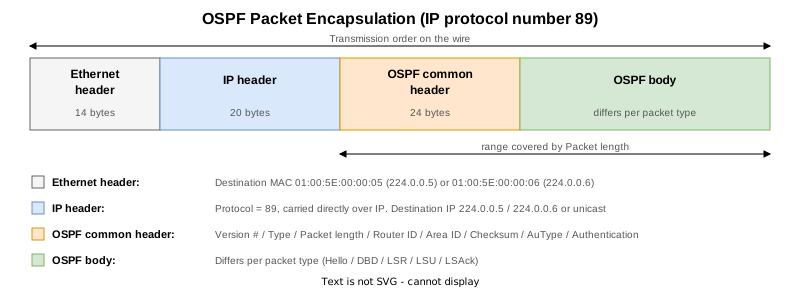
Depending on what it is for, the destination is one of two multicast addresses or a unicast address.
| Destination | Name | When it is used |
|---|---|---|
224.0.0.5 | AllSPFRouters | Every router running OSPF on the link. Hellos, and flooding from the DR or BDR |
224.0.0.6 | AllDRouters | The DR and BDR. Used when a DROther sends an LSA (RFC 2328 Section 13.3) |
| Unicast | — | DBD, LSR and LSU packets addressed to one neighbour |
Multicast destinations map to the Ethernet addresses 01:00:5E:00:00:05 and 01:00:5E:00:00:06. The IP TTL is 1, so the packets never leave the link: Appendix D of RFC 2328 says these addresses “should never be forwarded… To ensure that these packets will not travel multiple hops, their IP TTL must be set to 1”.
The five packet types
They are told apart by the Type field of the common header.
| Type | Name | Role |
|---|---|---|
| 1 | Hello | Discovers OSPF routers on the link and keeps the neighbour relationship alive; also checks that the parameters match |
| 2 | DBD (Database Description) | Sends the headers of the LSAs in the router’s own LSDB: a table of contents |
| 3 | LSR (Link State Request) | Asks for the LSAs that the table of contents showed to be missing or newer |
| 4 | LSU (Link State Update) | Carries the LSAs themselves. One LSU can hold several LSAs |
| 5 | LSAck (Link State Acknowledgment) | Acknowledges the LSAs received. OSPF does not use TCP, so this is what makes delivery reliable |
How they map onto the neighbour states is covered in OSPF Neighbor States.
The common header
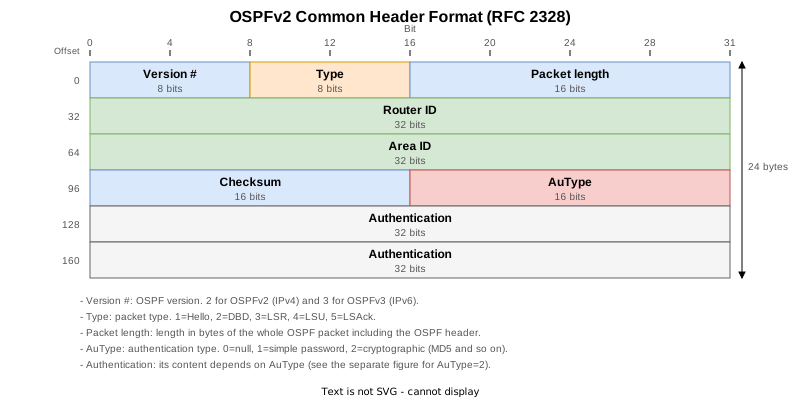
The same 24 bytes on all five types.
| Field | Size | Description |
|---|---|---|
| Version # | 8 bits | 2 for OSPFv2, 3 for OSPFv3 |
| Type | 8 bits | 1 Hello, 2 DBD, 3 LSR, 4 LSU, 5 LSAck |
| Packet length | 16 bits | The length of the whole OSPF packet including this header, in bytes |
| Router ID | 32 bits | The router ID of the sender |
| Area ID | 32 bits | The area of the interface the packet was sent from; 0.0.0.0 is the backbone |
| Checksum | 16 bits | The checksum of the whole packet excluding the 64-bit authentication field |
| AuType | 16 bits | 0 none, 1 simple password, 2 cryptographic |
| Authentication | 64 bits | Contents depend on AuType (next section) |
AuType and the Authentication field
| AuType | Method | What goes in the Authentication field |
|---|---|---|
0 | None | Unused. Anything may be sent and the receiver ignores it |
1 | Simple password | The configured password in the clear, readable in a capture |
2 | Cryptographic | A key identifier and a sequence number, with a message digest appended to the packet |
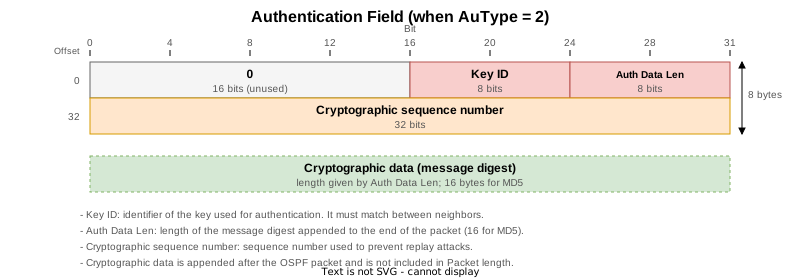
This is the layout when AuType is 2.
| Field | Size | Description |
|---|---|---|
| 0 | 16 bits | Unused, 0 |
| Key ID | 8 bits | Which key is used; it has to match between neighbours |
| Auth Data Len | 8 bits | The length in bytes of the digest appended to the packet; 16 for MD5 |
| Cryptographic sequence number | 32 bits | A non-decreasing value that guards against replay |
With AuType 2 the checksum is not calculated and is set to 0. Step (2) of D.4.3 in RFC 2328 says so; the digest protects integrity instead. RFC 5709 adds HMAC-SHA to this scheme, keeping the header layout unchanged and only altering Auth Data Len (32 for SHA-256). Configuring authentication, and what happens when it does not match, is covered in OSPF Authentication.
Lab verification
Lab setup

Four Cisco IOS XR routers (XRd 26.1.1). Three of them sit on a LAN so that all three roles exist: DR, BDR and DROther. Priorities make R3 the DR, R2 the BDR and R1 a DROther, so the LSUs R1 sends go to 224.0.0.6.
R1 - R4 is a point-to-point link with MD5 authentication, so that packets with AuType 2 can be shown as they are.
| STEP | Change | What it yields |
|---|---|---|
| 0 | Initial state | Steady-state Hellos and the DR / BDR / DROther roles |
| 1 | clear ospf 1 process on R1 | All five types on the LAN, plus LSUs to 224.0.0.6 |
| 2 | clear ospf 1 process on R4 | All five types on the authenticated link (AuType 2) |
| 3 | Checking the final state | — |
The roles on the LAN:
RP/0/RP0/CPU0:R1#show ospf interface brief
Wed Sep 23 15:04:35.961 UTC

* Indicates MADJ interface, (P) Indicates fast detect hold down state

Interfaces for OSPF 1

Interface          PID   Area            IP Address/Mask    Cost  State Nbrs F/C
Lo0                1     0               1.1.1.1/32         1     LOOP  0/0
Gi0/0/0/0          1     0               10.0.123.1/24      1     DROTH 2/2
Gi0/0/0/1          1     0               10.0.14.1/24       1     P2P   1/1
R1’s LAN side is DROTH (DROther) and its link to R4 is P2P.
These are the packets on the LAN when the OSPF process on R1 was reset in STEP 1.
    1 2026-09-24 00:06:48.960939   10.0.123.1 → 224.0.0.5    OSPF 118 Hello Packet
    2 2026-09-24 00:06:50.603440   10.0.123.1 → 224.0.0.6    OSPF 134 LS Update
    3 2026-09-24 00:06:50.610274   10.0.123.3 → 224.0.0.5    OSPF 134 LS Update
    4 2026-09-24 00:06:50.663889   10.0.123.1 → 224.0.0.5    OSPF 110 Hello Packet
    5 2026-09-24 00:06:50.720242   10.0.123.3 → 224.0.0.5    OSPF 94 LS Update
    6 2026-09-24 00:06:52.604326   10.0.123.2 → 224.0.0.5    OSPF 118 Hello Packet
    7 2026-09-24 00:06:52.608506   10.0.123.1 → 10.0.123.2   OSPF 78 DB Description
    8 2026-09-24 00:06:52.611622   10.0.123.2 → 10.0.123.1   OSPF 78 DB Description
    9 2026-09-24 00:06:52.614396   10.0.123.1 → 10.0.123.2   OSPF 98 DB Description
   10 2026-09-24 00:06:52.616276   10.0.123.2 → 224.0.0.5    OSPF 98 LS Acknowledge
   11 2026-09-24 00:06:52.616722   10.0.123.2 → 10.0.123.1   OSPF 158 DB Description
   12 2026-09-24 00:06:52.619421   10.0.123.1 → 10.0.123.2   OSPF 106 LS Request
   13 2026-09-24 00:06:52.619546   10.0.123.1 → 10.0.123.2   OSPF 78 DB Description
   14 2026-09-24 00:06:52.622184   10.0.123.2 → 10.0.123.1   OSPF 250 LS Update
   15 2026-09-24 00:06:52.660768   10.0.123.1 → 224.0.0.6    OSPF 122 LS Update
   16 2026-09-24 00:06:52.663645   10.0.123.2 → 10.0.123.1   OSPF 134 LS Update
All five types are there. The rest of this section takes them one at a time, by packet number.
Hello (type 1)
Open Shortest Path First
    OSPF Header
        Version: 2
        Message Type: Hello Packet (1)
        Packet Length: 52
        Source OSPF Router: 1.1.1.1
        Area ID: 0.0.0.0 (Backbone)
        Checksum: 0xd684 [correct]
        Instance ID: Base IPv4 Unicast Instance (0)
        Auth Type: Null (0)
        Auth Data (none): 0000000000000000
    OSPF Hello Packet
        Network Mask: 255.255.255.0
        Hello Interval [sec]: 10
        Options: 0x12, (L) LLS Data block, (E) External Routing
            0... .... = DN: Not set
            .0.. .... = (O) Opaque: Not set
            ..0. .... = (DC) Demand Circuits: Not supported
            ...1 .... = (L) LLS Data block: Present
            .... 0... = (N) NSSA: Not supported
            .... .0.. = (MC) Multicast: Not capable
            .... ..1. = (E) External Routing: Capable
            .... ...0 = (MT) Multi-Topology Routing: No
        Router Priority: 1
        Router Dead Interval [sec]: 40
        Designated Router: 10.0.123.3
        Backup Designated Router: 10.0.123.2
        Active Neighbor: 2.2.2.2
        Active Neighbor: 3.3.3.3
    OSPF LLS Data Block
        Checksum: 0x7fc2
        LLS Data Length: 32 bytes
        Extended options TLV
            TLV Type: 1
            TLV Length: 4
            Options: 0x00000001, (LR) LSDB Resynchronization
                .... .... .... .... .... .... .... ..0. = (RS) Restart Signal: Not set
                .... .... .... .... .... .... .... ...1 = (LR) LSDB Resynchronization: Set
        Local Interface ID
            TLV Type: 18
            TLV Length: 4
            Local Interface ID: 00000004
        Unknown LLS TLV
            TLV Type: 32768
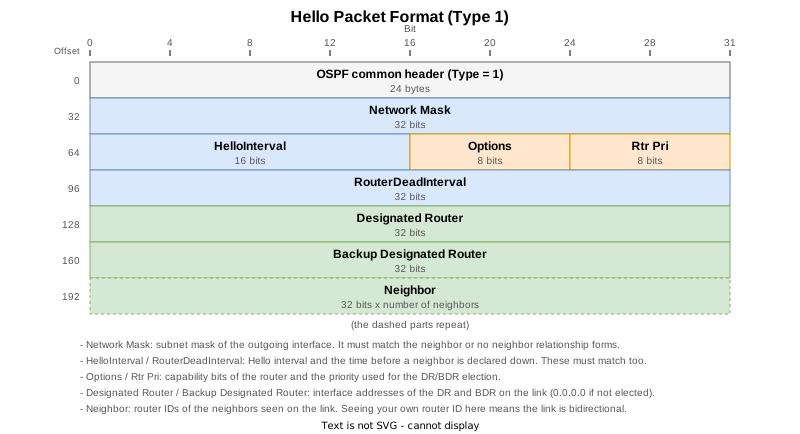
TLV Length: 8The DR and BDR are given as interface addresses, while neighbours are given as router IDs. Here the DR is 10.0.123.3 (R3), the BDR is 10.0.123.2 (R2), and two router IDs are listed as active neighbours. Seeing its own router ID in a neighbour’s Hello is how a router confirms two-way communication.
The bits of Options are covered in The OSPF Options Field.
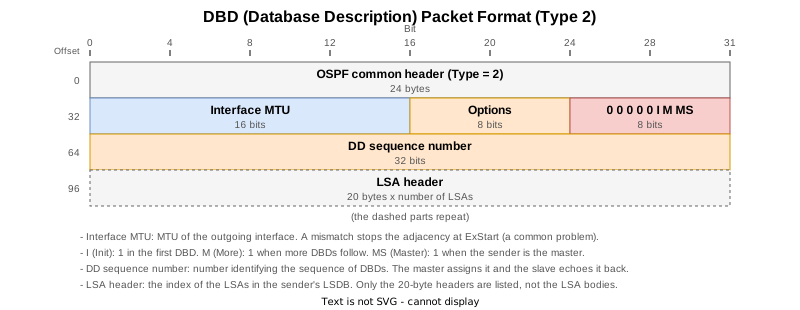
DBD (type 2)
Open Shortest Path First
    OSPF Header
        Version: 2
        Message Type: DB Description (2)
        Packet Length: 52
        Source OSPF Router: 1.1.1.1
        Area ID: 0.0.0.0 (Backbone)
        Checksum: 0x072e [correct]
        Instance ID: Base IPv4 Unicast Instance (0)
        Auth Type: Null (0)
        Auth Data (none): 0000000000000000
    OSPF DB Description
        Interface MTU: 1500
        Options: 0x52, (O) Opaque, (L) LLS Data block, (E) External Routing
            0... .... = DN: Not set
            .1.. .... = (O) Opaque: Set
            ..0. .... = (DC) Demand Circuits: Not supported
            ...1 .... = (L) LLS Data block: Present
            .... 0... = (N) NSSA: Not supported
            .... .0.. = (MC) Multicast: Not capable
            .... ..1. = (E) External Routing: Capable
            .... ...0 = (MT) Multi-Topology Routing: No
        DB Description: 0x02, (M) More
            .... 0... = (R) OOBResync: Not set
            .... .0.. = (I) Init: Not set
            .... ..1. = (M) More: Set
            .... ...0 = (MS) Master: No
DD Sequence: 847757453It carries the interface MTU, the options, the I (Init), M (More) and MS (Master) bits and a sequence number. Only LSA headers travel in it, never the LSAs themselves, and it is sent as unicast.
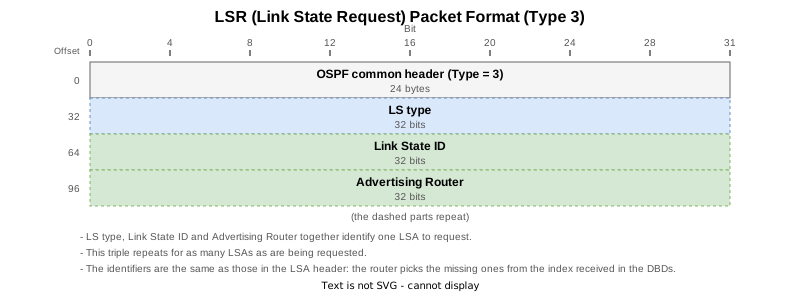
LSR (type 3)
Open Shortest Path First
    OSPF Header
        Version: 2
        Message Type: LS Request (3)
        Packet Length: 72
        Source OSPF Router: 1.1.1.1
        Area ID: 0.0.0.0 (Backbone)
        Checksum: 0x4c80 [correct]
        Instance ID: Base IPv4 Unicast Instance (0)
        Auth Type: Null (0)
        Auth Data (none): 0000000000000000
    Link State Request
        LS Type: Router-LSA (1)
        Link State ID: 2.2.2.2
        Advertising Router: 2.2.2.2
    Link State Request
        LS Type: Router-LSA (1)
        Link State ID: 3.3.3.3
        Advertising Router: 3.3.3.3
    Link State Request
        LS Type: Router-LSA (1)
        Link State ID: 4.4.4.4
        Advertising Router: 4.4.4.4
    Link State Request
        LS Type: Network-LSA (2)
        Link State ID: 10.0.123.3
Advertising Router: 3.3.3.3Each requested LSA is named by the triple of LS type, Link State ID and Advertising Router. Those three identify an LSA uniquely, without knowing anything about its contents.
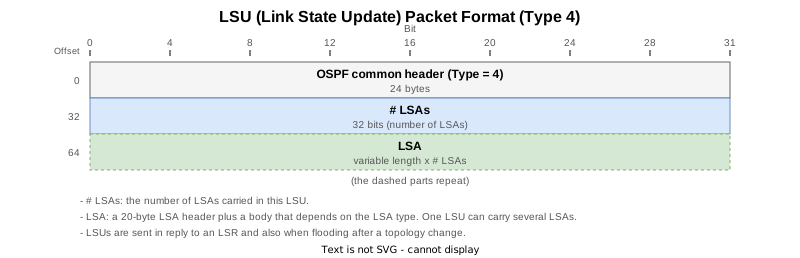
LSU (type 4)
Open Shortest Path First
    OSPF Header
        Version: 2
        Message Type: LS Update (4)
        Packet Length: 216
        Source OSPF Router: 2.2.2.2
        Area ID: 0.0.0.0 (Backbone)
        Checksum: 0xfac5 [correct]
        Instance ID: Base IPv4 Unicast Instance (0)
        Auth Type: Null (0)
        Auth Data (none): 0000000000000000
    LS Update Packet
        Number of LSAs: 4
        LSA-type 1 (Router-LSA), len 48
            .000 0010 0110 0101 = LS Age (seconds): 613
            0... .... .... .... = Do Not Age Flag: 0
            Options: 0x22, (DC) Demand Circuits, (E) External Routing
                0... .... = DN: Not set
                .0.. .... = (O) Opaque: Not set
                ..1. .... = (DC) Demand Circuits: Supported
                ...0 .... = (L) LLS Data block: Not Present
                .... 0... = (N) NSSA: Not supported
                .... .0.. = (MC) Multicast: Not capable
                .... ..1. = (E) External Routing: Capable
                .... ...0 = (MT) Multi-Topology Routing: No
            LS Type: Router-LSA (1)
            Link State ID: 2.2.2.2
            Advertising Router: 2.2.2.2
            Sequence Number: 0x80000003
            Checksum: 0x6196
Length: 48The LSAs themselves follow Number of LSAs. One LSU can carry several of them, which is the point of this packet type.
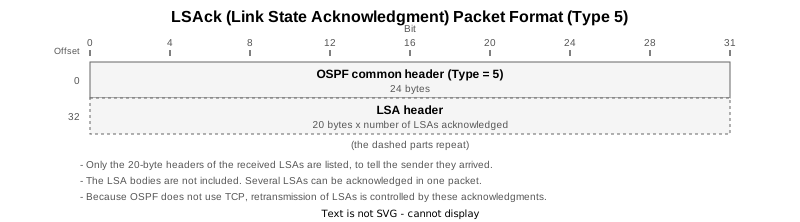
LSAck (type 5)
Open Shortest Path First
    OSPF Header
        Version: 2
        Message Type: LS Acknowledge (5)
        Packet Length: 64
        Source OSPF Router: 2.2.2.2
        Area ID: 0.0.0.0 (Backbone)
        Checksum: 0x5cae [correct]
        Instance ID: Base IPv4 Unicast Instance (0)
        Auth Type: Null (0)
        Auth Data (none): 0000000000000000
    LSA-type 1 (Router-LSA), len 72
        .000 1110 0001 0000 = LS Age (seconds): 3600
        0... .... .... .... = Do Not Age Flag: 0
        Options: 0x22, (DC) Demand Circuits, (E) External Routing
            0... .... = DN: Not set
            .0.. .... = (O) Opaque: Not set
            ..1. .... = (DC) Demand Circuits: Supported
            ...0 .... = (L) LLS Data block: Not Present
            .... 0... = (N) NSSA: Not supported
            .... .0.. = (MC) Multicast: Not capable
            .... ..1. = (E) External Routing: Capable
            .... ...0 = (MT) Multi-Topology Routing: No
        LS Type: Router-LSA (1)
        Link State ID: 1.1.1.1
        Advertising Router: 1.1.1.1
        Sequence Number: 0x80000004
        Checksum: 0x8c16
Length: 72Its contents are a list of LSA headers. Since OSPF does not use TCP, this packet is how the sender learns that an LSU arrived.
Which destination address is used
The destination of an LSU depends on the role of the sender.
    2 2026-09-24 00:06:50.603440   10.0.123.1 → 224.0.0.6    OSPF 134 LS Update
    3 2026-09-24 00:06:50.610274   10.0.123.3 → 224.0.0.5    OSPF 134 LS Update
    5 2026-09-24 00:06:50.720242   10.0.123.3 → 224.0.0.5    OSPF 94 LS Update
R1 (10.0.123.1), a DROther, sends to 224.0.0.6, while R3 (10.0.123.3), the DR, sends to 224.0.0.5. An LSA from a DROther is picked up by the DR and BDR first, and the DR floods it to the whole segment.
Internet Protocol Version 4, Src: 10.0.123.1, Dst: 224.0.0.6
    0100 .... = Version: 4
    .... 0101 = Header Length: 20 bytes (5)
    Differentiated Services Field: 0xc0 (DSCP: CS6, ECN: Not-ECT)
        1100 00.. = Differentiated Services Codepoint: Class Selector 6 (48)
        .... ..00 = Explicit Congestion Notification: Not ECN-Capable Transport (0)
    Total Length: 120
    Identification: 0x00a6 (166)
    000. .... = Flags: 0x0
        0... .... = Reserved bit: Not set
        .0.. .... = Don't fragment: Not set
        ..0. .... = More fragments: Not set
    ...0 0000 0000 0000 = Fragment Offset: 0
    Time to Live: 1
    Protocol: OSPF IGP (89)
    Header Checksum: 0x52c0 [validation disabled]
    [Header checksum status: Unverified]
    Source Address: 10.0.123.1
    Destination Address: 224.0.0.6
    [Stream index: 1]
Open Shortest Path First
    OSPF Header
        Version: 2
        Message Type: LS Update (4)
        Packet Length: 100
        Source OSPF Router: 1.1.1.1
        Area ID: 0.0.0.0 (Backbone)
        Checksum: 0x6f03 [correct]
        Instance ID: Base IPv4 Unicast Instance (0)
        Auth Type: Null (0)
Auth Data (none): 0000000000000000The Time to Live: 1 of the IP header is visible as well.
An authenticated packet (AuType 2)
R1 - R4 has MD5 authentication configured, which changes the second half of the common header even in a Hello.
Open Shortest Path First
    OSPF Header
        Version: 2
        Message Type: Hello Packet (1)
        Packet Length: 48
        Source OSPF Router: 1.1.1.1
        Area ID: 0.0.0.0 (Backbone)
        Checksum: 0x0000 (None)
        Instance ID: Base IPv4 Unicast Instance (0)
        Auth Type: Cryptographic (2)
        Auth Crypt Key id: 1
        Auth Crypt Data Length: 16
        Auth Crypt Sequence Number: 1790176300
Auth Crypt Data: 47e31c19da4b8167d8b7ffa21b4ad99bConfigurations and show outputs
In each STEP the following files were collected from all four routers, one file per router. The configuration used in the lab is the ..._run.txt file (nothing is configured during this test, so it is the same in every STEP).
| File | Contents |
|---|---|
..._show.txt | show version / show interface description / show route / show route ospf and the show ospf set (interface / interface brief / neighbor / database / database router / database network / statistics interface / routes), show key chain / show configuration commit list |
..._log.txt | show logging limited to that STEP |
..._run.txt | show running-config at that STEP |
..._trace.txt | show ospf trace events / errors |
..._ping.txt | ping (50 packets) and traceroute from R1 and R4 |
..._clear.txt | The counters cleared before the ping of that STEP |
..._reset.txt | The record of clear ospf 1 process (R1 in STEP 1, R4 in STEP 2) |
STEP 0: Initial state
| Router | show output | syslog | running-config | trace | ping | clear | reset |
|---|---|---|---|---|---|---|---|
| R1 | show | log | run | trace | ping | clear | — |
| R2 | show | log | run | trace | — | clear | — |
| R3 | show | log | run | trace | — | clear | — |
| R4 | show | log | run | trace | ping | clear | — |
STEP 1: clear ospf 1 process on R1 (the LAN side)
| Router | show output | syslog | running-config | trace | ping | clear | reset |
|---|---|---|---|---|---|---|---|
| R1 | show | log | run | trace | ping | clear | reset |
| R2 | show | log | run | trace | — | clear | — |
| R3 | show | log | run | trace | — | clear | — |
| R4 | show | log | run | trace | ping | clear | — |
STEP 2: clear ospf 1 process on R4 (the authenticated link)
| Router | show output | syslog | running-config | trace | ping | clear | reset |
|---|---|---|---|---|---|---|---|
| R1 | show | log | run | trace | ping | clear | — |
| R2 | show | log | run | trace | — | clear | — |
| R3 | show | log | run | trace | — | clear | — |
| R4 | show | log | run | trace | ping | clear | reset |
STEP 3: Checking the final state
| Router | show output | syslog | running-config | trace | ping | clear | reset |
|---|---|---|---|---|---|---|---|
| R1 | show | log | run | trace | ping | clear | — |
| R2 | show | log | run | trace | — | clear | — |
| R3 | show | log | run | trace | — | clear | — |
| R4 | show | log | run | trace | ping | clear | — |
Packets were captured per STEP on the LAN (R1 side) and on the R1 - R4 link.
| STEP | LAN (R1 side) | R1-R4 |
|---|---|---|
| 0 | pcap | pcap |
| 1 | pcap | pcap |
| 2 | pcap | pcap |
| 3 | pcap | pcap |
References
| Source | Sections referred to |
|---|---|
| RFC 2328 OSPF Version 2 | Appendix A.3 (the common header and the format of the five packet types), Section 13.3 (choosing the destination of an LSU), Appendix D (multicast and TTL; D.4.3 for cryptographic authentication) |
| RFC 5709 OSPFv2 HMAC-SHA Cryptographic Authentication | The extension to AuType 2 |
| Lab | Four Cisco IOS XR routers (XRd 26.1.1) |
Related articles
- What is OSPF
- OSPF Router ID
- OSPF Behavior When Router IDs Collide
- OSPF Packet Types and Header Format
- OSPF Authentication
- OSPF Neighbor States
- OSPF Options Field
- OSPF DR and BDR
- OSPF Network Types
- OSPF Cost (Metric)
- OSPF Equal-Cost Multi-Path (ECMP)
- OSPF External Routes (Redistributing Static Routes)
- OSPF RFC1583 Compatibility (External Route Selection Rules)
- OSPF Forwarding Address of AS External Routes
- OSPF Multiple Areas and the ABR
- OSPF Virtual Links
- OSPF Stub and Totally Stubby Areas
- OSPF NSSA and Totally NSSA
- OSPF Default Route
- OSPF Route Summarization
- OSPF LSAs and the LSA Header
- OSPF Hello and Dead Intervals
- OSPF Convergence Timers (SPF / LSA Throttling)
- OSPF LSA Refresh and Pacing
- OSPF router-LSA (type 1)
- OSPF network-LSA (type 2)
- OSPF summary-LSA (type 3)
- OSPF ASBR summary-LSA (type 4)
- OSPF AS external-LSA (type 5)
- OSPF NSSA External-LSA (Type 7)