What a summary-LSA is
A summary-LSA (type 3) is the LSA an ABR uses to say “there is a destination like this outside your area.” Where a router-LSA (type 1) and a network-LSA (type 2) carry topology, a type 3 carries nothing but a destination and a cost.
| Item | Content |
|---|---|
| Who originates it | An ABR (a router with interfaces in two or more areas) |
| How far it travels | Only inside the area it was advertised into |
| Link State ID | The network number of the destination (no mask) |
| Advertising Router | The router ID of the ABR that advertised it |
| What it carries | A destination prefix and a metric. No topology at all |
This article has one theme. A type 3 is rebuilt at every area boundary. It is not forwarded; each ABR creates a new one. So the same destination becomes a different LSA in a different area, with a different advertising router and a different metric.
Area design itself is covered in OSPF multiple areas and the ABR and aggregation in OSPF route summarization. This article stays on type 3 as an LSA.
Packet format
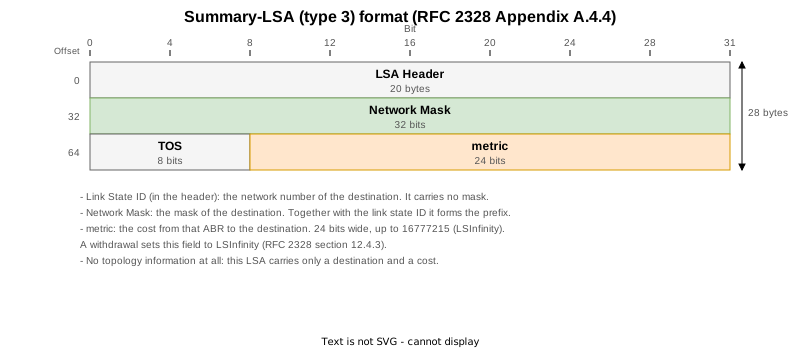
After the 20-byte common header there is only a network mask and a metric.
| Field | Size | Content |
|---|---|---|
| Network Mask | 4 bytes | the mask of the destination. Only together with the link state ID does it form a prefix |
| TOS | 1 byte | per-TOS metric; fixed at 0 on current implementations |
| metric | 3 bytes (24 bits) | the cost from that ABR to the destination |
The metric is 24 bits wide so that a withdrawal can carry 16777215 (LSInfinity). Router-LSA metrics are 16 bits; only types 3 and 5 have this width.
One LSA describes one destination, so the length is always 28 bytes.
Lab topology

| Router | Area | Role |
|---|---|---|
| R1 | 1 | internal router |
| R2 | 0 / 1 | ABR |
| R3, R4 | 0 / 2 | ABR (two of them) |
| R11, R12, R13 | 2 | internal routers |
Area 2 holds five loopbacks, 10.2.0.1 to 10.2.0.5/32. Area 1, area 0 and area 2 are chained, so a destination in area 2 crosses two boundaries before it reaches area 1. This article follows 10.2.0.1/32 (Loopback2 on R11).
Two ABRs (R3 and R4) sit between area 0 and area 2, so the same destination also gets two type 3 LSAs.
| STEP | Change | What it confirms |
|---|---|---|
| 0 | Right after boot | The type 3 for 10.2.0.1/32 is rebuilt in area 0 (R3, R4) and area 1 (R2) and the metric accumulates |
| 1 | R11’s Loopback2 removed from OSPF | The withdrawal passes boundary by boundary (MaxAge plus LSInfinity, 190 ms) |
| 2 | Restored | Regenerated |
| 3 | cost 10 on R3’s area 2 side | R3’s type 3 metric changes and the change chains into the next area |
| 4 | Restored | Recovery |
| 5 | R4’s area 2 side shut down | R4’s type 3 disappears and only R3’s remains |
| 6 | Everything restored | Final state |
Rebuilt at every area boundary

Start in area 0. show ospf database summary self-originate prints only the type 3 LSAs this router originated as an ABR. Here is the one R3 advertised into area 0 for 10.2.0.1/32.
  LS age: 165
  Options: (No TOS-capability, DC)
  LS Type: Summary Links (Network)
  Link State ID: 10.2.0.1 (Summary Network Number)
  Advertising Router: 3.3.3.3
  LS Seq Number: 80000001
  Checksum: 0x9e83
  Length: 28
  Network Mask: /32
	TOS: 0 	Metric: 2
The advertising router is R3 and the metric is 2 — R3’s own distance to R11 (1 for 172.16.3.0/24 plus 1 for the loopback). It is measured from where R3 stands.
The same destination, one area further along, looks like this.
  LS age: 143
  Options: (No TOS-capability, DC)
  LS Type: Summary Links (Network)
  Link State ID: 10.2.0.1 (Summary Network Number)
  Advertising Router: 2.2.2.2
  LS Seq Number: 80000001
  Checksum: 0xc65e
  Length: 28
  Network Mask: /32
TOS: 0 Metric: 3 | Item | The type 3 in area 0 | The type 3 in area 1 |
|---|---|---|
| Link State ID | 10.2.0.1 | 10.2.0.1 (the same) |
| Network Mask | /32 | /32 (the same) |
| Advertising Router | 3.3.3.3 | 2.2.2.2 |
| Metric | 2 | 3 |
The destination is the same, but these are different LSAs. An LSA is identified by the triple of LS type, link state ID and advertising router, so a different advertising router makes a different LSA. R2 did not forward R3’s type 3; it built a new one from its own LSDB calculation. The metric of 3 is R2’s cost to R3 (1) plus the 2 that R3 declared.
From R1, inside area 1, there is no way to tell that a router called R11 even exists. R11’s router-LSA never leaves area 2. All R1 knows is that 10.2.0.1/32 lies somewhere towards R2 at a cost of 3.
The packets show the same thing. Here is No.113 from the area 0 capture and No.109 from the area 1 capture.
Open Shortest Path First
    OSPF Header
        Version: 2
        Message Type: LS Update (4)
        Packet Length: 56
        Source OSPF Router: 3.3.3.3
        Area ID: 0.0.0.0 (Backbone)
        Checksum: 0xa70c [correct]
        Instance ID: Base IPv4 Unicast Instance (0)
        Auth Type: Null (0)
        Auth Data (none): 0000000000000000
    LS Update Packet
        Number of LSAs: 1
        LSA-type 3 (Summary-LSA (IP network)), len 28
            .000 0000 0000 0001 = LS Age (seconds): 1
            0... .... .... .... = Do Not Age Flag: 0
            Options: 0x22, (DC) Demand Circuits, (E) External Routing
                0... .... = DN: Not set
                .0.. .... = (O) Opaque: Not set
                ..1. .... = (DC) Demand Circuits: Supported
                ...0 .... = (L) LLS Data block: Not Present
                .... 0... = (N) NSSA: Not supported
                .... .0.. = (MC) Multicast: Not capable
                .... ..1. = (E) External Routing: Capable
                .... ...0 = (MT) Multi-Topology Routing: No
            LS Type: Summary-LSA (IP network) (3)
            Link State ID: 10.2.0.1
            Advertising Router: 3.3.3.3
            Sequence Number: 0x80000001
            Checksum: 0x9e83
            Length: 28
            Netmask: 255.255.255.255
            TOS: 0
Metric: 2Open Shortest Path First
OSPF Header
Version: 2
Message Type: LS Update (4)
Packet Length: 56
Source OSPF Router: 2.2.2.2
Area ID: 0.0.0.1
Checksum: 0x8333 [correct]
Instance ID: Base IPv4 Unicast Instance (0)
Auth Type: Null (0)
Auth Data (none): 0000000000000000
LS Update Packet
Number of LSAs: 1
LSA-type 3 (Summary-LSA (IP network)), len 28
.000 0000 0000 0001 = LS Age (seconds): 1
0... .... .... .... = Do Not Age Flag: 0
Options: 0x22, (DC) Demand Circuits, (E) External Routing
0... .... = DN: Not set
.0.. .... = (O) Opaque: Not set
..1. .... = (DC) Demand Circuits: Supported
...0 .... = (L) LLS Data block: Not Present
.... 0... = (N) NSSA: Not supported
.... .0.. = (MC) Multicast: Not capable
.... ..1. = (E) External Routing: Capable
.... ...0 = (MT) Multi-Topology Routing: No
LS Type: Summary-LSA (IP network) (3)
Link State ID: 10.2.0.1
Advertising Router: 2.2.2.2
Sequence Number: 0x80000001
Checksum: 0xc65e
Length: 28
Netmask: 255.255.255.255
TOS: 0
Metric: 3The link state ID and the netmask match; only the advertising router and the metric differ. These are two different LSAs travelling on two different links.
Two ABRs mean two type 3 LSAs for one destination
R3 and R4 both sit between area 0 and area 2, so the area 0 LSDB holds two type 3 LSAs for 10.2.0.1/32.
  Routing Bit Set on this LSA
  LS age: 145
  Options: (No TOS-capability, DC)
  LS Type: Summary Links (Network)
  Link State ID: 10.2.0.1 (Summary Network Number)
  Advertising Router: 3.3.3.3
  LS Seq Number: 80000001
  Checksum: 0x9e83
  Length: 28
  Network Mask: /32
	TOS: 0 	Metric: 2

  LS age: 121
  Options: (No TOS-capability, DC)
  LS Type: Summary Links (Network)
  Link State ID: 10.2.0.1 (Summary Network Number)
  Advertising Router: 4.4.4.4
  LS Seq Number: 80000001
  Checksum: 0xee24
  Length: 28
  Network Mask: /32
	TOS: 0 	Metric: 13
R3 says 2 and R4 says 13. R4’s is larger because 172.16.4.0/24 is configured with a cost of 10. Each ABR declares the distance measured from itself, and a receiver adds its own cost to that ABR before comparing.
What changes when the configuration changes
10.2.0.1/32 was removed and its cost changed to see how the type 3 LSAs follow. Across the seven STEPs:
| STEP | Change | Area 0 | Area 1 |
|---|---|---|---|
| 0 | right after boot | R3:2 / R4:13 | R2:3 |
| 1 | Loopback2 on R11 removed from OSPF | (none) | (none) |
| 2 | restored | R3:2 / R4:13 | R2:3 |
| 3 | cost 10 on R3’s area 2 interface | R3:11 / R4:13 | R2:12 |
| 4 | reverted | R3:2 / R4:13 | R2:3 |
| 5 | shutdown on R4’s area 2 interface | R3:2 only | R2:3 (unchanged) |
| 6 | everything restored (final state) | R3:2 / R4:13 | R2:3 |
A cost change ripples into the next area
Setting cost 10 on R3’s area 2 interface takes the metric of R3’s type 3 from 2 to 11.
  LS age: 153
  Options: (No TOS-capability, DC)
  LS Type: Summary Links (Network)
  Link State ID: 10.2.0.1 (Summary Network Number)
  Advertising Router: 3.3.3.3
  LS Seq Number: 80000002
  Checksum: 0xf621
  Length: 28
  Network Mask: /32
	TOS: 0 	Metric: 11
That much is obvious. What matters is what happens beyond: the type 3 R2 advertises into area 1 follows.
  LS age: 130
  Options: (No TOS-capability, DC)
  LS Type: Summary Links (Network)
  Link State ID: 10.2.0.1 (Summary Network Number)
  Advertising Router: 2.2.2.2
  LS Seq Number: 80000002
  Checksum: 0x1ffb
  Length: 28
  Network Mask: /32
	TOS: 0 	Metric: 12
From 3 to 12. R2 recomputed its best path to 10.2.0.1/32 as 1 + 11 = 12 via R3 and rebuilt its type 3 with that result. Its sequence number advances by one as well.
One line changed in area 2 rewrites an LSA two areas away — that is the type 3 chain. Only the number changes, though: routers in area 1 cannot tell what happened in area 2.
Absolute timestamps from the captures show the chain happening one step at a time. No.171 in area 0 (R3, metric 11) is at 13:01:23.881 and No.166 in area 1 (R2, metric 12) at 13:01:24.087.
The difference is 206 milliseconds — the measurable cost of crossing one area boundary.
A withdrawal travels one step at a time too
Removing the destination itself sends a withdrawal along the same path. Loopback2 on R11 was taken out of OSPF.
Open Shortest Path First
    OSPF Header
        Version: 2
        Message Type: LS Update (4)
        Packet Length: 56
        Source OSPF Router: 3.3.3.3
        Area ID: 0.0.0.0 (Backbone)
        Checksum: 0xade8 [correct]
        Instance ID: Base IPv4 Unicast Instance (0)
        Auth Type: Null (0)
        Auth Data (none): 0000000000000000
    LS Update Packet
        Number of LSAs: 1
        LSA-type 3 (Summary-LSA (IP network)), len 28
            .000 1110 0001 0000 = LS Age (seconds): 3600
            0... .... .... .... = Do Not Age Flag: 0
            Options: 0x22, (DC) Demand Circuits, (E) External Routing
                0... .... = DN: Not set
                .0.. .... = (O) Opaque: Not set
                ..1. .... = (DC) Demand Circuits: Supported
                ...0 .... = (L) LLS Data block: Not Present
                .... 0... = (N) NSSA: Not supported
                .... .0.. = (MC) Multicast: Not capable
                .... ..1. = (E) External Routing: Capable
                .... ...0 = (MT) Multi-Topology Routing: No
            LS Type: Summary-LSA (IP network) (3)
            Link State ID: 10.2.0.1
            Advertising Router: 3.3.3.3
            Sequence Number: 0x80000002
            Checksum: 0x889a
            Length: 28
            Netmask: 255.255.255.255
            TOS: 0
Metric: 16777215Both LS Age 3600 (MaxAge) and Metric 16777215 (LSInfinity) are set. RFC 2328 section 12.4.3 says a type 3 whose destination became unreachable is flushed at MaxAge, and Appendix B (LSInfinity) permits advertising the unreachable metric as an alternative; IOS XR sends both in one LSA. Either reading makes a receiver stop using the route.
The same withdrawal reaches area 1 one step later.
Open Shortest Path First
    OSPF Header
        Version: 2
        Message Type: LS Update (4)
        Packet Length: 56
        Source OSPF Router: 2.2.2.2
        Area ID: 0.0.0.1
        Checksum: 0x9405 [correct]
        Instance ID: Base IPv4 Unicast Instance (0)
        Auth Type: Null (0)
        Auth Data (none): 0000000000000000
    LS Update Packet
        Number of LSAs: 1
        LSA-type 3 (Summary-LSA (IP network)), len 28
            .000 1110 0001 0000 = LS Age (seconds): 3600
            0... .... .... .... = Do Not Age Flag: 0
            Options: 0x22, (DC) Demand Circuits, (E) External Routing
                0... .... = DN: Not set
                .0.. .... = (O) Opaque: Not set
                ..1. .... = (DC) Demand Circuits: Supported
                ...0 .... = (L) LLS Data block: Not Present
                .... 0... = (N) NSSA: Not supported
                .... .0.. = (MC) Multicast: Not capable
                .... ..1. = (E) External Routing: Capable
                .... ...0 = (MT) Multi-Topology Routing: No
            LS Type: Summary-LSA (IP network) (3)
            Link State ID: 10.2.0.1
            Advertising Router: 2.2.2.2
            Sequence Number: 0x80000002
            Checksum: 0xa680
            Length: 28
            Netmask: 255.255.255.255
            TOS: 0
Metric: 16777215Lining up the absolute timestamps of the two captures makes the order plain.
| Time | Area | What happened |
|---|---|---|
| 12:52:24.688 | 0 | R3 withdraws |
| 12:52:24.752 | 0 | R4 withdraws (64 ms after R3) |
| 12:52:24.878 | 1 | R2 withdraws (190 ms after R3) |
A destination that disappeared in area 2 takes one step at a time to reach area 1 through area 0. This is the measurement behind the statement that type 3 behaves like a distance vector between areas.
Losing a redundant ABR does not reach the next area
Shutting down R4’s area 2 interface leaves only one type 3 in area 0.
  Routing Bit Set on this LSA
  LS age: 402
  Options: (No TOS-capability, DC)
  LS Type: Summary Links (Network)
  Link State ID: 10.2.0.1 (Summary Network Number)
  Advertising Router: 3.3.3.3
  LS Seq Number: 80000003
  Checksum: 0x9a85
  Length: 28
  Network Mask: /32
	TOS: 0 	Metric: 2
Yet nothing at all changes in area 1. R2’s best path was already via R3 (cost 3) and the path via R4 (cost 14) was never used, so the content of R2’s type 3 does not change and there is nothing to rebuild.
A type 3 carries only the cost of the best path, so as long as that value holds, changes outside the area stop there. That is exactly the effect of dividing a network into areas.
Going through the backbone
Because type 3 behaves like a distance vector, it could loop. Two rules in RFC 2328 section 12.4.3 prevent that.
| Rule | Content |
|---|---|
| 1 | Advertise only intra-area routes into the backbone. Routes learned from another area (received as type 3) are not injected into the backbone |
| 2 | Routes learned from the backbone may be advertised into non-backbone areas |
R2 shows it. R2 is the ABR between area 0 and area 1, so under rule 1 the only thing it may advertise into area 0 is what comes from area 1.
RP/0/RP0/CPU0:R2#show ospf database summary self-originate
Wed Sep  9 03:49:39.462 UTC


            OSPF Router with ID (2.2.2.2) (Process ID 1)

		Summary Net Link States (Area 0)

  LS age: 108
  Options: (No TOS-capability, DC)
  LS Type: Summary Links (Network)
  Link State ID: 1.1.1.1 (Summary Network Number)
  Advertising Router: 2.2.2.2
  LS Seq Number: 80000001
  Checksum: 0x33fb
  Length: 28
  Network Mask: /32
	TOS: 0 	Metric: 2

  LS age: 183
  Options: (No TOS-capability, DC)
  LS Type: Summary Links (Network)
  Link State ID: 10.0.12.0 (Summary Network Number)
  Advertising Router: 2.2.2.2
  LS Seq Number: 80000001
  Checksum: 0x50cd
  Length: 28
  Network Mask: /24
	TOS: 0 	Metric: 1
Only two: 1.1.1.1 and 10.0.12.0 — both of them in area 1. The area 0 LSDB is full of type 3 LSAs from area 2, starting with 10.2.0.1, and R2 pushes back not one of them.
Towards area 1, on the other hand, it advertises 17 destinations: everything it learned in area 0, including everything from area 2.
| Direction | What R2 advertises | Count |
|---|---|---|
| area 1 into area 0 | only routes that live in area 1 | 2 |
| area 0 into area 1 | everything it knows in area 0 | 17 |
That asymmetry produces both the rule that all inter-area traffic crosses the backbone and the reason loops do not form. Routes from area 2 enter area 0 and leave for area 1: one direction only.
How SPF treats it
A type 3 is neither a vertex nor an edge of the graph. The inter-area calculation of RFC 2328 section 16.2 runs after the shortest-path tree is built.
- Build the shortest-path tree of your own area from types 1 and 2 alone
- Find the ABRs in that tree and the cost to reach each one
- For each type 3 an ABR originated, the cost of the destination is
cost to the ABR + the metric of the type 3
So a type 3 is not a branch of the tree but a tag hung on its tip. Receiving more of them does not make the SPF calculation heavier, which is why splitting a network into areas reduces computation.
The inter-area routes on R1, an internal router of area 1, show the addition.
RP/0/RP0/CPU0:R1#show ospf routes
Wed Sep  9 03:49:20.863 UTC

Topology Table for ospf 1 with ID 1.1.1.1

Codes: O - Intra area, O IA - Inter area
       O E1 - External type 1, O E2 - External type 2
       O N1 - NSSA external type 1, O N2 - NSSA external type 2

O    1.1.1.1/32, metric 1
       1.1.1.1, directly connected, via Loopback0, ifIndex 7
O IA 2.2.2.2/32, metric 2
       10.0.12.2, from 2.2.2.2, via GigabitEthernet0/0/0/0, ifIndex 4, path-id 1
O IA 3.3.3.3/32, metric 3
       10.0.12.2, from 2.2.2.2, via GigabitEthernet0/0/0/0, ifIndex 4, path-id 1
O IA 4.4.4.4/32, metric 3
       10.0.12.2, from 2.2.2.2, via GigabitEthernet0/0/0/0, ifIndex 4, path-id 1
O    10.0.12.0/24, metric 1
       10.0.12.1, directly connected, via GigabitEthernet0/0/0/0, ifIndex 4
O IA 10.0.23.0/24, metric 2
       10.0.12.2, from 2.2.2.2, via GigabitEthernet0/0/0/0, ifIndex 4, path-id 1
O IA 10.0.24.0/24, metric 2
       10.0.12.2, from 2.2.2.2, via GigabitEthernet0/0/0/0, ifIndex 4, path-id 1
O IA 10.1.11.0/24, metric 4
       10.0.12.2, from 2.2.2.2, via GigabitEthernet0/0/0/0, ifIndex 4, path-id 1
O IA 10.1.12.0/24, metric 5
       10.0.12.2, from 2.2.2.2, via GigabitEthernet0/0/0/0, ifIndex 4, path-id 1
O IA 10.2.0.1/32, metric 4
       10.0.12.2, from 2.2.2.2, via GigabitEthernet0/0/0/0, ifIndex 4, path-id 1
O IA 10.2.0.2/32, metric 4
       10.0.12.2, from 2.2.2.2, via GigabitEthernet0/0/0/0, ifIndex 4, path-id 1
O IA 10.2.0.3/32, metric 6
       10.0.12.2, from 2.2.2.2, via GigabitEthernet0/0/0/0, ifIndex 4, path-id 1
O IA 10.2.0.4/32, metric 6
10.2.0.1/32 is metric 4: 1 from R1 to R2, plus the 3 that R2 declared in its type 3. R1 decides this route knowing nothing whatsoever about the topology of area 2.
Summary
| What you want to know | Where to look |
|---|---|
| Which ABR advertises this destination | the advertising router of the type 3 |
| How far it is from that ABR | the metric (your own cost to the ABR is not included) |
| The destination prefix | the link state ID together with the network mask |
| Whether the route was withdrawn | LS Age 3600 or Metric 16777215 |
| What an ABR advertises in which direction | show ospf database summary self-originate |
The trick to reading type 3 LSAs is to keep asking who is saying this, and measured from where. The same destination is a different LSA in a different area, and the metric starts from a different place. When a metric does not add up during troubleshooting, it is usually because you are looking from the wrong ABR’s point of view.
References
| Document | Section | Content |
|---|---|---|
| RFC 2328 | Section 12.4.3 | originating summary-LSAs: advertise only intra-area routes into the backbone, and how to withdraw one |
| RFC 2328 | Appendix A.4.4 | the packet format of a summary-LSA (a 24-bit metric) |
| RFC 2328 | Section 16.2 | the inter-area calculation, added to the cost of the ABR once the tree exists |
| RFC 2328 | Section 3.1 | the design in which all inter-area traffic crosses the backbone |
| RFC 2328 | Appendix E | what to do when link state IDs collide |
Lab setup
Seven XRd routers (IOS XR 26.1.1) in CML across three areas. Area 2 holds the loopbacks 10.2.0.1 to 10.2.0.5/32, and 10.2.0.1/32 is the one followed here. Captures were taken at two points at once, in area 0 (R2 - R3) and in area 1 (R1 - R2), to see the same destination travelling as two different LSAs on two different links and to measure the delay between them.
Download the area 0 capture (R2 - R3)
Download the area 1 capture (R1 - R2)
Verification config and show output
Three kinds of file were collected from all seven routers at every STEP, split per router. The verification config is the ..._run.txt file (the final state is the one from STEP 6).
| File | Content |
|---|---|
..._show.txt | show version / show interface description / show route / show route ospf / show ospf / show ospf interface / show ospf interface brief / show ospf neighbor / show ospf neighbor detail / show ospf database / show ospf database router / show ospf database network / show ospf statistics interface / show ospf database summary self-originate / show ospf database summary / show ospf border-routers / show ospf routes / show ospf database database-summary |
..._log.txt | show logging narrowed to the range of that STEP |
..._run.txt | show running-config at that STEP (the verification config) |
Adding show ospf database summary self-originate is what made this article work: only the type 3 LSAs the router built itself are listed, grouped by area, so what it advertises in which direction fits on one screen.
STEP 0: right after boot
| Router | show output | syslog | running-config |
|---|---|---|---|
| R1 | show | log | run |
| R2 | show | log | run |
| R3 | show | log | run |
| R4 | show | log | run |
| R11 | show | log | run |
| R12 | show | log | run |
| R13 | show | log | run |
STEP 1: Loopback2 (10.2.0.1) on R11 removed from OSPF
| Router | show output | syslog | running-config |
|---|---|---|---|
| R1 | show | log | run |
| R2 | show | log | run |
| R3 | show | log | run |
| R4 | show | log | run |
| R11 | show | log | run |
| R12 | show | log | run |
| R13 | show | log | run |
STEP 2: restored
| Router | show output | syslog | running-config |
|---|---|---|---|
| R1 | show | log | run |
| R2 | show | log | run |
| R3 | show | log | run |
| R4 | show | log | run |
| R11 | show | log | run |
| R12 | show | log | run |
| R13 | show | log | run |
STEP 3: cost 10 on R3’s area 2 interface
| Router | show output | syslog | running-config |
|---|---|---|---|
| R1 | show | log | run |
| R2 | show | log | run |
| R3 | show | log | run |
| R4 | show | log | run |
| R11 | show | log | run |
| R12 | show | log | run |
| R13 | show | log | run |
STEP 4: reverted
| Router | show output | syslog | running-config |
|---|---|---|---|
| R1 | show | log | run |
| R2 | show | log | run |
| R3 | show | log | run |
| R4 | show | log | run |
| R11 | show | log | run |
| R12 | show | log | run |
| R13 | show | log | run |
STEP 5: shutdown on R4’s area 2 interface (one ABR left)
| Router | show output | syslog | running-config |
|---|---|---|---|
| R1 | show | log | run |
| R2 | show | log | run |
| R3 | show | log | run |
| R4 | show | log | run |
| R11 | show | log | run |
| R12 | show | log | run |
| R13 | show | log | run |
STEP 6: everything restored (final state)
| Router | show output | syslog | running-config |
|---|---|---|---|
| R1 | show | log | run |
| R2 | show | log | run |
| R3 | show | log | run |
| R4 | show | log | run |
| R11 | show | log | run |
| R12 | show | log | run |
| R13 | show | log | run |
Related articles
- What is OSPF
- OSPF Router ID
- OSPF Behavior When Router IDs Collide
- OSPF Packet Types and Header Format
- OSPF Authentication
- OSPF Neighbor States
- OSPF Options Field
- OSPF DR and BDR
- OSPF Network Types
- OSPF Cost (Metric)
- OSPF Equal-Cost Multi-Path (ECMP)
- OSPF External Routes (Redistributing Static Routes)
- OSPF RFC1583 Compatibility (External Route Selection Rules)
- OSPF Forwarding Address of AS External Routes
- OSPF Multiple Areas and the ABR
- OSPF Virtual Links
- OSPF Stub and Totally Stubby Areas
- OSPF NSSA and Totally NSSA
- OSPF Default Route
- OSPF Route Summarization
- OSPF LSAs and the LSA Header
- OSPF Hello and Dead Intervals
- OSPF Convergence Timers (SPF / LSA Throttling)
- OSPF LSA Refresh and Pacing
- OSPF router-LSA (type 1)
- OSPF network-LSA (type 2)
- OSPF summary-LSA (type 3)
- OSPF ASBR summary-LSA (type 4)
- OSPF AS external-LSA (type 5)
- OSPF NSSA External-LSA (Type 7)